VectorStyler
    • Categories
    • Unread
    • Recent
    • Tags
    • Popular
    • Register
    • Login

    How do I select and move a number of nodes nondistructively with Liquify tool?

    Scheduled Pinned Locked Moved Questions and Support
    3 Posts 2 Posters 3.2k Views 2 Watching
    Loading More Posts
    • Oldest to Newest
    • Newest to Oldest
    • Most Votes
    Reply
    • Reply as topic
    Log in to reply
    This topic has been deleted. Only users with topic management privileges can see it.
    • RaaskotR Offline
      Raaskot
      last edited by

      In Illustrator, Blender, Clip Paint Studio (vector mode), Moho etc. you can choose to move nodes/points in shapes without adding now ones. How can I make Liquify tool non-distructive? Is there perhaps another setting to achieve a non-destruct "fall-off drag"-option?

      Liquify tool non-distructive?

      Regards, Raaskot

      VectorStylerV 1 Reply Last reply Reply Quote 0
      • VectorStylerV Offline
        VectorStyler @Raaskot
        last edited by

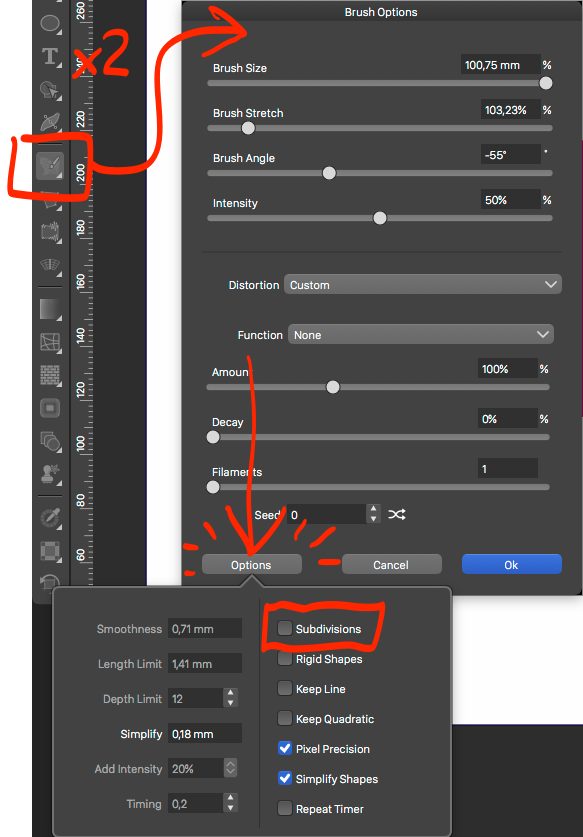
        @Raaskot Double click the liquify tool and in the "Brush Options" view click then "Options" button at the bottom-left corner.
        Here, uncheck the "Subdivisions" box.

        1 Reply Last reply Reply Quote 1
        • RaaskotR Offline
          Raaskot
          last edited by

          Cool, thanks!
          0_1705730539367_9505f3f2-ab71-4ba6-b2fb-a267e60e881d-billede.png

          1 Reply Last reply Reply Quote 1
          • First post
            Last post