VectorStyler
    • Categories
    • Unread
    • Recent
    • Tags
    • Popular
    • Register
    • Login

    How do I set the number of digits in the Distance to three?

    Scheduled Pinned Locked Moved VectorStyler 1.2 beta
    8 Posts 4 Posters 7.8k Views 3 Watching
    Loading More Posts
    • Oldest to Newest
    • Newest to Oldest
    • Most Votes
    Reply
    • Reply as topic
    Log in to reply
    This topic has been deleted. Only users with topic management privileges can see it.
    • BoldlineB Offline
      Boldline
      last edited by

      In the Offset Path Distance setting, the default number of digits included is two. I want to set this to at least three so I can use the slider and have more precision instead of having to manually type the digits in

      I tried adjusting the settings menu>decimal width to give it three digits as a default but that did not work. is there another place I need to go to adjust this?
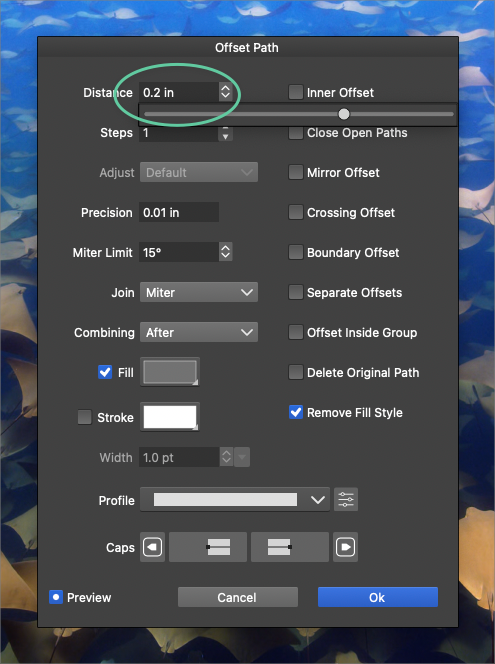
      0_1705864369466_6842f5fb-88dc-4f93-a09c-eb2dc64004ad-BLD 2024-01-21 at 14.10.50.png

      🍎 macOS Tahoe 26.2, Mac mini (M1, 2020), Chip Apple M1, Memory 16 GB
      Cintiq 27QHD Display and LG Ultra HD Display

      S VectorStylerV 2 Replies Last reply Reply Quote 0
      • S Offline
        Subpath @Boldline
        last edited by Subpath

        @Boldline

        I use Point for measuring.
        Setting Point decimals in Settings > Decimal Widths > Point Decimals works.
        But only if you set the value manually.

        Seems to be a problem with the slider.

        Win 11
        CPU: AMD Ryzen 5 9600X, 6-core.
        GPU: Nvidia Geforce RTX 5070.

        1 Reply Last reply Reply Quote 1
        • F Offline
          FastVector
          last edited by

          You don't have to change the unit settings. If you working with the unit inch, and want to use points in the Distance input field , just add pt to the number. And then you can use the slider in the new unit as well.

          Windows 10 | 1920x1080 | 125%

          S 1 Reply Last reply Reply Quote 0
          • S Offline
            Subpath @FastVector
            last edited by

            @FastVector

            i know that.
            @boldline question is not about inch or pt
            is about the decimal setting

            i mentioned only points for the case inch work different

            Win 11
            CPU: AMD Ryzen 5 9600X, 6-core.
            GPU: Nvidia Geforce RTX 5070.

            1 Reply Last reply Reply Quote 0
            • VectorStylerV Offline
              VectorStyler @Boldline
              last edited by

              @Boldline Here if I set the decimal width of Inches to 3 (or 4) in settings it will display with those number of decimals in the offset path view.
              Send me your settings and workspace files by email.

              BoldlineB 2 Replies Last reply Reply Quote 2
              • S Offline
                Subpath
                last edited by

                @Boldline

                found that solution that @VectorStyler mentioned too
                a user have to set the decimals to 3 or 4 to get
                a Value like 45,23 which work then also with the Slider

                Win 11
                CPU: AMD Ryzen 5 9600X, 6-core.
                GPU: Nvidia Geforce RTX 5070.

                1 Reply Last reply Reply Quote 1
                • BoldlineB Offline
                  Boldline @VectorStyler
                  last edited by

                  @VectorStyler said in How do I set the number of digits in the Distance to three?:

                  Send me your settings and workspace files by email.

                  Sent. Thanks!

                  🍎 macOS Tahoe 26.2, Mac mini (M1, 2020), Chip Apple M1, Memory 16 GB
                  Cintiq 27QHD Display and LG Ultra HD Display

                  1 Reply Last reply Reply Quote 0
                  • BoldlineB Offline
                    Boldline @VectorStyler
                    last edited by Boldline

                    @VectorStyler said in How do I set the number of digits in the Distance to three?:

                    Here if I set the decimal width of Inches to 3 (or 4) in settings it will display with those number of decimals in the offset path view.

                    This solution does work. I set it to 4 decimals and everything is better. It also improves the slider


                    🍎 macOS Tahoe 26.2, Mac mini (M1, 2020), Chip Apple M1, Memory 16 GB
                    Cintiq 27QHD Display and LG Ultra HD Display

                    1 Reply Last reply Reply Quote 1
                    • First post
                      Last post