Transform tool mode needs to be more obvious during active use
-
I know there has been a lot of back and forth about whether or not the first three "transform tools" should be in the contextual menu only or also part of the transform tool extended set in the toolbar. I am more the latter but could see the answer also being both places.
I ran into an issue today where I was using the second tool in the transform tools to edit vectors inside a grouping of objects. I finished my edit and continued on with my work. I found I was unable to grab a selection of objects and make them into a group. If I selected the objects and grouped it, I could move them in unison for as long as they remained selected. If I deselected and then attempted to use the transform tool to move the group, everything fell apart again. It took a while before I realized the transform tool was still set to the second option.
Whether or not the transform tools ever go back to being located as part of the transform tool in the toolbox again, perhaps the main transform icon should change to be the symbol for whatever secondary transform tool is currently active. it might help avoid some confusion for sure
Maybe this icon needs to turn white with a blue background to signify it is active?

much like this one does already?


🍎 macOS Tahoe 26.2, Mac mini (M1, 2020), Chip Apple M1, Memory 16 GB
Cintiq 27QHD Display and LG Ultra HD Display -
+1
I support this request, at least the icon should show the user that they have made a change -
@Boldline I will try to find a solution for this.
-
I can see this not being easy due to the many options
But maybe it is possible able to narrow this down by only showing
the selected transform mode's icon instead of the more generic icon,
and adding a small triangle to indicate that multiple options are available.like a toolbar icon changes when you select a different tool
just a thought of mine
-
@Subpath said in Transform tool mode needs to be more obvious during active use:
But maybe it is possible able to narrow this down by only showing
the selected transform mode's icon instead of the more generic icon,
and adding a small triangle to indicate that multiple options are available.This was the original mode of working with the transform tool (still available as customization).
Should I restore to this mode? and remove the four modes from the context popup? -
My thought was rather that you could leave it that way
so that only one icon is displayedbut when the transformation mode is changed
Then display the icon of the selected transformation mode
instead of the generic icon -
@Subpath said in Transform tool mode needs to be more obvious during active use:
Then display the icon of the selected transformation mode
instead of the generic iconWill do this.
-
@VectorStyler said in Transform tool mode needs to be more obvious during active use:
@Subpath said in Transform tool mode needs to be more obvious during active use:
But maybe it is possible able to narrow this down by only showing
the selected transform mode's icon instead of the more generic icon,
and adding a small triangle to indicate that multiple options are available.This was the original mode of working with the transform tool (still available as customization).
Should I restore to this mode? and remove the four modes from the context popup?Changing the transform icon in the main toolbar to the current transform option utter would be helpful. This might be enough.
I'm still confused why the transform options are not located in the vertical toolbar in th he first place. It makes logical sense to me to look there for them. What was the reasoning to move them out?
-
@Boldline said in Transform tool mode needs to be more obvious during active use:
What was the reasoning to move them out?
Too many tools.
-
@VectorStyler said in Transform tool mode needs to be more obvious during active use:
@Boldline said in Transform tool mode needs to be more obvious during active use:
What was the reasoning to move them out?
Too many tools.
Maybe I am not fully understanding?
I would only move the three additional tools circled here in red into the transform tool on the vertical toolbar
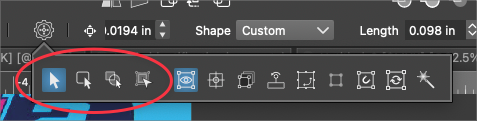
Respectfully, most of the tools in the vertical tool bar have more than the three tools that would be in the transform pull-out:
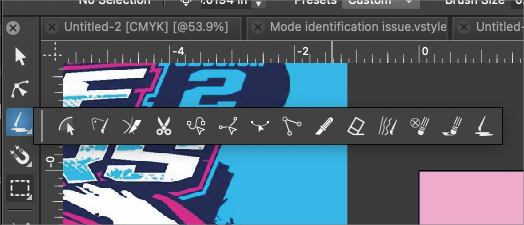
Not trying to cause an argument, merely trying to understand
UPDATE: playing around more with the other options in that section, I can see how they are all related to "transform" and I can see in part why it was moved

