VectorStyler
    • Categories
    • Unread
    • Recent
    • Tags
    • Popular
    • Register
    • Login

    Widen Text on Path

    Scheduled Pinned Locked Moved Questions and Support
    7 Posts 2 Posters 5.5k Views 1 Watching
    Loading More Posts
    • Oldest to Newest
    • Newest to Oldest
    • Most Votes
    Reply
    • Reply as topic
    Log in to reply
    This topic has been deleted. Only users with topic management privileges can see it.
    • BoldlineB Offline
      Boldline
      last edited by Boldline

      If I wanted to widen text already existing on a path, what would be the best way to do so? I'm not meaning tracking necessarily, but literally warping the font letters to be wider than the original font was
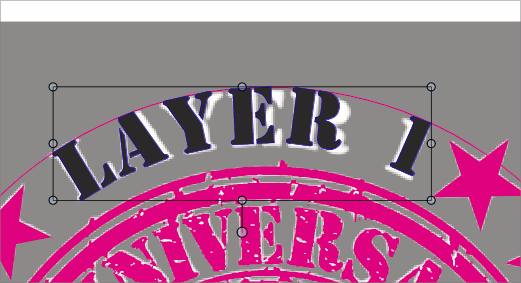
      0_1710330904425_063f4ad7-1f35-4759-9d48-4eb09215b66c-BLD 2024-03-13 at 07.54.29.png

      🍎 macOS Tahoe 26.2, Mac mini (M1, 2020), Chip Apple M1, Memory 16 GB
      Cintiq 27QHD Display and LG Ultra HD Display

      VectorStylerV 1 Reply Last reply Reply Quote 0
      • VectorStylerV Offline
        VectorStyler @Boldline
        last edited by

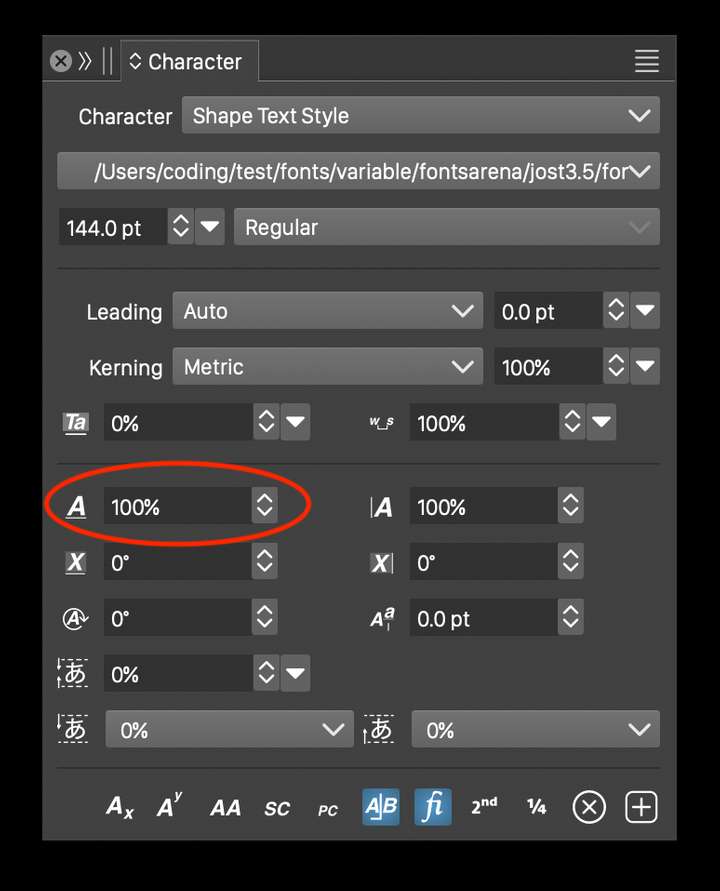
        @Boldline There is the horizontal scaling of characters, an option in the Character panel.

        BoldlineB 1 Reply Last reply Reply Quote 0
        • BoldlineB Offline
          Boldline @VectorStyler
          last edited by Boldline

          @VectorStyler said in Widen Text on Path:

          @Boldline There is the horizontal scaling of characters, an option in the Character panel.

          I had looked there but none of the obvious ones will give me the result I am looking for. I want to be able to manipulate the white text that currently says "Layer" and make it look like the pink text above it nd accomplish this wjile the text is already on a path. (color difference is only for easier explanation)

          By the way, the Settings menus all look so clean and professional. nice job with that!
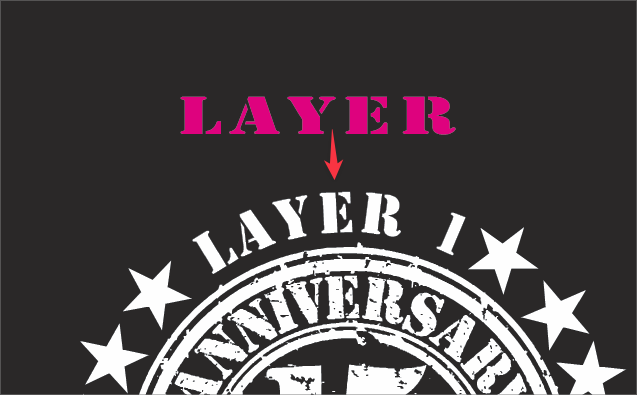
          0_1710332470323_3b2273d8-e66a-413d-8ea2-9330c09e738d-BLD 2024-03-13 at 08.20.09.png

          0_1710332680877_9eea57e0-b66c-46ce-a85e-3fd8637ddb62-BLD 2024-03-13 at 08.24.21.png

          🍎 macOS Tahoe 26.2, Mac mini (M1, 2020), Chip Apple M1, Memory 16 GB
          Cintiq 27QHD Display and LG Ultra HD Display

          VectorStylerV 1 Reply Last reply Reply Quote 0
          • VectorStylerV Offline
            VectorStyler @Boldline
            last edited by

            @Boldline

            Did you try this (red circle) field?

            0_1710332831990_Screenshot 2024-03-13 at 14.26.25.png

            BoldlineB 1 Reply Last reply Reply Quote 0
            • BoldlineB Offline
              Boldline @VectorStyler
              last edited by Boldline

              @VectorStyler Sorry, I was looking in the character options panel by mistake
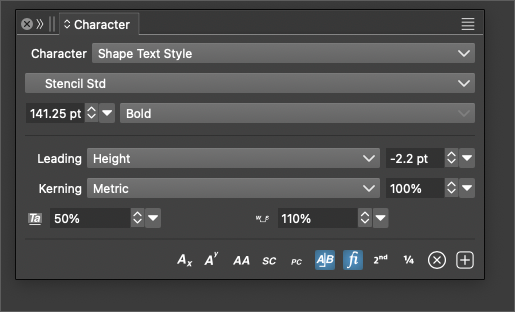
              Is there a setting I need to change? I'm not seeing those lower options in my character panel. I tried pulling out the panel in case it was hidden that way to no avail.
              0_1710333005954_89c37313-84a8-4ced-8432-6187360dcaa9-BLD 2024-03-13 at 08.29.53.png

              🍎 macOS Tahoe 26.2, Mac mini (M1, 2020), Chip Apple M1, Memory 16 GB
              Cintiq 27QHD Display and LG Ultra HD Display

              VectorStylerV 1 Reply Last reply Reply Quote 1
              • VectorStylerV Offline
                VectorStyler @Boldline
                last edited by

                @Boldline Click on the double arrow in the panel title.

                1 Reply Last reply Reply Quote 0
                • BoldlineB Offline
                  Boldline
                  last edited by

                  @VectorStyler sorry for the many back and forth in the thread. I see the arrow now, I was attempting to use the wrong one (the iconify one). I'm a little slow today.

                  That said, the option you circled in your screenshot worked perfectly. Thank you for your help!

                  🍎 macOS Tahoe 26.2, Mac mini (M1, 2020), Chip Apple M1, Memory 16 GB
                  Cintiq 27QHD Display and LG Ultra HD Display

                  1 Reply Last reply Reply Quote 0
                  • First post
                    Last post