VectorStyler
    • Categories
    • Unread
    • Recent
    • Tags
    • Popular
    • Register
    • Login

    Tracing a bitmap image

    Scheduled Pinned Locked Moved Questions and Support
    14 Posts 3 Posters 10.4k Views 3 Watching
    Loading More Posts
    • Oldest to Newest
    • Newest to Oldest
    • Most Votes
    Reply
    • Reply as topic
    Log in to reply
    This topic has been deleted. Only users with topic management privileges can see it.
    • B Offline
      B-Vs-V
      last edited by

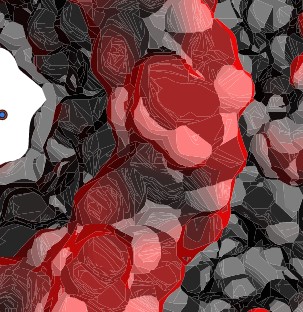
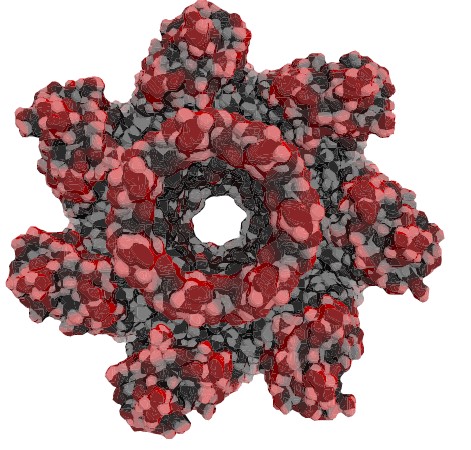
      I'm trying to trace a bitmap image (png file) but despite numerous attempts, I can't manage to avoid having these fine white lines everywhere, even though there aren't any in the original image.
      I'm certainly not applying the right settings, but there are plenty of parameters to test nonetheless. Any ideas/tips on how to avoid this while preserving the nuances of the original image? Thanks ☺
      0_1713331940168_t1.jpg

      0_1713331947354_t2.jpg

      W11 Pro 25H2 - 12th Gen Intel(R) i7-12700K 3.61 GHz - RAM 64 Go - NVIDIA GF GTX 4070 Ti - Intuos - Dell UP3216Q / Eizo ColorEdge
      W11 Pro 25H2 - 12th Gen Intel(R) i7-12700KF 3.60 GHz -RAM 64 Go - NVIDIA GF GTX 3080 - IntuosPro- ProArt PA329C

      VectorStylerV 1 Reply Last reply Reply Quote 0
      • VectorStylerV Offline
        VectorStyler @B-Vs-V
        last edited by

        @Pat This is caused by the anti-aliasing when rendering touching shapes.
        The anti-aliasing can be disabled in View -> Subpixel by selecting None.

        B 2 Replies Last reply Reply Quote 1
        • B Offline
          B-Vs-V @VectorStyler
          last edited by

          @VectorStyler Thanks ☺

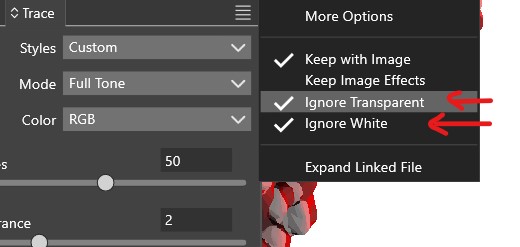
          Is it possible to keep these two options enabled by default?

          0_1713335029965_t1.jpg

          W11 Pro 25H2 - 12th Gen Intel(R) i7-12700K 3.61 GHz - RAM 64 Go - NVIDIA GF GTX 4070 Ti - Intuos - Dell UP3216Q / Eizo ColorEdge
          W11 Pro 25H2 - 12th Gen Intel(R) i7-12700KF 3.60 GHz -RAM 64 Go - NVIDIA GF GTX 3080 - IntuosPro- ProArt PA329C

          1 Reply Last reply Reply Quote 0
          • B Offline
            B-Vs-V @VectorStyler
            last edited by

            @VectorStyler said in Tracing a bitmap image:

            @Pat This is caused by the anti-aliasing when rendering touching shapes.
            The anti-aliasing can be disabled in View -> Subpixel by selecting None.

            These lines disappear in the viewer window but, as I suspected, they are always present in an exported file (jpeg or pdf).

            W11 Pro 25H2 - 12th Gen Intel(R) i7-12700K 3.61 GHz - RAM 64 Go - NVIDIA GF GTX 4070 Ti - Intuos - Dell UP3216Q / Eizo ColorEdge
            W11 Pro 25H2 - 12th Gen Intel(R) i7-12700KF 3.60 GHz -RAM 64 Go - NVIDIA GF GTX 3080 - IntuosPro- ProArt PA329C

            H 1 Reply Last reply Reply Quote 0
            • H Offline
              Harry @B-Vs-V
              last edited by

              @Pat said in Tracing a bitmap image:

              These lines disappear in the viewer window but, as I suspected, they are always present in an exported file (jpeg or pdf).

              In the Export panel, try to turn off the Smoothing by selecting "None".

              Win 11, XP Pen Deco 01 V2 graphic tablet

              B 1 Reply Last reply Reply Quote 2
              • B Offline
                B-Vs-V @Harry
                last edited by

                @Harry Thanks ☺ It helps for jpeg/png files but I didn't see this option for pdf (except "smooth gradient" but I didn't expect it to be the same feature)... & jpeg/png quality is clearly not there yet after tracing.

                I guess I'll have to play with it a bit more but here are so many options to test...

                W11 Pro 25H2 - 12th Gen Intel(R) i7-12700K 3.61 GHz - RAM 64 Go - NVIDIA GF GTX 4070 Ti - Intuos - Dell UP3216Q / Eizo ColorEdge
                W11 Pro 25H2 - 12th Gen Intel(R) i7-12700KF 3.60 GHz -RAM 64 Go - NVIDIA GF GTX 3080 - IntuosPro- ProArt PA329C

                VectorStylerV 1 Reply Last reply Reply Quote 0
                • VectorStylerV Offline
                  VectorStyler @B-Vs-V
                  last edited by

                  @Pat said in Tracing a bitmap image:

                  didn't see this option for pdf

                  this option is not needed for PDF, as it should output vectors

                  B 1 Reply Last reply Reply Quote 1
                  • B Offline
                    B-Vs-V @VectorStyler
                    last edited by

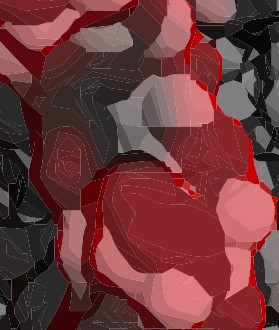
                    @VectorStyler Ok but I can't use the pdf output or there is an option to edit I'm not aware of ?

                    0_1713355419156_t.jpg

                    0_1713355426004_t1.jpg

                    W11 Pro 25H2 - 12th Gen Intel(R) i7-12700K 3.61 GHz - RAM 64 Go - NVIDIA GF GTX 4070 Ti - Intuos - Dell UP3216Q / Eizo ColorEdge
                    W11 Pro 25H2 - 12th Gen Intel(R) i7-12700KF 3.60 GHz -RAM 64 Go - NVIDIA GF GTX 3080 - IntuosPro- ProArt PA329C

                    VectorStylerV 1 Reply Last reply Reply Quote 1
                    • VectorStylerV Offline
                      VectorStyler @B-Vs-V
                      last edited by

                      @Pat Is this a PDF file? what app was used to display it?

                      B 1 Reply Last reply Reply Quote 0
                      • B Offline
                        B-Vs-V @VectorStyler
                        last edited by

                        @VectorStyler Adobe Acrobat DC (2015).

                        W11 Pro 25H2 - 12th Gen Intel(R) i7-12700K 3.61 GHz - RAM 64 Go - NVIDIA GF GTX 4070 Ti - Intuos - Dell UP3216Q / Eizo ColorEdge
                        W11 Pro 25H2 - 12th Gen Intel(R) i7-12700KF 3.60 GHz -RAM 64 Go - NVIDIA GF GTX 3080 - IntuosPro- ProArt PA329C

                        VectorStylerV 1 Reply Last reply Reply Quote 0
                        • VectorStylerV Offline
                          VectorStyler @B-Vs-V
                          last edited by

                          @Pat Send me the VS file and the PDF file by email. I need to replicate this here to find out what can cause this.

                          Some apps render anti-aliasing with this kind of artifacts (VS and AD also), but the Adobe tools should have a different vector rendering scheme.
                          Unless an image was output into the PDF by VS.

                          B 1 Reply Last reply Reply Quote 0
                          • B Offline
                            B-Vs-V @VectorStyler
                            last edited by

                            @VectorStyler As I've recently re-subscribed to Adobe CC, I've just installed the latest version of Acrobat DC: the lines are there when I open the file, but after a few seconds they disappear. Should I still send the files?

                            W11 Pro 25H2 - 12th Gen Intel(R) i7-12700K 3.61 GHz - RAM 64 Go - NVIDIA GF GTX 4070 Ti - Intuos - Dell UP3216Q / Eizo ColorEdge
                            W11 Pro 25H2 - 12th Gen Intel(R) i7-12700KF 3.60 GHz -RAM 64 Go - NVIDIA GF GTX 3080 - IntuosPro- ProArt PA329C

                            VectorStylerV 1 Reply Last reply Reply Quote 0
                            • VectorStylerV Offline
                              VectorStyler @B-Vs-V
                              last edited by

                              @Pat said in Tracing a bitmap image:

                              Should I still send the files?

                              Still send me the files. I would like check if the export is vectors and if it is touching shapes indeed.

                              B 1 Reply Last reply Reply Quote 0
                              • B Offline
                                B-Vs-V @VectorStyler
                                last edited by

                                @VectorStyler Files sent ☺

                                W11 Pro 25H2 - 12th Gen Intel(R) i7-12700K 3.61 GHz - RAM 64 Go - NVIDIA GF GTX 4070 Ti - Intuos - Dell UP3216Q / Eizo ColorEdge
                                W11 Pro 25H2 - 12th Gen Intel(R) i7-12700KF 3.60 GHz -RAM 64 Go - NVIDIA GF GTX 3080 - IntuosPro- ProArt PA329C

                                1 Reply Last reply Reply Quote 1
                                • First post
                                  Last post