VectorStyler
    • Categories
    • Unread
    • Recent
    • Tags
    • Popular
    • Register
    • Login

    Aligning with Key Object (Circle)

    Scheduled Pinned Locked Moved Questions and Support
    7 Posts 3 Posters 5.8k Views 3 Watching
    Loading More Posts
    • Oldest to Newest
    • Newest to Oldest
    • Most Votes
    Reply
    • Reply as topic
    Log in to reply
    This topic has been deleted. Only users with topic management privileges can see it.
    • R Offline
      richbyte
      last edited by

      Please tell me how to align few rectangles along a circular path like this:

      https://s3.amazonaws.com/ceblog/wp-content/uploads/2018/03/24214554/website-color-palettes-18.jpg

      VectorStylerV 1 Reply Last reply Reply Quote 0
      • VectorStylerV Offline
        VectorStyler @richbyte
        last edited by

        @richbyte The rectangles along the vertical direction must each be grouped. Then the resulting groups aligned to a path with the Alignment panel.

        1 Reply Last reply Reply Quote 0
        • R Offline
          richbyte
          last edited by

          1. Grouped the rectangles.
          2. Registration point to bottom centre for both the group and all rectangles.
          3. Chose - Align to Shape
          4. Selected all and then selected the circle as key object

          https://www.icloud.com/iclouddrive/01973iXYb2O700c19jmmQt2Qg#Screen_Shot_2024-04-19_at_4.06.28_PM

          S VectorStylerV 2 Replies Last reply Reply Quote 0
          • S Offline
            Subpath @richbyte
            last edited by

            @richbyte

            well, its not aligning
            but another solution

            Here the Video

            Win 11
            CPU: AMD Ryzen 5 9600X, 6-core.
            GPU: Nvidia Geforce RTX 5070.

            R 1 Reply Last reply Reply Quote 0
            • VectorStylerV Offline
              VectorStyler @richbyte
              last edited by

              @richbyte The "Align on Shape" alignment options must be activated from the panel menu.
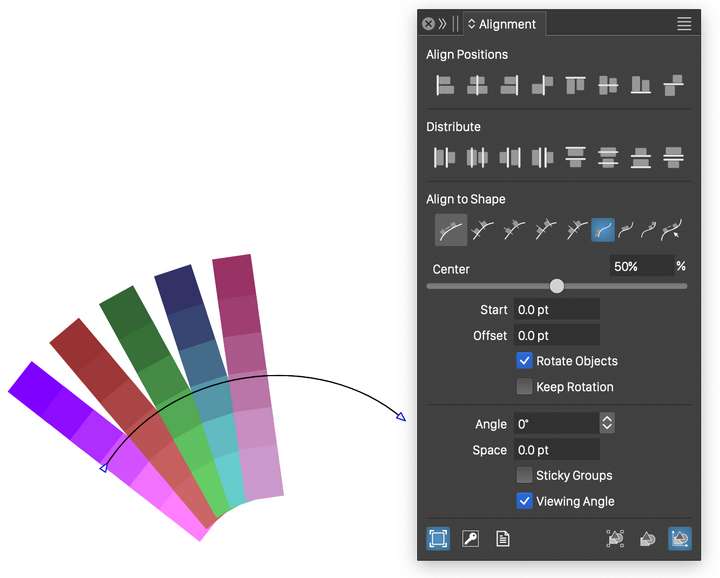
              0_1713524999797_alignonshape.png

              R 1 Reply Last reply Reply Quote 0
              • R Offline
                richbyte @Subpath
                last edited by

                @Subpath Appreciate your help. This is interesting using transform.Thank you!

                1 Reply Last reply Reply Quote 1
                • R Offline
                  richbyte @VectorStyler
                  last edited by

                  @VectorStyler This worked. I had the "Align on Shape" activated. The circle(key object) was too small, your illustration help figure it out (The arc). Thank you!

                  1 Reply Last reply Reply Quote 1
                  • First post
                    Last post