VectorStyler
    • Categories
    • Unread
    • Recent
    • Tags
    • Popular
    • Register
    • Login

    I can't add swatches to external (locked) color palettes.

    Scheduled Pinned Locked Moved Questions and Support
    11 Posts 2 Posters 8.2k Views 2 Watching
    Loading More Posts
    • Oldest to Newest
    • Newest to Oldest
    • Most Votes
    Reply
    • Reply as topic
    Log in to reply
    This topic has been deleted. Only users with topic management privileges can see it.
    • RaaskotR Offline
      Raaskot
      last edited by

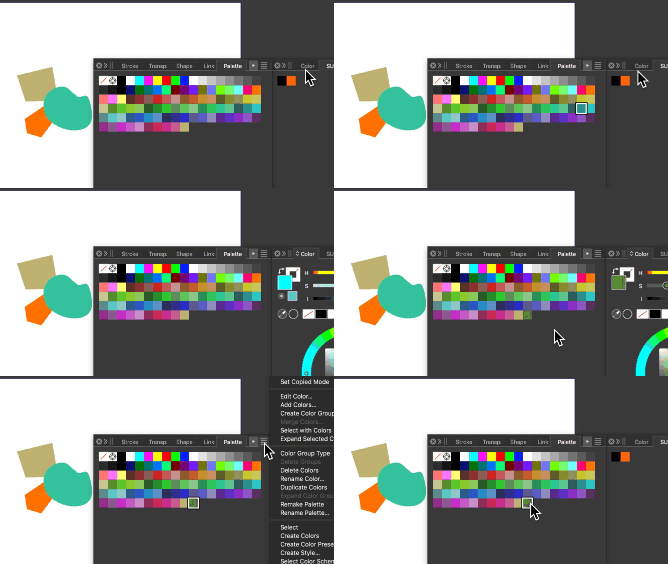
      Tried to consult online guide but not quite confident with how VS color palette managent works.

      In other apps I just drag and drop color swatches from panel to panels but here they seems locked.

      I cannot figure out how to unlock the latter. I guess I miss something out in the VS palette concept.

      Can you help?
      alt text
      0_1713529666373_b428b681-8767-49f3-ae41-68efa88eb046-billede.png

      VectorStylerV 1 Reply Last reply Reply Quote 0
      • VectorStylerV Offline
        VectorStyler @Raaskot
        last edited by

        @Raaskot Was the external palette opened from a file, or created as a new palette?
        If it was opened from a file, is the file read only?

        RaaskotR 1 Reply Last reply Reply Quote 0
        • RaaskotR Offline
          Raaskot @VectorStyler
          last edited by Raaskot

          @VectorStyler
          Do you mean from the MacOS or otherwise?

          I guess its read only but I don't where/how its placed to check it out. Do you know?

          VectorStylerV 1 Reply Last reply Reply Quote 1
          • VectorStylerV Offline
            VectorStyler @Raaskot
            last edited by

            @Raaskot How was the external palette created?

            RaaskotR 1 Reply Last reply Reply Quote 0
            • RaaskotR Offline
              Raaskot @VectorStyler
              last edited by Raaskot

              @VectorStyler
              Dont remember. Likely from A-Illustrator
              Tried to search in OS ---> No success.

              Can I find it via VS UI?

              VectorStylerV 1 Reply Last reply Reply Quote 1
              • VectorStylerV Offline
                VectorStyler @Raaskot
                last edited by

                @Raaskot said in I can't add swatches to external (locked) color palettes.:

                Can I find it via VS UI?

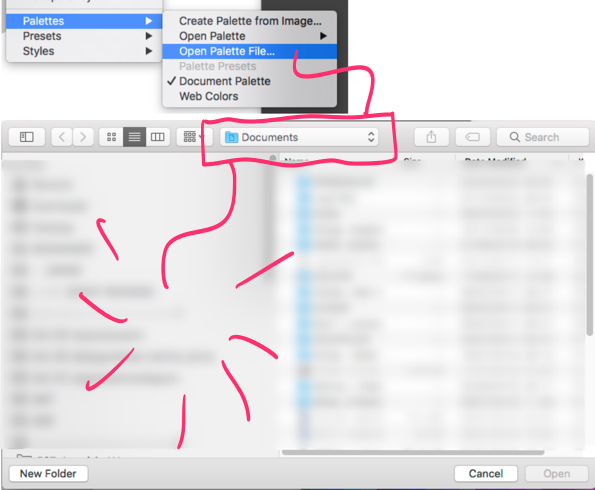
                You can open a palette file using the Panels -> Palette -> Open Palette File command.

                RaaskotR 1 Reply Last reply Reply Quote 0
                • RaaskotR Offline
                  Raaskot @VectorStyler
                  last edited by Raaskot

                  @VectorStyler
                  Sure, but no clue of where from VS load the palette-files.

                  Is there a specific VS ressource folder to access?
                  0_1713626563747_a67daf0f-aea4-4b9e-86b5-0fa8475992e4-billede.png

                  VectorStylerV 1 Reply Last reply Reply Quote 0
                  • VectorStylerV Offline
                    VectorStyler @Raaskot
                    last edited by

                    @Raaskot said in I can't add swatches to external (locked) color palettes.:

                    Is there a specific VS ressource folder to access?

                    I was thinking about external palettes (other than VS), in case you have the file.

                    RaaskotR 1 Reply Last reply Reply Quote 0
                    • RaaskotR Offline
                      Raaskot @VectorStyler
                      last edited by Raaskot

                      @VectorStyler
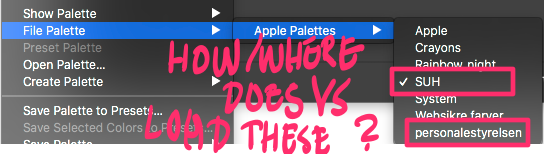
                      Yes, but when using OS Finder/search I cannot reach them on my harddisk.

                      1. How does VS pick them?
                      2. Is it possible to remove palettes from VS?
                      0_1713710396618_dd76568b-3252-442c-aa10-1b8fef8fcb05-billede.png

                      VectorStylerV 1 Reply Last reply Reply Quote 1
                      • VectorStylerV Offline
                        VectorStyler @Raaskot
                        last edited by

                        @Raaskot Those palettes are from MacOS. VS picks them by asking the system the available palettes.

                        They might be in ~/Library/Colors/, but depends on how they were created (by other apps).

                        VS cannot create these kind of palettes

                        RaaskotR 1 Reply Last reply Reply Quote 1
                        • RaaskotR Offline
                          Raaskot @VectorStyler
                          last edited by Raaskot

                          @VectorStyler
                          Make sense why they are non editable. But simply cannot find them on HD. Tried to lookup in the Library (and Application Support folder), but no show. I hoped It would make me understand the nature of the palettes better.

                          I guess the palettes has been created with Dope Illustrator time ago. Have to investigate further ...


                          1 Reply Last reply Reply Quote 1
                          • First post
                            Last post