Pen tool - fill shapes usability
-
With the installation of 1.2, I was reminded of how far away the setting is to turn off 'fill shapes with pencil tool', which otherwise is the default. It's an incredibly counterproductive feature, 'fill', when you mostly draw lines around things and only later apply fill, if at all. I had to search for it to find it, and I only did that because I remembered the previous discussion about it.
I still strongly recommend that this setting be somehow brought forward in the user interface for the pen tool; it's too vital to be tucked away so far. It could also be useful to have the ability to switch modes on the fly, if one needs different behaviors at different times.
It doesn't have to be a bulky label with a checkbox, could be an icon.
🍏 macOS Sequoia Apple Silicon
-
@Ingolf Not every potential variable option can be added to the UI without it looking bogged down and complicated. There's a solid number of designers who utilize the fill shapes with pencil tool for most of their work and a solid number like yourself who would primarily use it as a stroke only and choose to fill in the resulting shapes in a later step of your process.
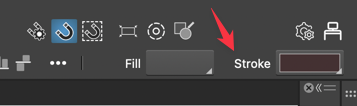
The option already exists on the contextual menu bar to choose a fill and/or a stroke for the pencil tool. If you know for sure you'll never want to use the fill with pencil tool, then that option is available to set permanently. If you want the fill option occasionally, then set it to allow for fills and then modify the fill/stroke option in the contextual menu. We already have that expectation with other tools - we check the settings in the contextual menu before we go about using them.
I primarily use the pencil tool as an immediate fill and I just check that fill is set and I go about my use of the pencil tool. If I occasionally need a stroke-only pencil tool result, it's easy enough to make the choice already without digging deep into the settings each time
-
@Ingolf said in Pen tool - fill shapes usability:
I still strongly recommend that this setting be somehow brought forward in the user interface for the pen tool;
I will try to find a solution for this. The context panel is a bit loaded for the pencil tool (npt much room left).
-
@VectorStyler said in Pen tool - fill shapes usability:
@Ingolf said in Pen tool - fill shapes usability:
I will try to find a solution for this. The context panel is a bit loaded for the pencil tool (npt much room left).This setting also applies to the pen tool, which is what I use the most and mentioned above, but in the settings, it says pencil tool, so it's extra difficult to guess what the setting covers.

Yes, there's a lot going on in the interface, but perhaps you should consider using text labels less; they take up a lot of space and, of course, are easier to understand, but visually, they take up the equivalent of 4-5 small icons, and I think they create a cluttered interface.
But anyway, I referred to the setting in the pen tool, but I would say the issue also applies to the use of the pencil tool.
Cheers


