Taskbar icon change (now orange?)
-
It's a nice change and better color fit, imo and it lines up with my red/orange section of icons nicely. I arrange by ROYGBIV as it keeps it visually easier to scan. Also, because I'm weird.
Minor feedback: I have VS pinned in my taskbar and it lost the reference (i.e. not found) when I installed the latest update.
When loading the program, the taskbar icon was actually blank at first and I couldn't repin it at all. I restarted, or maybe I just had to be patient and it showed up eventually with the "new one" and then I was able to repin it. The application is still blue though? Minor issue.
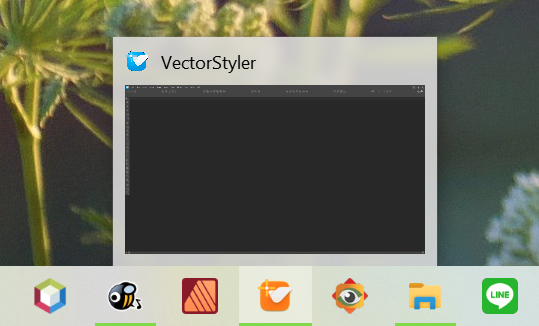
Windows 11 Build 26200.7171 (25H2)
AMD Ryzen 7 9700X with Gigabyte X870E Aorus Pro Ice
32GB RAM @ 6000MHz
PNY NVIDIA RTX 5070 Ti 16GB; Display 1: 4K @150%; Display 2: 4K @150%
Wacom Intuos Pro L (2025); Wacom Intuos Pro M; Epson ET-8550; Siser Romeo -
@debraspicher Might be that windows cached the previous (beta) icon.
-
@debraspicher said in Taskbar icon change (now orange?):
Minor feedback: I have VS pinned in my taskbar and it lost the reference (i.e. not found) when I installed the latest update.
It has probably always been like that, but I haven't kept an eye on it for a long time, as I'm done with Windows after 30 years. Goodbye, and good riddance.
Personally, I missed a Windows installer that allows you not to place an icon on the desktop, and which generated an icon that, when placed in the taskbar, worked after the next update.
-
I'm updating this because perhaps it connects with the issue with the installers/updaters not overwriting the preexisting installer in Windows.
When opening the program, there's a "blank" icon. I have no idea how common or uncommon that is, but the orange icon appears. Then it becomes blue...
Well, if you pin this blue icon, it becomes orange. Unpin, it becomes blue. Try to re-pin and suddenly the program is not "visible" to the taskbar to provide additional context items... whereas before the recent documents list was available as well as access to the direct EXE as well where we could right click get to the context menu for it there as well.
Video:
https://1drv.ms/v/s!AuWHX0h5bAoRio4ghaN1hEv54ebI0w?e=IYECU1Edit: Very important... This is after I uninstalled VS and reinstalled it after removing the extra Control Panel entries. By the way, there's some preexisting data from when the programs were installed still available to me.
You can see an example of this where one such file in the recent listing is available in the taskbar in the video... that is NOT recent. Like not at all. So, that's interesting...Apparently we can pin files there, I did not know that. Anyway, old program data is available to me, it's like I didn't really uninstall... -
@debraspicher I will try to find out what could cause this in the MSI installer.


