Stroke Width panel - broken?
-
I am not sure I am using it right, but here goes:
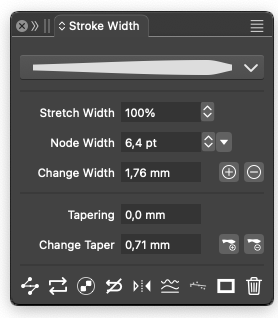
@VectorStyler can you check out the stroke width panel? I get nothing out of changing the values in the Node Width field, but the values change when I use the Stroke Width Tool with the selected node. The input field does nothing even after that.
I tried changing values on nodes on a curve I had just drawn, and it says hairline. It's possible to change the value with the slider, but when you select a value on the slider, it changes back to hairline again.
If you can only change the value on nodes that have already been modified with the Stroke Width Tool, then there should be at least no option to change it. On the other hand, it wouldn't be unreasonable, I think without having much experience with stroke width tools, that by changing the value, you convert a conventional node into a variable width node.
Overall, it's something I need to test now, after having laughed and cried my way through Serif's low-tech attempt at a Line Width Tool currently in beta. Right now, they're working from DISASTER up to the next level "Bloody awful" - if the beta improves anything vital at all? Canva certainly didn't pay too little for Serif.
I can definitely recommend that you give Stroke Width in VS a health check before Serif releases their attempt at a line width tool, which, if nothing else, is proof that the company is not a "learning organization." There MUST be people out there scouring the market after being just as disappointed as I am if this they release that kind of flawed feature.
I am trying out this panel:
🍏 macOS Sequoia Apple Silicon
-
Seems it works hereVS 1.2.020
is working also in 1.2.023
also no problem using the sliderWin 11
CPU: AMD Ryzen 5 9600X, 6-core.
GPU: Nvidia Geforce RTX 5070. -
@Ingolf said in Stroke Width panel - broken?:
can you check out the stroke width panel?
I will test this.
-
that by changing the value, you convert a conventional node into a variable width node.
I've been wanting to bring up this point, as it would be very convenient and would also allow for utilizing the selection capabilities of the node tool.
-
@Subpath said in Stroke Width panel - broken?:
Thanks buddy - like in your example it works like a charm on my mac as well.
So what confused me as a stroke width beginner ins VS - was that I used the panel out of context and before it was ready for input, so to speak.
I agree with Xiao that it would be very handy if entering a number in the panel converted the node to a variable width node before using the dragging stroke width tool. Maybe it is even easier to implement than a lot of usability code with interface feedback.

Just my input - as I said, not a hardcore user of this feature at all (yet, planning ahead!).
I got re-inspired to use this tool after seeing someone request it (in vain) for Affinity - for use in font design where specific values are apparently king. Understandably.
-
I think I understand the problem
If not, at least one width node is selected
The “Node Width” field does not change anythingbtw the label “Node width” gave me the idea that maybe one
or more width nodes must first be selectedbut a new user might get stuck here ?
-
@Subpath I will try to add the width selection for path node also. The problem is that this will create a new stroke width node that will not follow the path node.
-
I actually don't have a problem with the way it is,
because you can find out how it worksSo my thoughts went more , as an aid, perhaps
to extend the tooltip text slightly by the line
“Select a width node first” ?Just an idea, I don't know if this is a good solution maybe
@Ingolf or @Li-Xiao know better SolutionsWin 11
CPU: AMD Ryzen 5 9600X, 6-core.
GPU: Nvidia Geforce RTX 5070. -
@Subpath @VectorStyler
While there is indeed room for improvement in stroke width, I think it would be more meaningful to incorporate non-destructive and dynamic stroke width within the Repeater or shape effects. -
@Subpath said in Stroke Width panel - broken?:
I actually don't have a problem with the way it is,
because you can find out how it worksSo my thoughts went more , as an aid, perhaps
to extend the tooltip text slightly by the line
“Select a width node first” ?Just an idea, I don't know if this is a good solution maybe
@Ingolf or @Li-Xiao know better SolutionsYou know me, more usability, less Linux
Yes, there's a bit of missing self-explanatory context, so one knows it's about the context of the sequence of actions and the line width tool.This is where a status bar that can throw a line's explanation/error message has helped me a lot in other programs.
Anyway, I'm a strong opponent of fields and functions with usable interfaces in a situation where they can't be used. And even worse, no feedback when you try. It's poor and outdated usability that costs customers countless hours figuring out programs. Affinity, for example, has huge amounts of it, and their forum is filled with repeated "how the fuck" questions solely from the small percentage of customers who use their forum.
There are at least smaller tricks, if nothing else, that can be easily implemented, giving customers a clear idea that the path is closed here, and preferably also why.

