VectorStyler
    • Categories
    • Unread
    • Recent
    • Tags
    • Popular
    • Register
    • Login

    How do I set the arrow size in comparison to the stroke?

    Scheduled Pinned Locked Moved Questions and Support
    2 Posts 2 Posters 2.6k Views 1 Watching
    Loading More Posts
    • Oldest to Newest
    • Newest to Oldest
    • Most Votes
    Reply
    • Reply as topic
    Log in to reply
    This topic has been deleted. Only users with topic management privileges can see it.
    • BoldlineB Offline
      Boldline
      last edited by

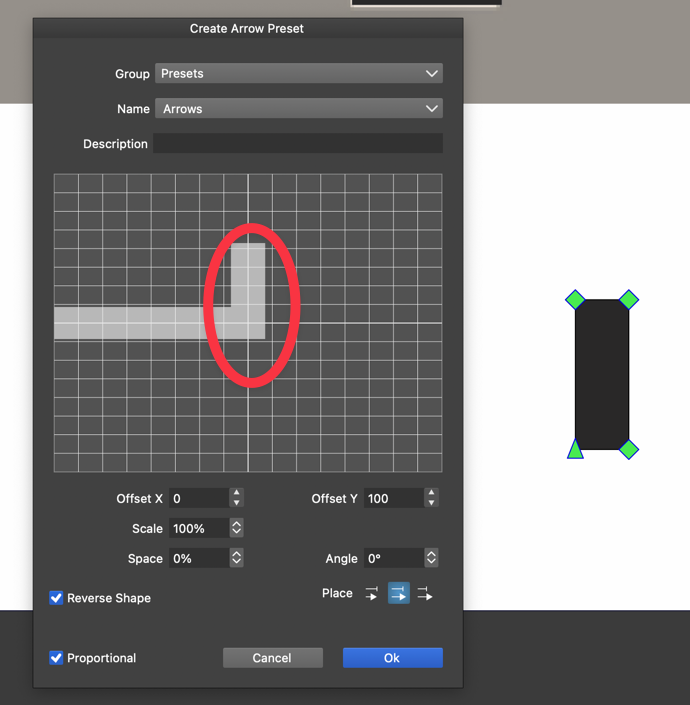
      I am experimenting with custom "arrow" presets. I created a "serif" of sorts that I then when I created the preset, I didn't see a way to make the "arrow" the same size as the sample stroke size.

      Unless I am missing something, it seems difficult to size the "arrow" and get it the scale I want it to be.
      0_1714882550660_36e9ad80-0988-43f8-82b4-55cc445c3abe-CleanShot 2024-05-05 at 00.14.42.png

      🍎 macOS Tahoe 26.2, Mac mini (M1, 2020), Chip Apple M1, Memory 16 GB
      Cintiq 27QHD Display and LG Ultra HD Display

      VectorStylerV 1 Reply Last reply Reply Quote 0
      • VectorStylerV Offline
        VectorStyler @Boldline
        last edited by

        @Boldline The size can be adjusted with the "Scale" field, and it will always be relative to the stroke width.
        The initial size (100%) is about 3x of the stroke width.

        1 Reply Last reply Reply Quote 0
        • First post
          Last post
