VectorStyler
    • Categories
    • Unread
    • Recent
    • Tags
    • Popular
    • Register
    • Login

    Artboard printing / exporting in the order set by the user.

    Scheduled Pinned Locked Moved Features and Ideas
    4 Posts 2 Posters 4.0k Views 2 Watching
    Loading More Posts
    • Oldest to Newest
    • Newest to Oldest
    • Most Votes
    Reply
    • Reply as topic
    Log in to reply
    This topic has been deleted. Only users with topic management privileges can see it.
    • H Offline
      Harry
      last edited by

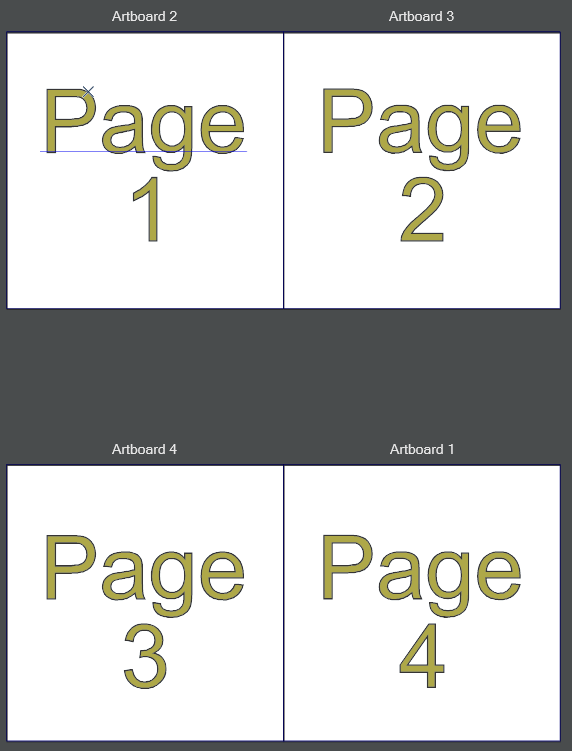
      Let's say I have a 100 page book made of 100 artboards. I have to export it to PDF in one file and in the proper order of pages. Now, I print / export all of those as PDF, but order of pages (artboards) is like I've created them. Any added or copied artboard is printed at the end of the PDF file and not in the order in which they appear on the canvas.

      This is what I want to achieve (check artboard's numbers - those are their order of creation):
      0_1715245233030_obraz_2024-05-09_110033027.png

      And this is the exported PDF file:
      0_1715245197584_obraz_2024-05-09_105957580.png

      Can we implement an option to print artboards in the order set by the user - for example by rows or by columns?

      Win 11, XP Pen Deco 01 V2 graphic tablet

      VectorStylerV 1 Reply Last reply Reply Quote 1
      • VectorStylerV Offline
        VectorStyler @Harry
        last edited by

        @Harry For printing only there is the Items field (the use depends on the selected Source). For the page order above type "4,1-3"

        H 1 Reply Last reply Reply Quote 1
        • H Offline
          Harry @VectorStyler
          last edited by

          @VectorStyler Is it possible to change artboards order for the Export tool?

          Win 11, XP Pen Deco 01 V2 graphic tablet

          VectorStylerV 1 Reply Last reply Reply Quote 1
          • VectorStylerV Offline
            VectorStyler @Harry
            last edited by

            @Harry Not for the export tool, only for printing. I will try to add it for export also.

            1 Reply Last reply Reply Quote 1
            • First post
              Last post