VectorStyler
    • Categories
    • Unread
    • Recent
    • Tags
    • Popular
    • Register
    • Login

    How to copy text via clipboard and paste in VS with new appearance?

    Scheduled Pinned Locked Moved Questions and Support
    3 Posts 3 Posters 3.6k Views 3 Watching
    Loading More Posts
    • Oldest to Newest
    • Newest to Oldest
    • Most Votes
    Reply
    • Reply as topic
    Log in to reply
    This topic has been deleted. Only users with topic management privileges can see it.
    • RaaskotR Offline
      Raaskot
      last edited by

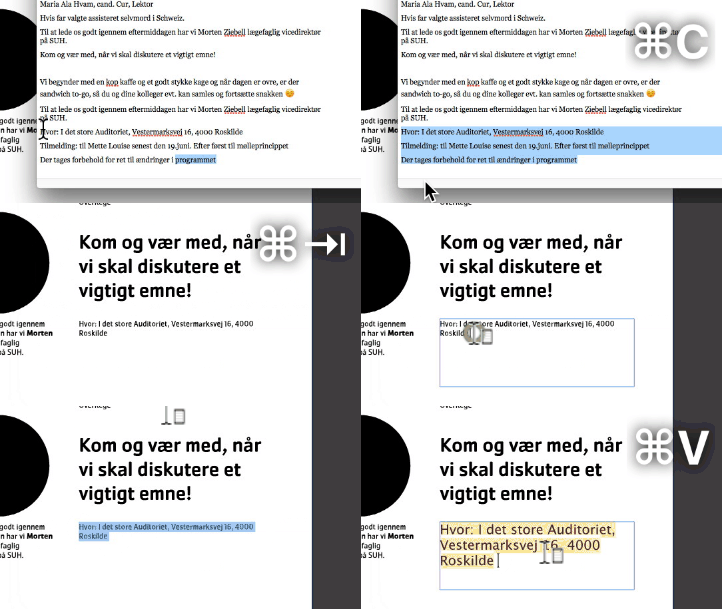
      Like in most recent mac-programmes I can, by using shift-opt-cmd-keys in VS, copy the apperance of a text.

      But how do I copy text via Mac clipboard, overwrite placeholder text and thus inheret the same font as the placeholder?

      Having to go back in popupmenu and copy appearance from other textframes (or applying styles) constantly is annoying and cumbersome.
      alt text

      1 Reply Last reply Reply Quote 1
      • IngolfI Offline
        Ingolf
        last edited by

        I think VS' lacks a paste without format in text contexts, @VectorStyler?

        (In macOS itself this is labelled something like Paste and match style which is just more meaningful to the average Joe than "paste without format")

        🍏 macOS Sequoia Apple Silicon

        VectorStylerV 1 Reply Last reply Reply Quote 2
        • VectorStylerV Offline
          VectorStyler @Ingolf
          last edited by

          @Ingolf said in How to copy text via clipboard and paste in VS with new appearance?:

          I think VS' lacks a paste without format in text contexts

          I will check this as it should not be an issue. But yes, by default text i pasted with formatting.

          1 Reply Last reply Reply Quote 1
          • First post
            Last post
