VectorStyler
    • Categories
    • Unread
    • Recent
    • Tags
    • Popular
    • Register
    • Login

    Consolidate the Color Panels under the Panels menu?

    Scheduled Pinned Locked Moved Features and Ideas
    3 Posts 2 Posters 3.7k Views 1 Watching
    Loading More Posts
    • Oldest to Newest
    • Newest to Oldest
    • Most Votes
    Reply
    • Reply as topic
    Log in to reply
    This topic has been deleted. Only users with topic management privileges can see it.
    • BoldlineB Offline
      Boldline
      last edited by

      Would it make sense to consolidate the color panels under the Panels menu?
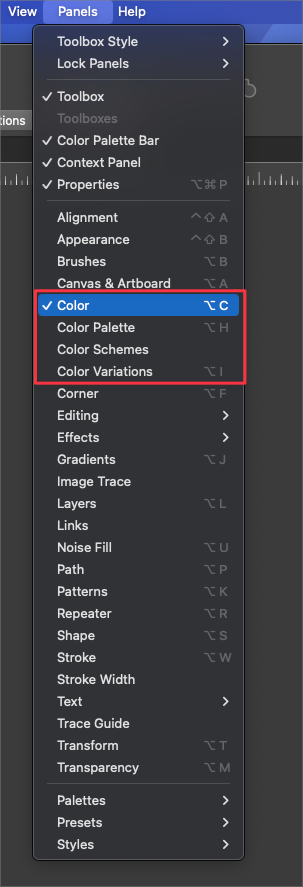
      0_1716989795999_3f4c9096-551f-4858-92ea-85319c7ad6f1-BLD 2024-05-29 at 09.35.36.png

      🍎 macOS Tahoe 26.2, Mac mini (M1, 2020), Chip Apple M1, Memory 16 GB
      Cintiq 27QHD Display and LG Ultra HD Display

      VectorStylerV 1 Reply Last reply Reply Quote 0
      • VectorStylerV Offline
        VectorStyler @Boldline
        last edited by

        @Boldline Would it be under a sub-menu? Cannot make a single panel out of these, as it would create confusion.

        BoldlineB 1 Reply Last reply Reply Quote 0
        • BoldlineB Offline
          Boldline @VectorStyler
          last edited by

          @VectorStyler said in Consolidate the Color Panels under the Panels menu?:

          @Boldline Would it be under a sub-menu? Cannot make a single panel out of these, as it would create confusion.

          Correct, I was implying they would be under a sub-menu. I should have elaborated further. I was envisioning the color choices in a sub menu similar to how some others in the Panels menu are set up, like "Text" is currently
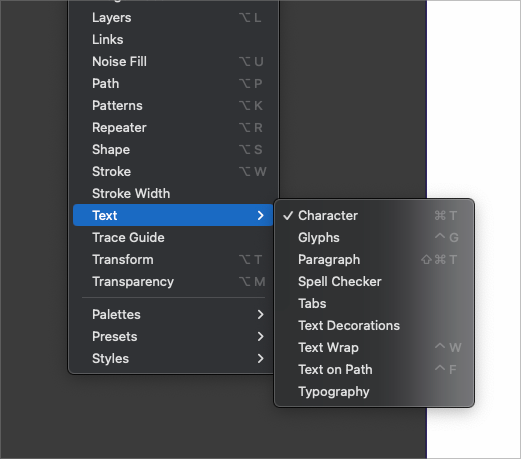
          0_1716991122065_36eec787-4a7e-4d02-88a7-77fc50bb8156-BLD 2024-05-29 at 09.57.43.png

          🍎 macOS Tahoe 26.2, Mac mini (M1, 2020), Chip Apple M1, Memory 16 GB
          Cintiq 27QHD Display and LG Ultra HD Display

          1 Reply Last reply Reply Quote 1
          • First post
            Last post
