VectorStyler
    • Categories
    • Unread
    • Recent
    • Tags
    • Popular
    • Register
    • Login

    Colour of VS icon

    Scheduled Pinned Locked Moved General Discussion
    10 Posts 3 Posters 10.4k Views 2 Watching
    Loading More Posts
    • Oldest to Newest
    • Newest to Oldest
    • Most Votes
    Reply
    • Reply as topic
    Log in to reply
    This topic has been deleted. Only users with topic management privileges can see it.
    • W Offline
      William Kansepa
      last edited by

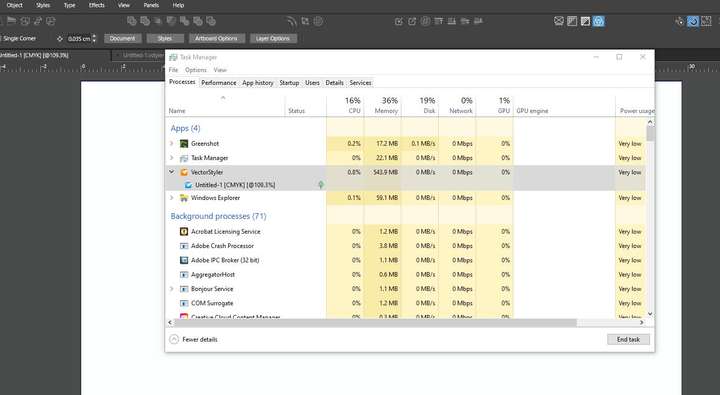
      I have observed that the VectorStyler icon has retained the orange instead of the new blue colour in the following:

      • Software Updater

      • Task Manager (VS app will show in orange, but an open document's icon will be blue)

      HP•Windows 11 Pro•11th Gen Intel(R) Core(TM) i7-1165G7 @ 2.80GHz 2.70 GHz• RAM: 16.0 GB (DDR4)

      VectorStylerV W 2 Replies Last reply Reply Quote 0
      • VectorStylerV Offline
        VectorStyler @William Kansepa
        last edited by

        @William-Kansepa said in Colour of VS icon:

        Task Manager

        I will check these

        1 Reply Last reply Reply Quote 0
        • W Offline
          William Kansepa @William Kansepa
          last edited by

          @William-Kansepa said in Colour of VS icon:

          I have observed that the VectorStyler icon has retained the orange instead of the new blue colour in the following:

          • Software Updater

          • Task Manager (VS app will show in orange, but an open document's icon will be blue)

          Sorry, I forgot to mention that this occurs in Windows 10.

          HP•Windows 11 Pro•11th Gen Intel(R) Core(TM) i7-1165G7 @ 2.80GHz 2.70 GHz• RAM: 16.0 GB (DDR4)

          1 Reply Last reply Reply Quote 1
          • S Offline
            Subpath
            last edited by Subpath

            nothing happen here, also win 10
            everthing is blue, VS 1.2.027

            Win 11
            CPU: AMD Ryzen 5 9600X, 6-core.
            GPU: Nvidia Geforce RTX 5070.

            VectorStylerV W 2 Replies Last reply Reply Quote 0
            • VectorStylerV Offline
              VectorStyler @Subpath
              last edited by

              @Subpath @William-Kansepa it could be that Windows cached some older icons.

              S 1 Reply Last reply Reply Quote 1
              • W Offline
                William Kansepa @Subpath
                last edited by

                Thank you @Subpath

                0_1717157622856_Orange icon in Task Manager.jpg

                HP•Windows 11 Pro•11th Gen Intel(R) Core(TM) i7-1165G7 @ 2.80GHz 2.70 GHz• RAM: 16.0 GB (DDR4)

                S 1 Reply Last reply Reply Quote 0
                • S Offline
                  Subpath @William Kansepa
                  last edited by Subpath

                  @William-Kansepa, @VectorStyler

                  ok, did not look at these places
                  here my List

                  orange icon

                  taskmanager
                  .exe in install folder

                  blue icon

                  Files in Folder
                  Program on Taskbar
                  VS Link on Desktop
                  in Program Deinstall List
                  Windows Start Menu

                  Btw the Icon color doesnt bother me

                  Win 11
                  CPU: AMD Ryzen 5 9600X, 6-core.
                  GPU: Nvidia Geforce RTX 5070.

                  W 1 Reply Last reply Reply Quote 1
                  • S Offline
                    Subpath @VectorStyler
                    last edited by

                    @VectorStyler

                    dont know
                    do not know how windows handle icons / icon changes

                    Win 11
                    CPU: AMD Ryzen 5 9600X, 6-core.
                    GPU: Nvidia Geforce RTX 5070.

                    1 Reply Last reply Reply Quote 0
                    • W Offline
                      William Kansepa @Subpath
                      last edited by

                      @Subpath I am with you on that. It is no biggie but we strive for perfection aren't we all...

                      HP•Windows 11 Pro•11th Gen Intel(R) Core(TM) i7-1165G7 @ 2.80GHz 2.70 GHz• RAM: 16.0 GB (DDR4)

                      S 1 Reply Last reply Reply Quote 1
                      • S Offline
                        Subpath @William Kansepa
                        last edited by

                        @William-Kansepa said in Colour of VS icon:

                        but we strive for perfection aren't we all.

                        absolute true 🙂

                        but love the japanese style where the perfection
                        is only perfect with some imperfection 🙂

                        Win 11
                        CPU: AMD Ryzen 5 9600X, 6-core.
                        GPU: Nvidia Geforce RTX 5070.

                        1 Reply Last reply Reply Quote 0
                        • First post
                          Last post