Layer selection tool use clarification
-
I was hoping to get a little more clarification and elaboration on the selection tool in the layers panel and what it is best used for compared to just selecting the layer itself. In the VS manual, it describes the layer panel radio button as "the selection tool can be used to select the layer or object using regular object selection." I understand I can select specific layers and by doing so make an active selection of the objects on that layer or sub-layer - but I noticed I cannot drag multiple selected layer/sublayers to another layer at the same time. it only moves one of the selected. I can move multiple layers/sublayers if I select it by clicking on the layer tab itself, not the radio button. Is this by intention?
Here is a link to the video showing this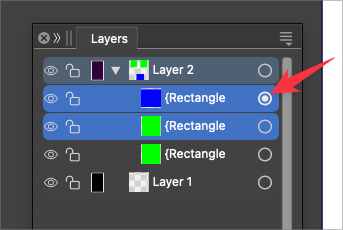
🍎 macOS Tahoe 26.2, Mac mini (M1, 2020), Chip Apple M1, Memory 16 GB
Cintiq 27QHD Display and LG Ultra HD Display -
@Boldline Yes. Selection is a bit painful for multiple objects. I'd like to be able to move things swiftly between pre-existing Layers easily. As it is, I have to find them in the Layers panel, then select them again with Shift/Ctrl in the same panel that already has them highlighted with the radio toggle... then I still have to drag the Layers up/down rather painfully whichever direction they need to go.
Maybe there are easier ways to do this in VS.
AI had the little square highlight in the root Layer that we could use to move objects Layers more easily and I wasn't the biggest fan of that either, but I can't think of any other way it could be improved?
Windows 11 Build 26200.7171 (25H2)
AMD Ryzen 7 9700X with Gigabyte X870E Aorus Pro Ice
32GB RAM @ 6000MHz
PNY NVIDIA RTX 5070 Ti 16GB; Display 1: 4K @150%; Display 2: 4K @150%
Wacom Intuos Pro L (2025); Wacom Intuos Pro M; Epson ET-8550; Siser Romeo -
@Boldline said in Layer selection tool use clarification:
I can move multiple layers/sublayers if I select it by clicking on the layer tab itself, not the radio button. Is this by intention?
Yes. The radio button is used to make / adjust the selection on the canvas.
-
@debraspicher The default Layers panel selection in VS is similar to the one in Illustrator.
But in VS you can configure in the Layers panel menu -> Panel Options to sync the on canvas and Layers panel selection by checking "Select Highlighted" and "Highlight Selected" options.


