Allow for “incrementally” increasing/decreasing unit values in Dialog Boxes/Panels
-
Allow for “incrementally” increasing/decreasing unit values in Dialog Boxes/Panels
Generally, there seems to be two (2) ways to adjust values in many of the Dialog Boxes/Panels.
- Click in a numeric entry field and type in the desired value
- Click the up/down caret/arrow-like icon next to the entry field box to bring up a Slider to click and drag
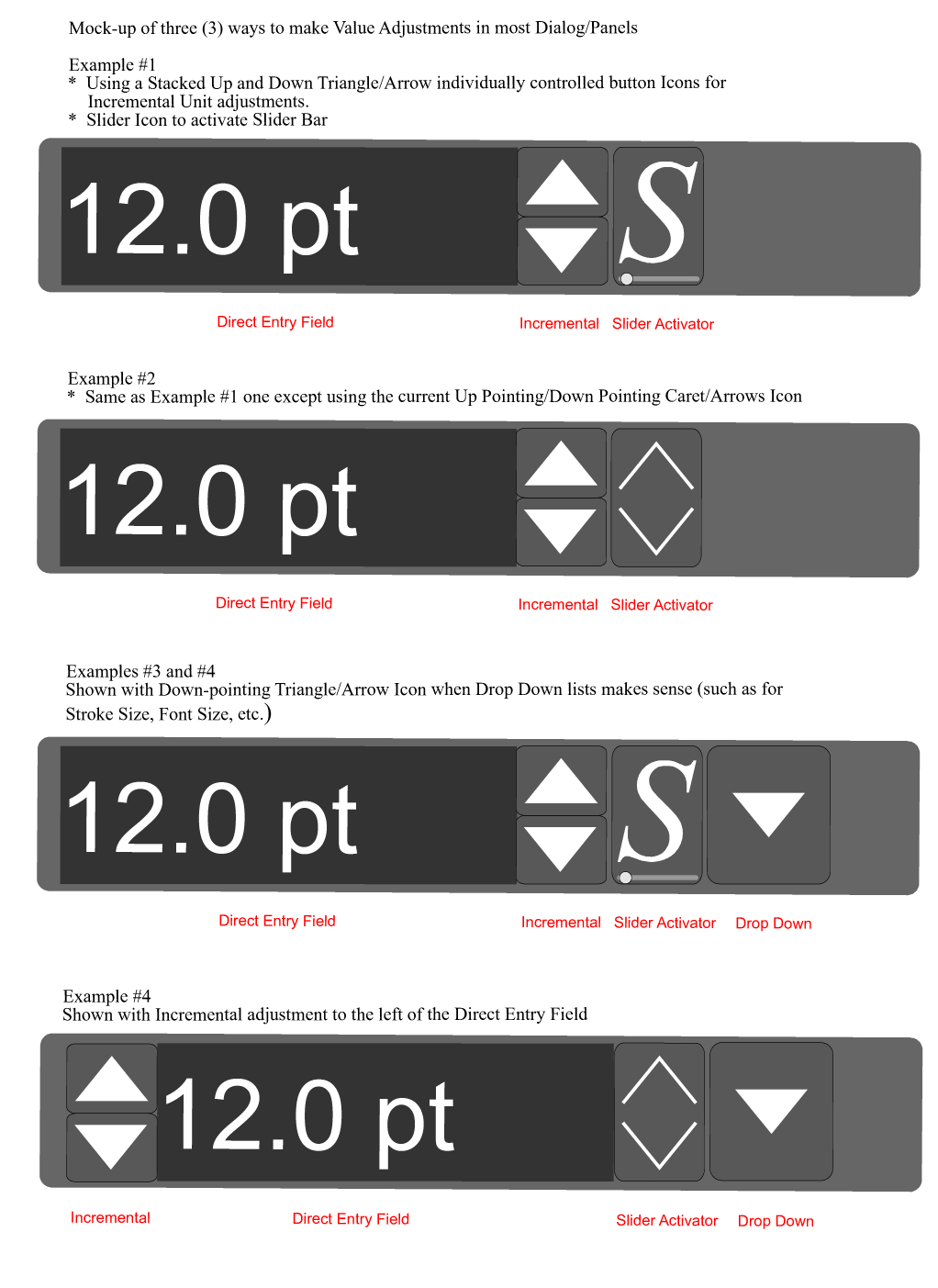
I think it would also be helpful to be able to adjust the values a third way- Incrementally, by clicking on stacked independently controlled, Up/Down pointing triangle/arrow button icons.
Note:
Maybe it’s just me, but Intuitively, because the caret/arrow-like icon looks so much like something you would expect to click on to make a value go up or down, it is a little bit of a misleading/confusing icon; hence I created a Slider Icon - a simple Italic S with a “slider bar” graphic under it (not saying this is a brilliant design or anything, ha, ha - just something to use as an idea/example) as a substitute icon to activate the "slider" function (although I also show examples keeping the current Icon in my mock-ups shown below as well).
Regardless of whether the slider Icon is changed, the Main thing I wanted to do was to add the stacked Up-pointing and Down-pointing Triangle icon buttons for the ability to increase or decrease the units incrementally by clicking the appropriate triangle.
The Incremental buttons work just as you would expect. For example, if the default units is Points, and you click on the Up pointing triangle/arrow button icon, the points will increase one point each time it is clicked. Hold down the Shift Key while clicking to increase in 10 Point increments.
Of course the "incremental" Triangle buttons are not novel, I'm simply suggesting adding the capability in Dialog Boxes/Panels where it doesn't currently exist in but could be helpful if present. Anywhere there is currently a "slider" is a candidate. Many are found in the Shape Effects sections. Some examples would be, Steps and Distance in Offset Path and Offset Path Shape Effect, Width in Outline Path , Steps in Contour and Blend, Stroke weight, and so on).
Below is a mock-up of various ways it might be presented visually in Dialog Boxes/Panels.
You may have a much better way of doing this, either with different Icons, Modifier Keys, Preferences, etc.
-
@Vector-Rock There is a third way to increase/decrease a value, by scrolling inside the input field (after clicking it).
@vectoradmin The only complaint I would have with scrolling is that it is a bit coarse — the value is difficult to adjust in 1 unit increments.
MacBook Pro (Intel) running Monterey 12.6.4
-
@b77 If you click inside a number field, the Up/Down arrow keys can be used to increment/decrement. But of course this is not the mouse.
-
The slider toggle needs a different icon i think, either a right-facing arrow like in Illustrator or an oval just like the slider handle, i still find myself clicking the up/down arrows of the slider button and expecting it to increment/decrement the value by 1.
Also it would be nice if you didn't have to release the mouse button to adjust the slider, just mouseDown and drag up or down, or even left/right.
-
@vectoradmin Indeed, thanks. Sometimes however scrolling is faster when you need to make a big value change quickly with a scroll/swipe then slow down to nail the right number in 1 unit increments, and as I said, value scrolling is a bit difficult to control.
-
@Kyriakos said in Allow for “incrementally” increasing/decreasing unit values in Dialog Boxes/Panels:
The slider toggle needs a different icon I think, either a right facing arrow like illustrator or an oval just like the slider handle
That's what prompted me to say the icon is little misleading. It simply "looks" like that is what it should/would do
 .
.It's not a deal breaker or anything for me, and eventually I would get used to it, but I guess it falls into the "improve the user interface category".
If it were changed, what should the icon look like?
I'm not sure. The illustrator one is not that great either in my opinion, but I guess the one thing it has going for it is a least lot of people would be familiar with it.As I was thinking about what it should look like, nothing totally jumped out at me; hence the S (for the word Slider), Italicized (for "movement") and a "Graphic" Underneath it (looks pretty close to what the actual slider bar looks like now)- That's the best I could come up with, ha, ha.

I guess you could also just use the Slider "Graphic" by itself (eliminate the S) and vertically center the Graphic in the icon box.
@Kyriakos said in Allow for “incrementally” increasing/decreasing unit values in Dialog Boxes/Panels:
The slider toggle needs a different icon I think, i still find myself clicking the up/down arrows of the slider button and expecting it to increment/decrement the value by 1.
@kyriakos: EXACTLY!
 Yep, I am CONSTANTLY doing this myself too!
I bet this is a common thing.
-
@b77 said in Allow for “incrementally” increasing/decreasing unit values in Dialog Boxes/Panels:
@Vector-Rock There is a third way to increase/decrease a value, by scrolling inside the input field (after clicking it).
@vectoradmin The only complaint I would have with scrolling is that it is a bit coarse — the value is difficult to adjust in 1 unit increments.
@b77 - Thanks for the info. I didn't know you could click inside the entry field and use scrolling.
Also, very good point about scrolling being nice when you want to quickly make a bigger value increment changes.
Too bad about the scrolling not super accurate for trying to get precise one unit increment changes. I'll have to check that out.
Maybe @vectoradmin can let us know if there is anything that can be done to fix the mouse precision issue (unless this a “mouse technology" specific problem unrelated to VectorStyler).
-
@vectoradmin said in Allow for “incrementally” increasing/decreasing unit values in Dialog Boxes/Panels:
@b77 If you click inside a number field, the Up/Down arrow keys can be used to increment/decrement. But of course this is not the mouse.
@vectoradmin Thanks for that information, I hadn't noticed you could adjust by clicking inside the number field and using the Up and Down Arrow Keys on the keyboard.......That's very good news and makes a big difference to me.
Could you add the functionality to be able to change the unit increments to 10 at a time by holding down the Shift Key while clicking the Up and Down Arrow Keys on the Keyboard ???
Side Note:
You may still want to at least think about adding the "incremental", stacked Up/Down Triangles Icon buttons in the Panels for a few of reasons.- Many may expect to see this control option and be surprised if its not there.
- It's totally intuitive. It does exactly what people expect it to do as they are familiar with the concept from other programs.
- With your mouse, It provides a simple way to tweak your value with a quick "tap", which is especially useful when you can see your changes "live" as you are tapping.
Given that you can indeed Incrementally change the Units as you described, I don't know if it is "critical" to add the incremental, stacked Up/Down Triangles Icon buttons. I also don't know the difficulty or challenges you would incur from a "coding" standpoint to do so; however, it still may be prudent to at least "consider" doing so.
-
@Vector-Rock Some small improvements will come in the next build.
I keep the up/down scroll button idea open for the build after that. Technically it is not an issue, just have to find the right arrangement. -
@vectoradmin said in Allow for “incrementally” increasing/decreasing unit values in Dialog Boxes/Panels:
@Vector-Rock Some small improvements will come in the next build.
In keep the up/down scroll button idea open for the build after that. Technically it is not an issue, just have to find the right arrangement.Sounds good. I look forward to what you come up with.

