VectorStyler
    • Categories
    • Unread
    • Recent
    • Tags
    • Popular
    • Register
    • Login

    update 1.2.028

    Scheduled Pinned Locked Moved Release notes of past builds
    14 Posts 7 Posters 11.6k Views 6 Watching
    Loading More Posts
    • Oldest to Newest
    • Newest to Oldest
    • Most Votes
    Reply
    • Reply as topic
    Log in to reply
    This topic has been deleted. Only users with topic management privileges can see it.
    • H Offline
      Harry @VectorStyler
      last edited by

      @VectorStyler Big, big, thanks for your constant improvements!

      I want to mention that since a few versions back, VS has been installed in a few instances - here on Win 10:

      0_1718009900520_VS instances.png

      Win 11, XP Pen Deco 01 V2 graphic tablet

      VectorStylerV S 2 Replies Last reply Reply Quote 1
      • VectorStylerV Offline
        VectorStyler @Harry
        last edited by

        @Harry Not sure what could cause this. I tested it here and it is working correctly

        1 Reply Last reply Reply Quote 0
        • S Offline
          Subpath @Harry
          last edited by

          @Harry, @VectorStyler

          same here got 3 Instances
          .24, .27, .28
          but my install procedure is the same
          since Vers 1

          Win 11
          CPU: AMD Ryzen 5 9600X, 6-core.
          GPU: Nvidia Geforce RTX 5070.

          VectorStylerV 1 Reply Last reply Reply Quote 0
          • VectorStylerV Offline
            VectorStyler @Subpath
            last edited by VectorStyler

            @Subpath @Harry Are you installing with the updater, or by downloading separately?

            H 1 Reply Last reply Reply Quote 0
            • H Offline
              Harry @VectorStyler
              last edited by

              @VectorStyler said in update 1.2.028:

              @Subpath @Harry Are you installing with the updater, or by downloading separately?

              I'm installing by downloading separately.

              Win 11, XP Pen Deco 01 V2 graphic tablet

              VectorStylerV 1 Reply Last reply Reply Quote 1
              • VectorStylerV Offline
                VectorStyler @Harry
                last edited by

                @Harry said in update 1.2.028:

                I'm installing by downloading separately.

                That might create a new install and keep the old one.

                Use Help -> Check for Updates.

                debraspicherD 1 Reply Last reply Reply Quote 1
                • S Offline
                  Subpath
                  last edited by Subpath

                  @VectorStyler

                  When i start VectorStyler and the automatic
                  Message Panel appears that i new Version is avaible
                  thats the way i update. Since the first Version.

                  I also do always the same Step and install the
                  Update in the same Folder.

                  That Instances are new, i remember i notice something
                  like that maybe 5 or 7 Versions back i saw just one
                  other Instance. Now there are two more .24 and 27
                  and the regulary .28

                  Win 11
                  CPU: AMD Ryzen 5 9600X, 6-core.
                  GPU: Nvidia Geforce RTX 5070.

                  1 Reply Last reply Reply Quote 1
                  • L Offline
                    Li Xiao @VectorStyler
                    last edited by

                    @VectorStyler Thank you very much. The Repeater expand issue has been fixed.

                    1 Reply Last reply Reply Quote 2
                    • debraspicherD Offline
                      debraspicher @VectorStyler
                      last edited by debraspicher

                      @VectorStyler FWIW, That's what I was doing as well and ended up with another install. Just because I was on the forum and it was easiest*

                      *By the way, I was getting non-crash crash report dialogs after the reinstall. I had to go into the folder to delete the crash dump manually, but it's stopped so that's good.

                      Edit: Spoke too soon. I did an in-application upgrade. Now I have two entries:

                      0_1718035140128_5d72414a-87a5-44e0-8e50-d38ff71a5e69-image.png

                      Edit: Uninstalling that extra entry borked the program, so now I have to delete and reinstall. I checked to see if I could find the original Program Files folder and it is gone. The entry is still there though:

                      0_1718035328419_3ef57b75-df13-4ba3-bfab-118f185b28d7-image.png

                      This is the window it gives me when I try to open the program through Search or when I run repair install from Programs and Features. No idea why it says "network resource"...
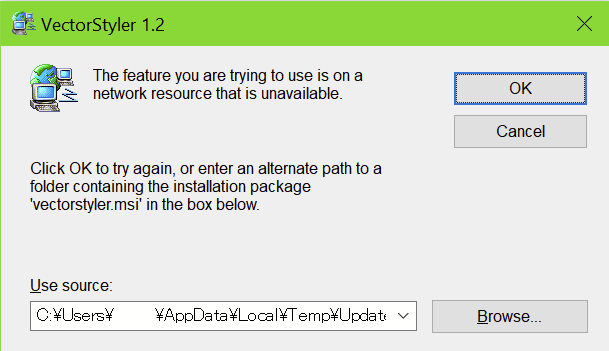
                      0_1718035444615_60d6d9cc-411f-4a70-a7ee-45cca598e662-image.png

                      Windows 11 Build 26200.7171 (25H2)
                      AMD Ryzen 7 9700X with Gigabyte X870E Aorus Pro Ice
                      32GB RAM @ 6000MHz
                      PNY NVIDIA RTX 5070 Ti 16GB; Display 1: 4K @150%; Display 2: 4K @150%
                      Wacom Intuos Pro L (2025); Wacom Intuos Pro M; Epson ET-8550; Siser Romeo

                      VectorStylerV IngolfI 2 Replies Last reply Reply Quote 1
                      • VectorStylerV Offline
                        VectorStyler @debraspicher
                        last edited by

                        @debraspicher Not clear why it could do that.
                        One solution is to remove completely and do a clean install from the download.

                        1 Reply Last reply Reply Quote 0
                        • IngolfI Offline
                          Ingolf @debraspicher
                          last edited by

                          @debraspicher said in update 1.2.028:

                          This is the window it gives me when I try to open the program through Search or when I run repair install from Programs and Features. No idea why it says "network resource"...
                          0_1718035444615_60d6d9cc-411f-4a70-a7ee-45cca598e662-image.png

                          I believe I have seen this years ago - diffent program, same issue. If the installation files (often a .msi file) have been removed or moved from their original location, Windows cannot find them to perform the repair. The network resource part is just misleading. As I remember, .msi packages are particularly sensitive to this issue for a few reasons because they store the installation path in the Windows registry or a installation log. If the installation file is moved or deleted, repair or changes to the installation will fail because the system looks for the file in its original location.

                          .msi files are - I believe - designed for corporate setups due to their centralized administration, automation capabilities, security, and maintenance features.

                          Anyway, that's how I remember it. As I mentioned, I have fled from Windows after 30 years of use, and I haven't missed Windows and these time-consuming, unnecessary problems for a second. Serif took it a step further into the abyss with the MSIX variation, which is a patch on a patch. Not recommended either.

                          🍏 macOS Sequoia Apple Silicon

                          1 Reply Last reply Reply Quote 3
                          • First post
                            Last post