Appearance Groups and Repeaters?
-
Re: Transform effect with multiple copies
Looking at the thread linked above, and a recent request on the Affinity forums in which someone gave a few quite nice examples that benefit from that same Copies option in the Transform effect as applied in the Appearance panel, I was thinking about how this could be generalized for a potentially greater range of options.
I would like to suggest that it be possible to group the entries in the Appearance panel (some consecutive mix of strokes and fills) and that some number of copies be applied to the group, rather than to an individual effect.
Each individual effect applied to objects within the group would then have a simple checkbox to indicate whether it should be applied once, or repeatedly (per copy).
The rendering of this would be that the effects would be applied to the first copy of items in that group as it currently is, but that the individual strokes and fills would then be duplicated for each copy (with the existing effects already applied), and the effects that are marked as per-copy would be applied to the duplicates, repeating this for the specified number of copies.
The effects would continue to be applied per-fill or per-stroke, against the corresponding duplicate, but the benefit of using a group for this is to allow them to be layered together over top of the previously effected fills and strokes.
-
@fde101 I added this to the feature backlog. A new feature with repeated transform that is easier to use than the repeater is needed. But I'm not sure that the Appearance panel is the right place for this.
-
@VectorStyler This feature is better suited for the Shape Effects panel.
-
The problem with the shape effects panel is that you can't target individual fills and strokes within the same object. You can only do that from the Appearance panel.
EDIT: The problem with limiting this to the Shape Effects panel is that it would be limited to a single stroke or fill. The copies could not be interspersed with other strokes or fills.
Consider (angles not perfect as I did this manually and quickly):
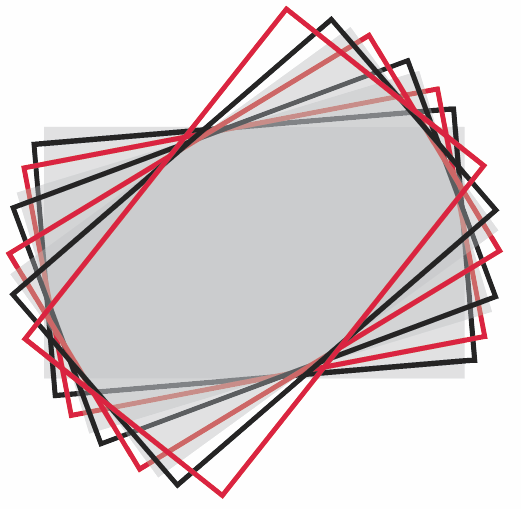
Granted I only used transforms here, and I did apply to both of the strokes and the fill, but there is no reason it should be limited to that.
-
Slightly better example:
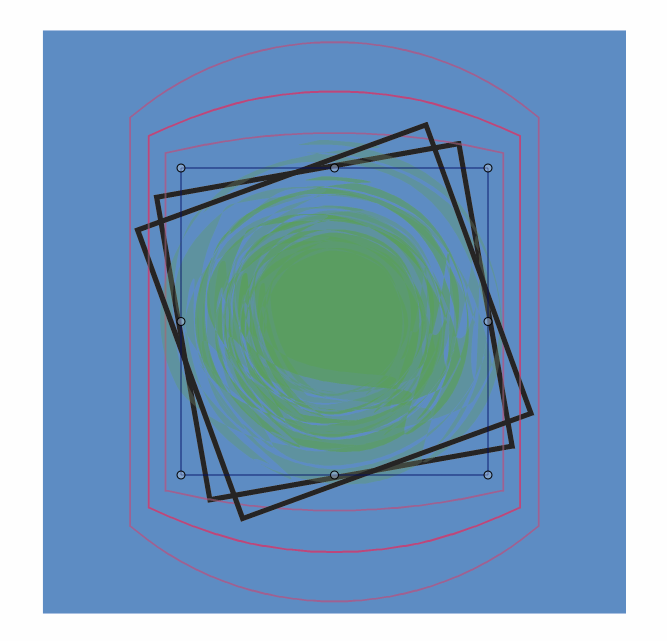
To do this:
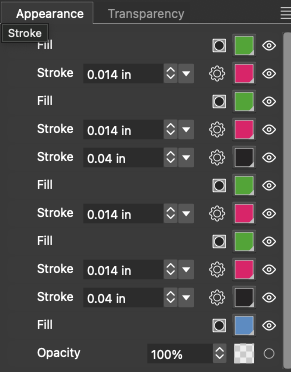
The grouping approach would result in two groups, one nested inside the other.
The inner group would contain the green fill and the red stroke, and the outer group would contain the inner group layered over the black stroke.
The blue background has a transform applied which makes it larger, the black stroke has a transform (rotate), the red stroke has a transform (larger) and a warp (bulge) along with a reduced opacity (though the opacity is fixed per instance of the stroke), and the green fill has a transform (smaller) and a reduced opacity, plus a ripple that has the same value throughout (as if applied once rather than to each copy, as per the "per copy" / "repeated" checkbox being turned off).
The idea being that there would be ONE black stroke, ONE red stroke and ONE green fill in the appearance panel so they could be edited all at once.
-
@fde101 Using the Appearance panel is feasible for a small number of copies, but it becomes extremely complex when dealing with hundreds of copies.
-
@fde101 I will try to find a way to do this. Certainly not through the Shape Effect panel, as those can alter shapes only (not styles).
