VectorStyler
    • Categories
    • Unread
    • Recent
    • Tags
    • Popular
    • Register
    • Login

    Path Sketch unexpected result
    Scheduled Pinned Locked Moved Questions and Support
    10 Posts 3 Posters 8.3k Views 2 Watching
    Loading More Posts
    • Oldest to Newest
    • Newest to Oldest
    • Most Votes
    Reply
    • Reply as topic
    Log in to reply
    This topic has been deleted. Only users with topic management privileges can see it.
    • BoldlineB Offline
      Boldline
      last edited by Boldline

      Here is an example of where Path Sketch does not always do what I expect it to do. I am trying to add to the existing piece. If I do it in small chunks, it works fine, but if I go around a large section and click off once I'm back inside the first shape again, I get an inverse result. when I try another time, with the same steps, it works as expected and fills in the whole shape. I'm sure there is some user error here! lol help would be appreciated!

      0_1718457565951_path sketch test.vstyler Here is the file

      Before:
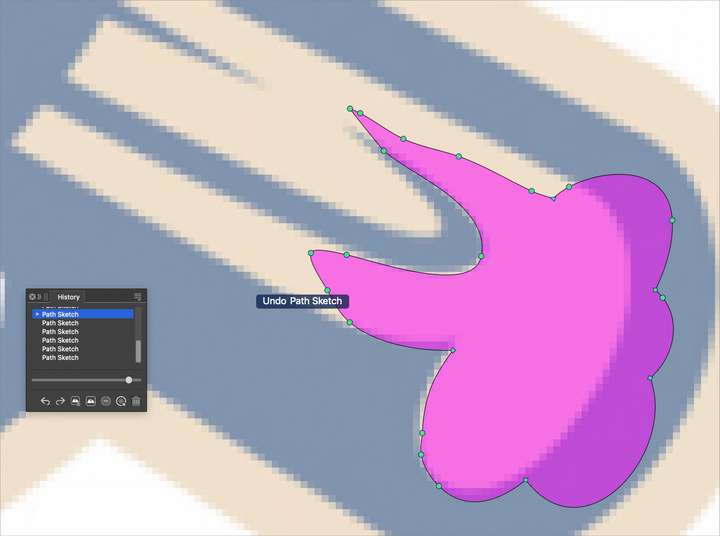
      0_1718457430461_5729a15f-d1db-4e96-9b88-a6da570e5e0b-BLD 2024-06-15 at 09.16.52.png
      After:
      0_1718457405903_2d45b48d-c103-454f-91ed-b0fbf185f0b7-BLD 2024-06-15 at 09.16.35.png

      🍎 macOS Tahoe 26.2, Mac mini (M1, 2020), Chip Apple M1, Memory 16 GB
      Cintiq 27QHD Display and LG Ultra HD Display

      S 1 Reply Last reply Reply Quote 0
      • S Offline
        Subpath @Boldline
        last edited by Subpath

        @Boldline , @VectorStyler

        in fact, sometimes it deletes instead of adding something
        (see the beginning of the video)

        I wouldn't put the Path Sketch Tool so deep into a shape if I wanted to add something.

        Here a video

        Win 11
        CPU: AMD Ryzen 5 9600X, 6-core.
        GPU: Nvidia Geforce RTX 5070.

        BoldlineB 1 Reply Last reply Reply Quote 1
        • BoldlineB Offline
          Boldline @Subpath
          last edited by Boldline

          @Subpath said in Path Sketch unexpected result:

          @Boldline , @VectorStyler

          in fact, sometimes it deletes instead of adding something
          (see the beginning of the video)

          I wouldn't put the Path Sketch Tool so deep into a shape if I wanted to add something.

          @VectorStyler It seems @Subpath and I have found a few issues that if modified, could drastically improve the Path Sketch tool.
          Could you look into why in his example, it deleted instead of adding? also, could the beginning and ending points of a path sketch stroke accomplish the same result as a shallow beginning and end point?
          Also looking into the file and video i included in this thread where I got unexpected results trying to encompass a large section of a shape to create a filled bigger shape and got the inverse instead? (similar to what @Subpath was mentioning he was experiencing)?
          Here is another video where I was doing some experimenting and I noticed that if I "completed" the stroke, it would always delete, even if I started the stroke from the inside and anded it with a completed overlapping stroke inside.

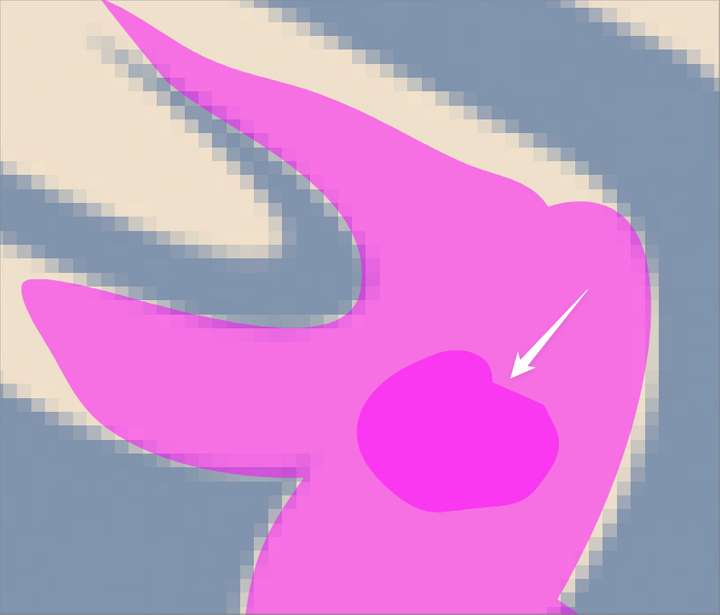
          Lastly, is there a way to add an option for creating a negative space inside a solid shape? I noticed if I did this, the new shape would not merge with the first shape like if I was adding an exterior section - i was able to select it after and change the color and use merge to "cut it out" I was wondering if a modifier key could be used to make a shape created completely inside a minus result right away. just an idea
          0_1718462665721_46078442-3645-4581-adef-77416efc65e4-BLD 2024-06-15 at 10.44.03.png

          🍎 macOS Tahoe 26.2, Mac mini (M1, 2020), Chip Apple M1, Memory 16 GB
          Cintiq 27QHD Display and LG Ultra HD Display

          VectorStylerV 1 Reply Last reply Reply Quote 0
          • VectorStylerV Offline
            VectorStyler @Boldline
            last edited by

            @Boldline I opened a bug on this and will try to improve the path sketch tool.
            Removal and addition are both part of the tool, but maybe it need a better decision on which one to do.

            S 1 Reply Last reply Reply Quote 0
            • S Offline
              Subpath @VectorStyler
              last edited by Subpath

              @VectorStyler

              As a lazy mouse user i dont like to pressing
              buttons apart from mouse buttons

              But in case using the Path Sketch Tool i hat a though in the direction
              pressing the shift or control key would delete and no key pressing would add.
              Just i though.

              What do others think about this ?

              Win 11
              CPU: AMD Ryzen 5 9600X, 6-core.
              GPU: Nvidia Geforce RTX 5070.

              BoldlineB 1 Reply Last reply Reply Quote 1
              • BoldlineB Offline
                Boldline @Subpath
                last edited by

                @Subpath said in Path Sketch unexpected result:

                But in case using the Path Sketch Tool i hat a though in the direction
                pressing the shift or control key would delete and no key pressing would add.

                One of the great features and charm of the path sketch tool is that it can all be done with strokes alone. I'm not against @Subpath's idea so long as the current method of adding and subtracting is not done away with. I could see that tying in with my earlier request idea to use a modifier key to create a negative space inside a solid shape

                🍎 macOS Tahoe 26.2, Mac mini (M1, 2020), Chip Apple M1, Memory 16 GB
                Cintiq 27QHD Display and LG Ultra HD Display

                S 1 Reply Last reply Reply Quote 0
                • S Offline
                  Subpath @Boldline
                  last edited by Subpath

                  @Boldline

                  As I wrote before, I'm not a big fan of modifier keys.
                  But maybe VectorStyler could set this modifier key
                  as an option in the settings.

                  The problem at the moment is that it's a bit unpredictable
                  whether the path sketch tool deletes or adds an area in some cases.

                  With a modifier key we would at least always have a clearly
                  defined state. As long as i press the key i am in delete mode,
                  if i don't press the key i am in add mode.

                  Win 11
                  CPU: AMD Ryzen 5 9600X, 6-core.
                  GPU: Nvidia Geforce RTX 5070.

                  BoldlineB 1 Reply Last reply Reply Quote 0
                  • BoldlineB Offline
                    Boldline @Subpath
                    last edited by

                    @Subpath said in Path Sketch unexpected result:

                    The problem at the moment is that it's a bit unpredictable
                    whether the path sketch tool deletes or adds an area in some cases.

                    I agree with you here, but this was why I was bringing up these issues to @VectorStyler in hopes that the path sketch tool could be improved upon so that it would be more consistent and predictable and potentially not even need a modifier to guarantee a result.

                    🍎 macOS Tahoe 26.2, Mac mini (M1, 2020), Chip Apple M1, Memory 16 GB
                    Cintiq 27QHD Display and LG Ultra HD Display

                    S 1 Reply Last reply Reply Quote 1
                    • S Offline
                      Subpath @Boldline
                      last edited by Subpath

                      @Boldline, @VectorStyler

                      I have no problem if @VectorStyler just improves the path sketch tool.

                      And I can live without a modifier key. That was just a
                      thought that went through my head.

                      Win 11
                      CPU: AMD Ryzen 5 9600X, 6-core.
                      GPU: Nvidia Geforce RTX 5070.

                      BoldlineB 1 Reply Last reply Reply Quote 0
                      • BoldlineB Offline
                        Boldline @Subpath
                        last edited by

                        @Subpath said in Path Sketch unexpected result:

                        @Boldline, @VectorStyler

                        I have no problem if @VectorStyler just improves the path sketch tool.

                        And I can live without a modifier key. That was just a
                        thought that went through my head.

                        I appreciate your idea

                        🍎 macOS Tahoe 26.2, Mac mini (M1, 2020), Chip Apple M1, Memory 16 GB
                        Cintiq 27QHD Display and LG Ultra HD Display

                        1 Reply Last reply Reply Quote 2
                        • First post
                          Last post