Layer bar signaling
-
Please provide a brief explanation of the meaning and behavior of the highlighting colors in the layer bars. I feel like the signaling is confusing and doesn't correspond to my actions or selections. Can't find the logic yet.
-
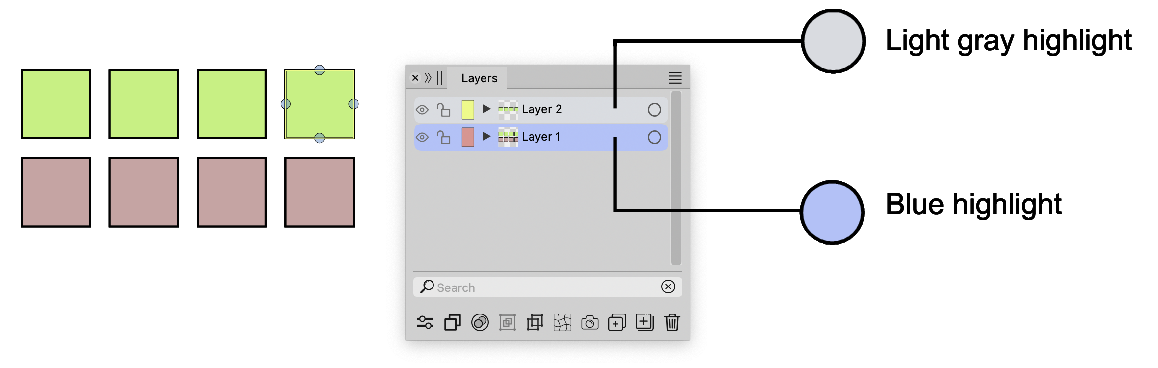
In your case, the bright color indicates which layer you are working in, and the blue color signifies the object in that layer you have selected with your pointer:
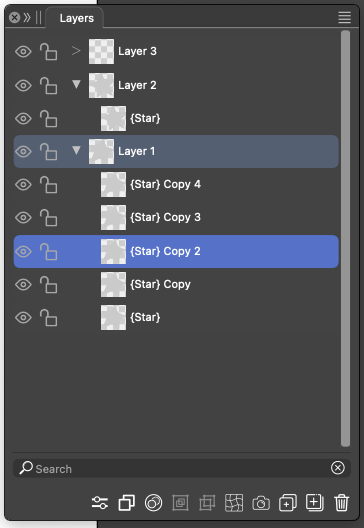
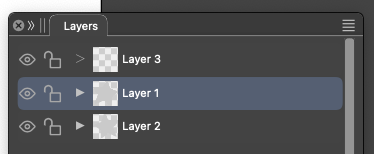
It makes sense in complex documents where you can scroll far up and down the layers hierarchy and need to find the current layer or navigate from it; or when a layer is simply collapsed:
-
@Ayo Yes, as explained by @Ingolf. In other words, strong blue is the selection on canvas and light blue is the selection in the Layers panel.
These two selections are different in VS (as in Illustrator, but not in Affinity), they can be synchronized to be the same with the Layers panel menu -> Panel Options -> Select Highlighted and Highlight Selected options. -
The devil is (again) in the options. Thanks.
Regarding functionalities for layers, I would like to repeat my plea for the unbeatable feature:
"move (drag & drop) artboard selected object(s) from one layer to another without unfolding and digging into stacks". A feature wish previously discussed in post:
https://www.vectorstyler.com/forum/topic/3294/ideas-to-improve-the-vectorstyler-layers-panelIs this useful from your perspective and if so, does it have a place in the backlog?
If I could help you with this in any way (frontend point of view), please let me know. -
@Ayo said in Layer bar signaling:
move (drag & drop) artboard selected object(s) from one layer to another without unfolding and digging into stacks
I will look into if this can be brought forward from the features list.


