VectorStyler
    • Categories
    • Unread
    • Recent
    • Tags
    • Popular
    • Register
    • Login

    Mesh Gradients as styles

    Scheduled Pinned Locked Moved Questions and Support
    4 Posts 2 Posters 4.3k Views 2 Watching
    Loading More Posts
    • Oldest to Newest
    • Newest to Oldest
    • Most Votes
    Reply
    • Reply as topic
    Log in to reply
    This topic has been deleted. Only users with topic management privileges can see it.
    • K Offline
      Kumr
      last edited by

      Is it possible to save mesh gradients as styles and presets? Perhaps it's already there and I couldn't figure out how.

      M1 MacBook Air, 16GB, macOS Sonoma 14.4.1

      VectorStylerV 1 Reply Last reply Reply Quote 1
      • VectorStylerV Offline
        VectorStyler @Kumr
        last edited by

        @Kumr Not possible, only as symbols. The problem is that the mesh is tied to the object shape (derived from it) and it would be impossible to fit into an other shape.

        Saving an "Object Style" will save the mesh, but when using it the results are not what expected.

        1 Reply Last reply Reply Quote 0
        • K Offline
          Kumr
          last edited by

          Ok, Thanks. I am able to open AI Mesh gradients object (both AI/ PDF exported files) in VS, and even edit the points and change colors. AI displays the following message when I open PDF (VS exported) and opens the mesh gradients as image objects.

          Attaching the VS file
          0_1719470795673_Mesh.vstyler
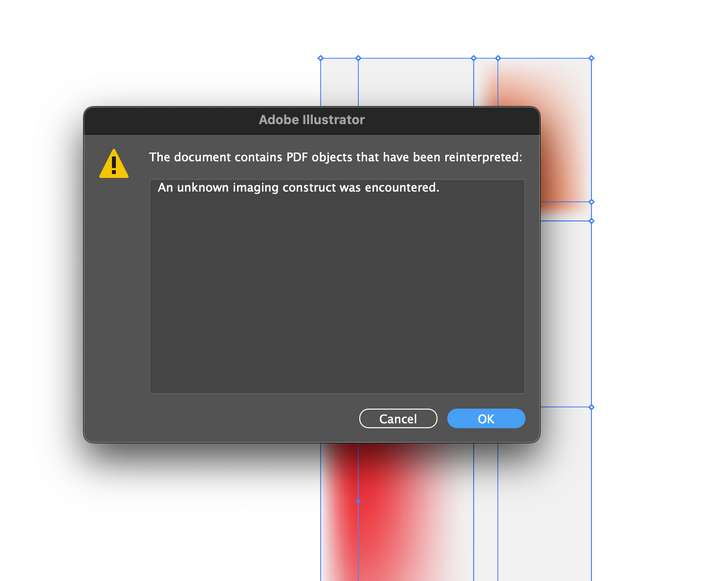
          0_1719470736900_Screenshot 2024-06-27 at 12.07.42 PM.png

          M1 MacBook Air, 16GB, macOS Sonoma 14.4.1

          VectorStylerV 1 Reply Last reply Reply Quote 1
          • VectorStylerV Offline
            VectorStyler @Kumr
            last edited by

            @Kumr said in Mesh Gradients as styles:

            AI displays the following message when I open PDF (VS exported) and opens the mesh gradients as image objects.

            I will try to find out what can cause this.

            1 Reply Last reply Reply Quote 0
            • First post
              Last post