VectorStyler
    • Categories
    • Unread
    • Recent
    • Tags
    • Popular
    • Register
    • Login

    Copy & Paste not working (intermittent)

    Scheduled Pinned Locked Moved Bugs in VectorStyler
    22 Posts 4 Posters 34.4k Views 4 Watching
    Loading More Posts
    • Oldest to Newest
    • Newest to Oldest
    • Most Votes
    Reply
    • Reply as topic
    Log in to reply
    This topic has been deleted. Only users with topic management privileges can see it.
    • debraspicherD Offline
      debraspicher
      last edited by debraspicher

      I think I've reported this before, but not sure if I reported the extent of it. Oddly enough it "reads" Cut operations into the History but nothing appears in the clipboard. I did make {Path} paste straight into a Layer name by trying to paste into it (this is how it shows in a clipboard viewer), but I didn't catch it on video.

      This paste into the Layer name directly works even in Paste is not visible in the Edit menu. So possibly it's not making its way properly into the clipboard when it does eventually catch:

      Video: https://1drv.ms/v/s!AuWHX0h5bAoRipMlcav3lGuBqap9QA?e=OADlyg

      Oh good, I caught it. Here is the clipboard data for it. You may need this program to view it: https://1drv.ms/u/s!AuWHX0h5bAoRipMmFXIttn6YZAHkaw?e=V2TX0L

      Video: https://1drv.ms/v/s!AuWHX0h5bAoRipMp5NjACYRARFgG0A?e=x96trV

      I'll email a file since it has History recorded with it.

      Windows 11 Build 26200.7171 (25H2)
      AMD Ryzen 7 9700X with Gigabyte X870E Aorus Pro Ice
      32GB RAM @ 6000MHz
      PNY NVIDIA RTX 5070 Ti 16GB; Display 1: 4K @150%; Display 2: 4K @200%
      Wacom Intuos Pro L (2025); Wacom Intuos Pro M; Epson ET-8550; Siser Romeo

      VectorStylerV 1 Reply Last reply Reply Quote 0
      • VectorStylerV Offline
        VectorStyler @debraspicher
        last edited by

        @debraspicher
        When working in the Layers panel, the copy / paste keys (Ctrl+C/V) are used to copy paste object names. This can be adjusted in the Layers panel options "Object Pasteboard" checkbox (check to copy/paste objects, not names).

        About the object name copy/paste: this feature allows to quickly rename multiple objects by pasting names from a spreadsheet or text editor.

        debraspicherD 1 Reply Last reply Reply Quote 2
        • debraspicherD Offline
          debraspicher @VectorStyler
          last edited by

          @VectorStyler Weird! It seemed to work at several points. Perhaps it was because of the Selected Highlight/Highlight Selected options, but that's just a guess. I'm trying to keep some optional things turned off to see if I can adjust to the native use case.

          I'm torn because I can see the usefulness in this feature as I care a great deal about in-file organization. However, as I noted here, it's painful to have to shift Objects between stacks through simple drag & drop due to the slow scroll speed.

          Perhaps, we can have a way to scroll with our scroll wheel while "holding" the Objects to be moved. That would mean the drop zones would have to be snappy, but it could mean a significant UX improvement for heavy mouse users.

          I also considered when testing for this, if it were possible to select the same Object(s) and then drag them in from the Canvas to the new placement in the Layers panel. Maybe that could also be an option.

          Just some thoughts I was having. Take it with a grain of salt.

          Windows 11 Build 26200.7171 (25H2)
          AMD Ryzen 7 9700X with Gigabyte X870E Aorus Pro Ice
          32GB RAM @ 6000MHz
          PNY NVIDIA RTX 5070 Ti 16GB; Display 1: 4K @150%; Display 2: 4K @200%
          Wacom Intuos Pro L (2025); Wacom Intuos Pro M; Epson ET-8550; Siser Romeo

          VectorStylerV 1 Reply Last reply Reply Quote 0
          • VectorStylerV Offline
            VectorStyler @debraspicher
            last edited by

            @debraspicher said in Copy & Paste not working (intermittent):

            Perhaps, we can have a way to scroll with our scroll wheel while "holding" the Objects to be moved

            This sounds like a useful new feature. I will think of a solution, suggestions are welcome.

            1 Reply Last reply Reply Quote 1
            • AyoA Offline
              Ayo
              last edited by

              @debraspicher & @VectorStyler said in Copy & Paste not working (intermittent):

              This sounds like a useful new feature. I will think of a solution, suggestions are welcome.

              Triggers me...
              Organizing objects. Do you mean this as an action within a single layer or within single and/or exchange between multiple layers?

              VectorStylerV debraspicherD 2 Replies Last reply Reply Quote 0
              • VectorStylerV Offline
                VectorStyler @Ayo
                last edited by

                @Ayo said in Copy & Paste not working (intermittent):

                Do you mean this as an action within a single layer or within single and/or exchange between multiple layers?

                It would be taking objects from any layer and placing nem somewhere in an other layer.

                1 Reply Last reply Reply Quote 1
                • debraspicherD Offline
                  debraspicher @Ayo
                  last edited by

                  @Ayo If you look at my post here and check the video, that's what we're talking about speeding up specifically: https://www.vectorstyler.com/forum/topic/4443/faster-way-to-do-this-simple-drag-drop

                  Windows 11 Build 26200.7171 (25H2)
                  AMD Ryzen 7 9700X with Gigabyte X870E Aorus Pro Ice
                  32GB RAM @ 6000MHz
                  PNY NVIDIA RTX 5070 Ti 16GB; Display 1: 4K @150%; Display 2: 4K @200%
                  Wacom Intuos Pro L (2025); Wacom Intuos Pro M; Epson ET-8550; Siser Romeo

                  1 Reply Last reply Reply Quote 2
                  • AyoA Offline
                    Ayo
                    last edited by

                    @VectorStyler said in Copy & Paste not working (intermittent):

                    suggestions are welcome

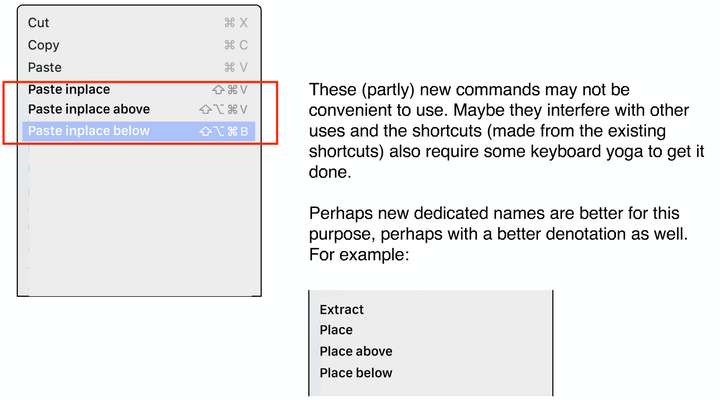
                    Attached is a suggestion to tackle the problem. Debrahspicher suggested "a way to scroll with our scroll wheel while "holding" the Objects to be moved". 'Holding' equals cutting and store it in the clipboard. Problem now is to paste it the right way. This is my suggestion: 0_1719830330413_organize objects.pdf

                    VectorStylerV 1 Reply Last reply Reply Quote 2
                    • VectorStylerV Offline
                      VectorStyler @Ayo
                      last edited by

                      @Ayo Got it, thanks! I have to think about this:)

                      AyoA 1 Reply Last reply Reply Quote 0
                      • AyoA Offline
                        Ayo @VectorStyler
                        last edited by

                        @VectorStyler An additional thought

                        0_1719837785308_f1de9a34-663b-4e78-bc89-2ac521ae6104-image.png

                        L 1 Reply Last reply Reply Quote 2
                        • L Offline
                          Li Xiao @Ayo
                          last edited by

                          @Ayo My idea is quite similar. You can select the object you want to move, right-click the mouse, and choose "Move to." Then, you can manually enter the name of the layer or choose from a list of layers to move the object to. Another idea is to mark the object you want to move and then select the target layer or object within the layer where you want to move it, either above or below it.

                          VectorStylerV AyoA 2 Replies Last reply Reply Quote 0
                          • VectorStylerV Offline
                            VectorStyler @Li Xiao
                            last edited by

                            @Li-Xiao said in Copy & Paste not working (intermittent):

                            Another idea is to mark the object you want to move and then select the target layer or object within the layer where you want to move it, either above or below it.

                            I would vote for this, as it does not require entering names.

                            1 Reply Last reply Reply Quote 1
                            • AyoA Offline
                              Ayo @Li Xiao
                              last edited by

                              @Li-Xiao said in Copy & Paste not working (intermittent):

                              Another idea is to mark the object you want to move and then select the target layer or object within the layer where you want to move it, either above or below it.

                              • mark the object
                              • select the target layer
                              • select the target object within the layer
                              • select above or below

                              Visual please?

                              1 Reply Last reply Reply Quote 2
                              • debraspicherD Offline
                                debraspicher
                                last edited by debraspicher

                                Just wanted to update this to say that Object Pasteboard is not working for me. I'm trying to paste things between documents. I have a Clipboard viewer open and nothing is copying using either a shortcut or Context menu command even though the Layer panel option is active.

                                I can a provide video clips if needed.

                                1.2.035

                                Edit: Funny enough, the Layers do something CPU-intensive on Copy/Cut, but never quite make it to the Clipboard. So that's interesting.

                                Edit2: I managed to get RAM usage to grow to memory leak levels by just using Copy/Cut on this one document that happens on every attempt. Each time it grows even larger. Right now sitting at 7Gb+ commit. I'll email the video with the hangs and resource usage.

                                Edit3: Everything sent to email.

                                Windows 11 Build 26200.7171 (25H2)
                                AMD Ryzen 7 9700X with Gigabyte X870E Aorus Pro Ice
                                32GB RAM @ 6000MHz
                                PNY NVIDIA RTX 5070 Ti 16GB; Display 1: 4K @150%; Display 2: 4K @200%
                                Wacom Intuos Pro L (2025); Wacom Intuos Pro M; Epson ET-8550; Siser Romeo

                                VectorStylerV 1 Reply Last reply Reply Quote 0
                                • VectorStylerV Offline
                                  VectorStyler @debraspicher
                                  last edited by

                                  @debraspicher I tried to replicate this here on Windows, with the file sent by email. The copying and pasting worked.

                                  The slowdown is caused by the PDF copying, this can be turned off in Settings -> Importing -> Copy PDF.

                                  Try turning of that option, and make sure the Copy as Objects option is on. Let me know if that works.

                                  debraspicherD 1 Reply Last reply Reply Quote 1
                                  • debraspicherD Offline
                                    debraspicher @VectorStyler
                                    last edited by

                                    @VectorStyler The Copy as PDF is already disabled on my end and Copy as Objects is already enabled.
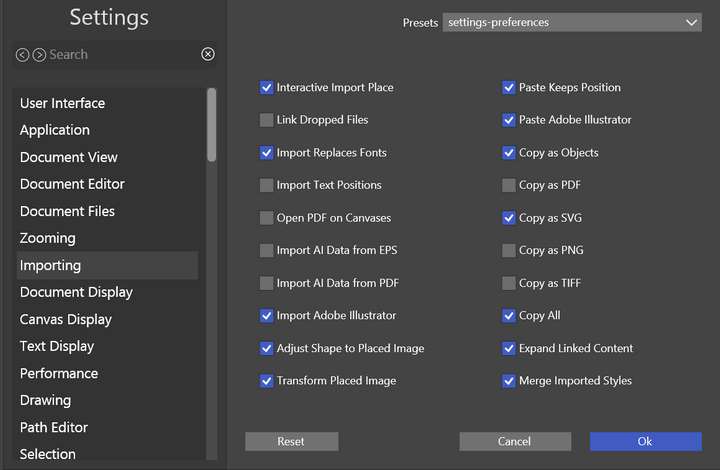
                                    0_1723643944668_654be54c-59ce-4f7d-9f19-d2c929ef7afd-image.png

                                    Windows 11 Build 26200.7171 (25H2)
                                    AMD Ryzen 7 9700X with Gigabyte X870E Aorus Pro Ice
                                    32GB RAM @ 6000MHz
                                    PNY NVIDIA RTX 5070 Ti 16GB; Display 1: 4K @150%; Display 2: 4K @200%
                                    Wacom Intuos Pro L (2025); Wacom Intuos Pro M; Epson ET-8550; Siser Romeo

                                    1 Reply Last reply Reply Quote 1
                                    • debraspicherD Offline
                                      debraspicher
                                      last edited by debraspicher

                                      I restarted the program (still 1.2.035) and naturally, Copy & Paste is working again. The copy operation is still taking a while.

                                      Also, checking the SVG portion of the Clipboard data, I've gotten this message. Have never seen this before, so not real sure what it's actually saying (than the obvious). It's hard to know whether is even meaningful except to say the SVG data is substantial (it seems to be). Another dialog like this popped up before this little viewer was hung, so I closed it:
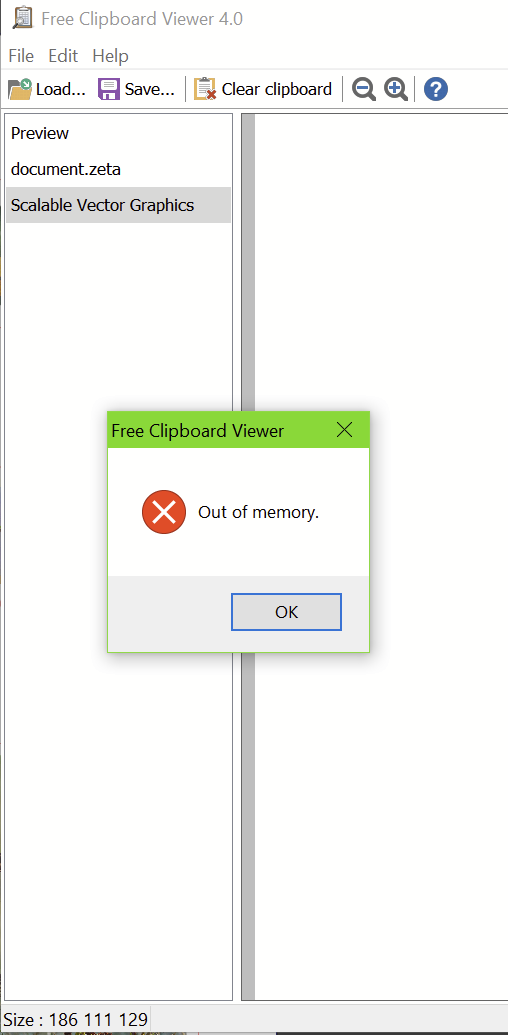
                                      0_1723645871836_e1aacfcb-38ea-46c2-877a-b4c45472681b-image.png

                                      Unfortunately copy and pasting not working is an intermittent issue. There wasn't much "time" in program in terms of working with documents, but I think VS had been open before I started opening new things to try to copy and paste. Thankfully I could get what I needed by using File>Import

                                      Updating to 1.2.036, the long hang still occurs. Disabling "Copy as SVG" shortens that time substantially. I've also noticed that VS' memory management is better. It's possible since it is moving to Clipboard properly now that it isn't "holding" onto that memory anymore. I tried to do multiple copy operations and the memory seems to end up in about the same place each time. Emptying the clipboard drops VS memory back down to about where it was pre-copy...

                                      Windows 11 Build 26200.7171 (25H2)
                                      AMD Ryzen 7 9700X with Gigabyte X870E Aorus Pro Ice
                                      32GB RAM @ 6000MHz
                                      PNY NVIDIA RTX 5070 Ti 16GB; Display 1: 4K @150%; Display 2: 4K @200%
                                      Wacom Intuos Pro L (2025); Wacom Intuos Pro M; Epson ET-8550; Siser Romeo

                                      VectorStylerV 2 Replies Last reply Reply Quote 0
                                      • VectorStylerV Offline
                                        VectorStyler @debraspicher
                                        last edited by

                                        @debraspicher Copy as SVG is also slow.

                                        1 Reply Last reply Reply Quote 0
                                        • VectorStylerV Offline
                                          VectorStyler @debraspicher
                                          last edited by

                                          @debraspicher said in Copy & Paste not working (intermittent):

                                          Emptying the clipboard drops VS memory back down to about where it was pre-copy...

                                          I will open a bug on this to find out more. But in this case the drawing contains a lot of images that are exported at full resolution to either SVG or PDF (also for VS objects only).

                                          debraspicherD 1 Reply Last reply Reply Quote 1
                                          • debraspicherD Offline
                                            debraspicher @VectorStyler
                                            last edited by

                                            @VectorStyler Yeah I'm not surprised that it's slow. The images are saved from a 24MP DSLR, probably at full resolution, but it is still something to report. I don't need SVG copy in most cases, so will turn it off. Would be nice to have a "Copy as>" option instead of the Preferences toggle if that isn't already available, but it's no biggie.

                                            The concerning bits are the inability to copy on occasion and the possible memory issue.

                                            Windows 11 Build 26200.7171 (25H2)
                                            AMD Ryzen 7 9700X with Gigabyte X870E Aorus Pro Ice
                                            32GB RAM @ 6000MHz
                                            PNY NVIDIA RTX 5070 Ti 16GB; Display 1: 4K @150%; Display 2: 4K @200%
                                            Wacom Intuos Pro L (2025); Wacom Intuos Pro M; Epson ET-8550; Siser Romeo

                                            VectorStylerV 1 Reply Last reply Reply Quote 1
                                            • First post
                                              Last post