How to keep layer contents buildup when duplicating artboard
-
How to keep layer contents buildup when duplicating an artboard (alt drag artboard tool). All my artwork on my layers 'top, content and background' are moved to top layer in stack when duplicating artboard.
-
@Ayo Yes, this seems to be a bug. It should duplicate top level layers only, with the content overlapping the artboards.
-
@VectorStyler I don't understand.
What do you mean by 'only top level layers'? My question is just very simple and is a basic behavioral expectation.Visualize it then, just to be sure
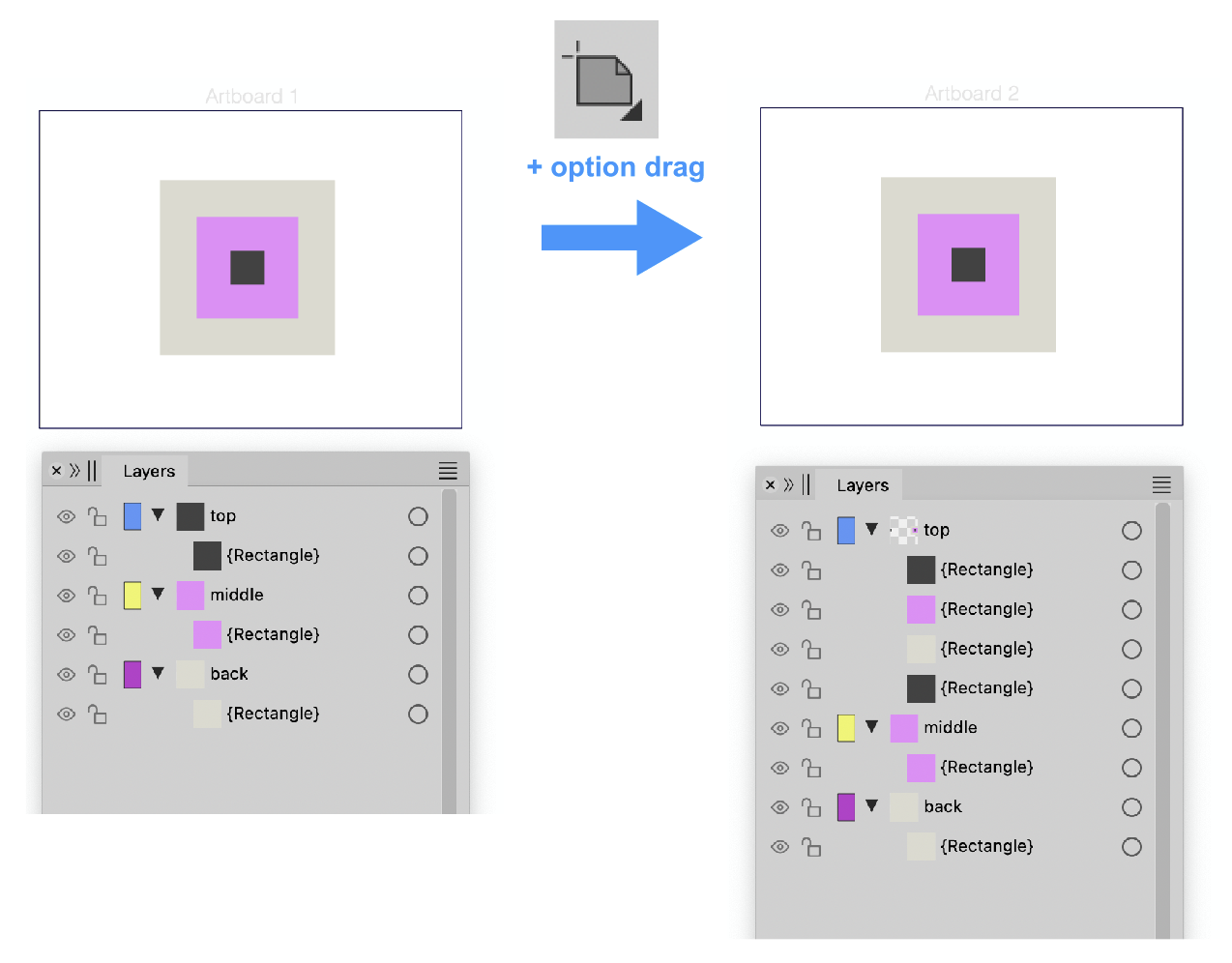
-
@Ayo Yes, I understood the question. The problem is that is is not working well in VS, all duplication will go into the current layer, and it should not.
-
@VectorStyler
Well then we have a major issue in my opinion. Good luck!
-
@VectorStyler
I can't help it and it's not my business, but I came to a thought about this issue.Based on my assumption that duplicating or cloning is some kind of special instant copy and paste operation. I thought of the following observation.
In illustrator it appears that
the content to be merged into layers is based on the layer name.Compare example 1 with 2
Example 1
––––––––––––––––––––––––––––––––––––––––
Document A- layer 3 (content 3A)
- layer 2 (content 2A)
- layer 1 (content 1A)
Document B
- layer 3 (content 3B)
- layer 2 (content 2B)
- layer 1 (content 1B)
Selecting all content from Document B and pasting it into Document A
(+paste rememer layers option ON), I get the following in Document A:
––––––––––––––––––
Document A- layer 3 (content 3A + 3B)
- layer 2 (content 2A+ 2B)
- layer 1 (content 1A+1B)
––––––––––––––––––––––––––––––––––––––––
Example 2
Well, if I change the name of a layer in document B, for example 'layer 3' to 'art', and repeat the copy/paste action, a new layer is created in document A placed on top of the stack.
––––––––––––––––––––––––––––––––––––––––
Document A- layer 3 (content 3A)
- layer 2 (content 2A)
- layer 1 (content 1A)
Document B
- Art (content 3B)
- layer 2 (content 2B)
- layer 1 (content 1B)
Selecting all content from Document B and pasting it into Document A
(+paste rememer layers option ON), I get the following in Document A:
–––––––––––––––––
Document A- Art (content 3B)
- layer 3 (content 3A)
- layer 2 (content 2A+ 2B)
- layer 1 (content 1A+1B)
––––––––––––––––––––––––––––––––––––––––
Maybe this behavior is related and it will help you.
Or am I talking nonsense and going crazy? -
@Ayo A fix will be in the next build, it will affect the move tool only (for now). Copy paste has different options (similar to AI).

