VectorStyler
    • Categories
    • Unread
    • Recent
    • Tags
    • Popular
    • Register
    • Login

    Blending & Image effect

    Scheduled Pinned Locked Moved Questions and Support
    6 Posts 3 Posters 4.8k Views 3 Watching
    Loading More Posts
    • Oldest to Newest
    • Newest to Oldest
    • Most Votes
    Reply
    • Reply as topic
    Log in to reply
    This topic has been deleted. Only users with topic management privileges can see it.
    • B Offline
      B-Vs-V
      last edited by

      It's been a long time since I tested blending and image effects, but it seemed to me that some of them propagated to all objects after blending (including the blended objects). This is obviously not the case with drop shadow. Am I mistaken? Have I missed something? I can't find my previous test files...

      As expected, a drop shadow is applied to blended objects after they have been grouped:
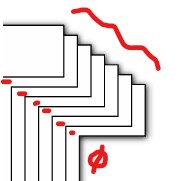
      0_1720101846700_ds1.jpg

      Blending is performed after drop shadow has been applied:
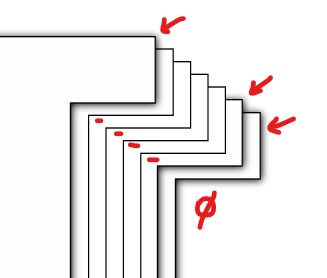
      0_1720101872899_ds2.jpg

      I had to expand the blended objects and apply the DS to each blended object.
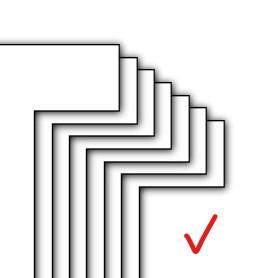
      0_1720101897146_ds3.jpg

      W11 Pro 25H2 - 12th Gen Intel(R) i7-12700K 3.61 GHz - RAM 64 Go - NVIDIA GF GTX 4070 Ti - Intuos - Dell UP3216Q / Eizo ColorEdge
      W11 Pro 25H2 - 12th Gen Intel(R) i7-12700KF 3.60 GHz -RAM 64 Go - NVIDIA GF GTX 3080 - IntuosPro- ProArt PA329C

      VectorStylerV 1 Reply Last reply Reply Quote 0
      • VectorStylerV Offline
        VectorStyler @B-Vs-V
        last edited by

        @Pat Was the Drop Shadow applied to the start / end objects before blending?

        B 1 Reply Last reply Reply Quote 0
        • B Offline
          B-Vs-V @VectorStyler
          last edited by

          @VectorStyler Yes, I guess I did try all combinations ☺

          W11 Pro 25H2 - 12th Gen Intel(R) i7-12700K 3.61 GHz - RAM 64 Go - NVIDIA GF GTX 4070 Ti - Intuos - Dell UP3216Q / Eizo ColorEdge
          W11 Pro 25H2 - 12th Gen Intel(R) i7-12700KF 3.60 GHz -RAM 64 Go - NVIDIA GF GTX 3080 - IntuosPro- ProArt PA329C

          L 1 Reply Last reply Reply Quote 1
          • L Offline
            Li Xiao @B-Vs-V
            last edited by

            @VectorStyler It seems to have a slight issue, but selecting any blending mode fixes it.
            0_1720111190356_Blend.vstyler
            https://youtu.be/t-O4eqfTZIo

            VectorStylerV 1 Reply Last reply Reply Quote 1
            • VectorStylerV Offline
              VectorStyler @Li Xiao
              last edited by

              @Li-Xiao Got it, this looks like a bug.

              L 1 Reply Last reply Reply Quote 1
              • L Offline
                Li Xiao @VectorStyler
                last edited by

                @VectorStyler A crash occurred during testing, and finally, the steps to reproduce the crash were identified.
                0_1720112738118_Blend Crash.vstyler
                https://youtu.be/ZaajOxtZMIE

                1 Reply Last reply Reply Quote 1
                • First post
                  Last post