VectorStyler
    • Categories
    • Unread
    • Recent
    • Tags
    • Popular
    • Register
    • Login

    Struggling with Snapping

    Scheduled Pinned Locked Moved Features and Ideas
    8 Posts 3 Posters 8.2k Views 2 Watching
    Loading More Posts
    • Oldest to Newest
    • Newest to Oldest
    • Most Votes
    Reply
    • Reply as topic
    Log in to reply
    This topic has been deleted. Only users with topic management privileges can see it.
    • AyoA Offline
      Ayo
      last edited by

      I keep struggling with Snapping. Especially because snapping is document oriented and not application oriented. You must set settings for every new or changing document. Seeing which setting is active would help a lot. Also an advantage for switching between different types of work within a document. Make your setting visible, a suggestion...
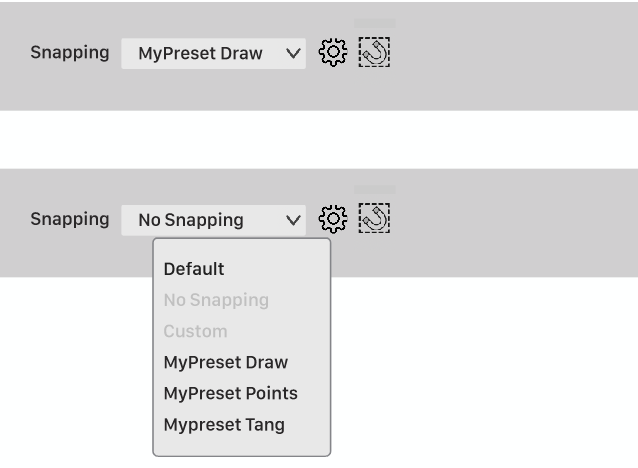
      0_1720518749165_1de652fa-ffb5-486a-8ffd-e16117b35f72-image.png

      VectorStylerV 1 Reply Last reply Reply Quote 1
      • VectorStylerV Offline
        VectorStyler @Ayo
        last edited by

        @Ayo In Settings -> Application there should be a "Common Snapping Options" to use global (not document) snapping options.

        AyoA 1 Reply Last reply Reply Quote 0
        • AyoA Offline
          Ayo @VectorStyler
          last edited by

          @VectorStyler
          Thank you! That already works better.
          The only strange thing is that with one preset the setting is remembered in the selector and with another preset the setting name jumps back to 'Custom'. The setting itself remains good. This after creating a new document or quit app and new doc.
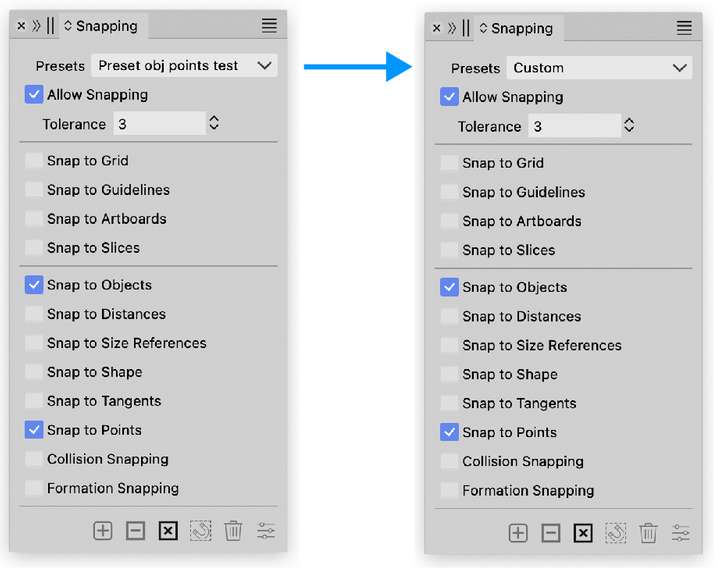
          0_1720521256346_cbec1617-faf8-4d56-82aa-f00effa3c5d7-image.png

          VectorStylerV 1 Reply Last reply Reply Quote 0
          • VectorStylerV Offline
            VectorStyler @Ayo
            last edited by

            @Ayo said in Struggling with Snapping:

            another preset the setting name jumps back to 'Custom'.

            I will look into this.

            AyoA 1 Reply Last reply Reply Quote 1
            • AyoA Offline
              Ayo @VectorStyler
              last edited by

              @VectorStyler A final note on this

              I am not a native English speaker as you have probably noticed😊 , but with your explanation and instructions I understand. If the name of the button had been more explanatory I would certainly found it. I have a problem with the word 'common'.
              Could be my problem but...

              Would it perhaps be better to change the text?
              Common Snapping Options > Global Snapping Options

              or (if true): Remember Snapping Options

              There will probably be more or better ones

              VectorStylerV 1 Reply Last reply Reply Quote 1
              • VectorStylerV Offline
                VectorStyler @Ayo
                last edited by

                @Ayo said in Struggling with Snapping:

                Common Snapping Options > Global Snapping Options

                Yes, "Global" might be the correct one.

                1 Reply Last reply Reply Quote 1
                • BoldlineB Online
                  Boldline
                  last edited by

                  @VectorStyler Just noticed a small spelling error in the popup text for the global snapping options
                  There's a "k" instead of an "l" in "global"
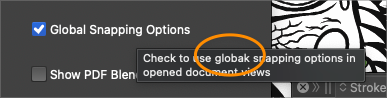
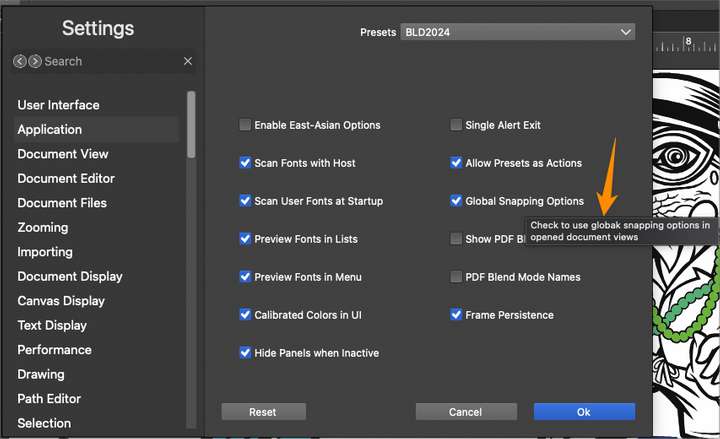
                  0_1720724579949_3e9c208c-6e65-4eab-944e-1baebaeb65cf-BLD 2024-07-11 at 15.02.07.png
                  0_1720724609989_68e0c493-2b54-48fd-8e57-8cbad176f6d3-BLD 2024-07-11 at 15.03.09.png

                  🍎 macOS Tahoe 26.2, Mac mini (M1, 2020), Chip Apple M1, Memory 16 GB
                  Cintiq 27QHD Display and LG Ultra HD Display

                  VectorStylerV 1 Reply Last reply Reply Quote 1
                  • VectorStylerV Offline
                    VectorStyler @Boldline
                    last edited by

                    @Boldline Will be fixed soon!

                    1 Reply Last reply Reply Quote 1
                    • First post
                      Last post
