Improvements to the Anchor point tool
-
I was using the Anchor Point tool today and wanted to see about modifying and expanding it's functionality. Right now if I click once on a node, it will auto convert it to a cusp node and retract any handles. If I click on a node and pull, the node becomes a smooth node and both handles are revealed. This is expected. If I click on a node and first make it a cusp by doing so, then click on the same node again, the entire node is erased - is this the normal function? I'd rather get rid of that option and change it some other function, like allowing it to remain a cusp node but with cubic segments (so the handles are exposed) - though I also realize this is not much different than pressing (3) or clicking on the corresponding tool button on the contextual menu bar
What if double-clicking erased the node entirely and clicking a second time on the node gave the option to make it a cusp node with applicable handles? This way each action would be predictable and expected.
I did notice a couple odd things when using the Anchor point tool:
The bottom left node of the square path shape I made does not get deleted when I click on the node a second (or third) time, unlike what is typical. Sometimes it ends up deleting a seemingly unrelated node entirely. When I click on that specific node, I see the node icon change its symbol direction slightly
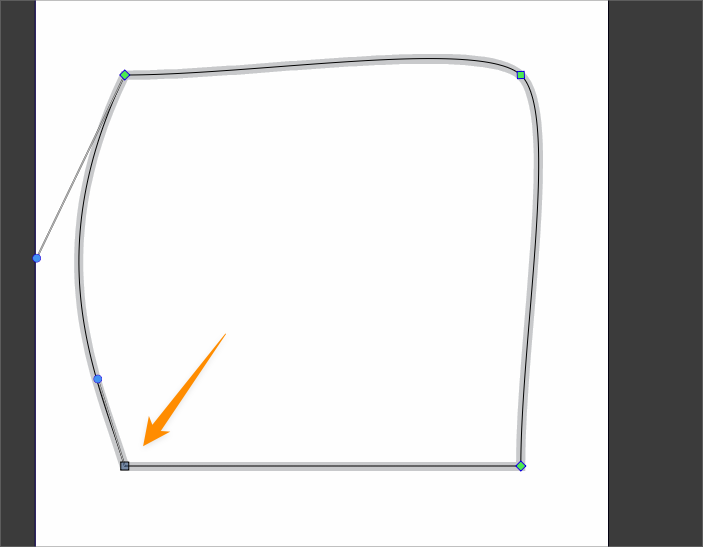
Here is the related VS file
0_1720708454684_anchor point tool issue.vstyler -
@Boldline said in Improvements to the Anchor point tool:
then click on the same node again, the entire node is erased - is this the normal function?
yes, this is by design.
I will add this to the features backlog.

