VectorStyler
    • Categories
    • Unread
    • Recent
    • Tags
    • Popular
    • Register
    • Login

    "Open Recent" list empty after updating to newest build

    Scheduled Pinned Locked Moved Questions and Support
    3 Posts 2 Posters 3.4k Views 1 Watching
    Loading More Posts
    • Oldest to Newest
    • Newest to Oldest
    • Most Votes
    Reply
    • Reply as topic
    Log in to reply
    This topic has been deleted. Only users with topic management privileges can see it.
    • BoldlineB Offline
      Boldline
      last edited by Boldline

      I just updated to the new build (34) and when I restarted VS, my panel bar on the far right was gone and all of my previously opened files were no longer listed under "open recent". Is this normal?
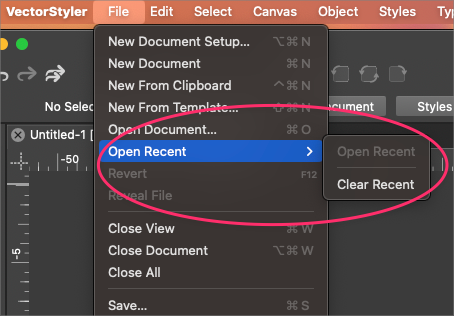
      0_1721742909245_ef01dab0-3c06-41e2-a750-fc0900e8392f-BLD 2024-07-23 at 09.53.58.png

      This panel was missing even though my custom saved configuration was active:

      0_1721743037365_490b0466-52f6-45ca-8867-17d13fc046c0-BLD 2024-07-23 at 09.56.26.png

      🍎 macOS Tahoe 26.2, Mac mini (M1, 2020), Chip Apple M1, Memory 16 GB
      Cintiq 27QHD Display and LG Ultra HD Display

      VectorStylerV 1 Reply Last reply Reply Quote 0
      • VectorStylerV Offline
        VectorStyler @Boldline
        last edited by

        @Boldline Should not be empty. Will it retain files after opening / closing and restarting?

        BoldlineB 1 Reply Last reply Reply Quote 0
        • BoldlineB Offline
          Boldline @VectorStyler
          last edited by Boldline

          @VectorStyler Yes - after I opened a file I had used previously and then saved the updates to it and then closed it and restarted VS, it now shows in the "Open Recent" - but none of the other files listed prior to the update are there
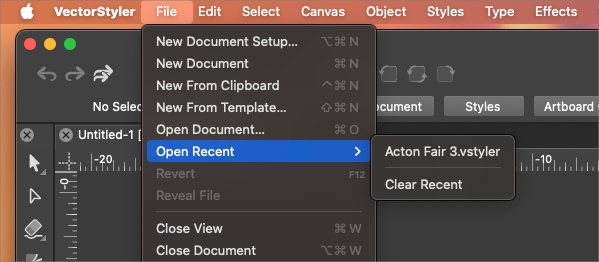
          0_1721745839590_9a63d567-a36b-4b8b-8f41-dfdf492d50d3-BLD 2024-07-23 at 10.41.46.png

          🍎 macOS Tahoe 26.2, Mac mini (M1, 2020), Chip Apple M1, Memory 16 GB
          Cintiq 27QHD Display and LG Ultra HD Display

          1 Reply Last reply Reply Quote 1
          • First post
            Last post
