VectorStyler
    • Categories
    • Unread
    • Recent
    • Tags
    • Popular
    • Register
    • Login

    How to use the Settings linked files
    Scheduled Pinned Locked Moved Questions and Support
    3 Posts 2 Posters 4.2k Views 1 Watching
    Loading More Posts
    • Oldest to Newest
    • Newest to Oldest
    • Most Votes
    Reply
    • Reply as topic
    Log in to reply
    This topic has been deleted. Only users with topic management privileges can see it.
    • BoldlineB Offline
      Boldline
      last edited by

      I'm trying to understand how to use the option to load applicable files into the settings panel applicable section. For example, I noticed I could switch to the folder mode: Settings Folder and add a link to a folder I created where I stored different customized settings files. It creates a long hard to read link and then when I click on it, while it opens the linked file successfully, the settings files themselves are greyed out.

      I was presuming the option to add a linked folder would be an easy way to drill down and get the exact settings file I was looking for - but it appears this is not the purpose.
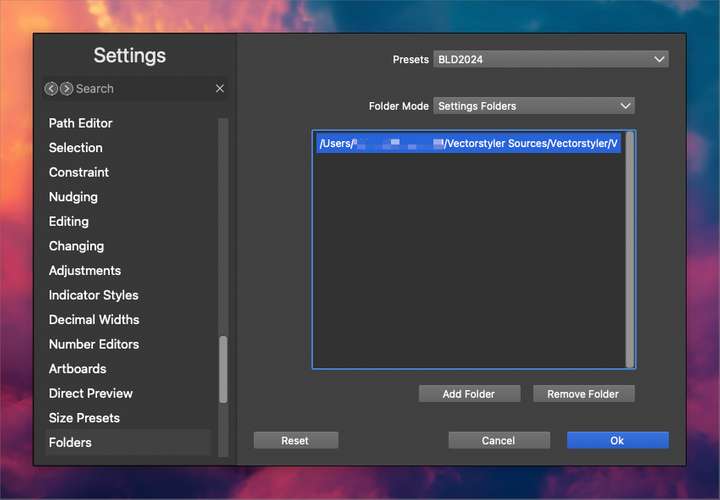
      0_1721864048198_5469fb80-0504-443b-9d78-6e3721ae7aae-BLD 2024-07-24 at 19.30.20.png

      🍎 macOS Tahoe 26.2, Mac mini (M1, 2020), Chip Apple M1, Memory 16 GB
      Cintiq 27QHD Display and LG Ultra HD Display

      VectorStylerV 1 Reply Last reply Reply Quote 1
      • VectorStylerV Offline
        VectorStyler @Boldline
        last edited by

        @Boldline Adding a folder here should result in the listing of settings files in the settings and workspace drop down buttons in the context panel.

        BoldlineB 1 Reply Last reply Reply Quote 0
        • BoldlineB Offline
          Boldline @VectorStyler
          last edited by

          @VectorStyler ok I think I understand. The file gets stored here "behind the scenes" but we look for the custom settings found inside the folder(s) where we adjust the settings file and workspace drop down buttons in the context panel. makes sense now - thank you


          🍎 macOS Tahoe 26.2, Mac mini (M1, 2020), Chip Apple M1, Memory 16 GB
          Cintiq 27QHD Display and LG Ultra HD Display

          1 Reply Last reply Reply Quote 1
          • First post
            Last post