VectorStyler
    • Categories
    • Unread
    • Recent
    • Tags
    • Popular
    • Register
    • Login

    update 1.2.039

    Scheduled Pinned Locked Moved Release notes of past builds
    7 Posts 3 Posters 6.5k Views 2 Watching
    Loading More Posts
    • Oldest to Newest
    • Newest to Oldest
    • Most Votes
    Reply
    • Reply as topic
    Log in to reply
    This topic has been deleted. Only users with topic management privileges can see it.
    • VectorStylerV Offline
      VectorStyler
      last edited by

      VectorStyler 1.2.039 release notes

      • Fixed a bug with the anchor tool that blocked selection changes.
      • Fixed a regression in moving modal views.
      • Changed the name for the locking option undo redo.
      • Changed the shortcuts for the segment type actions in node tool.
      • Node scaling to be updated correctly considering the display scaling.
      • Random repeater to work in rotated mode also.
      • Allow new mesh node insertion with double click.
      VectorStylerV debraspicherD 2 Replies Last reply Reply Quote 9
      • BoldlineB Offline
        Boldline
        last edited by

        Thank you for the updates and fixes!

        🍎 macOS Tahoe 26.2, Mac mini (M1, 2020), Chip Apple M1, Memory 16 GB
        Cintiq 27QHD Display and LG Ultra HD Display

        1 Reply Last reply Reply Quote 1
        • debraspicherD Offline
          debraspicher
          last edited by

          Thank you for this

          Windows 11 Build 26200.7171 (25H2)
          AMD Ryzen 7 9700X with Gigabyte X870E Aorus Pro Ice
          32GB RAM @ 6000MHz
          PNY NVIDIA RTX 5070 Ti 16GB; Display 1: 4K @150%; Display 2: 4K @150%
          Wacom Intuos Pro L (2025); Wacom Intuos Pro M; Epson ET-8550; Siser Romeo

          1 Reply Last reply Reply Quote 1
          • VectorStylerV Offline
            VectorStyler @VectorStyler
            last edited by

            In the MacOS version of yesterdays update, the settings may open a bit slower than earlier. This is fixed now, please download again.

            1 Reply Last reply Reply Quote 1
            • debraspicherD Offline
              debraspicher @VectorStyler
              last edited by debraspicher

              @VectorStyler said in update 1.2.039:

              Changed the shortcuts for the segment type actions in node tool.

              I noticed now when right clicking on nodes, those options including the node types are gone. They came back temporarily when switching back from Anchor Point Tool, but then are gone again on another right click. This is the current menu:
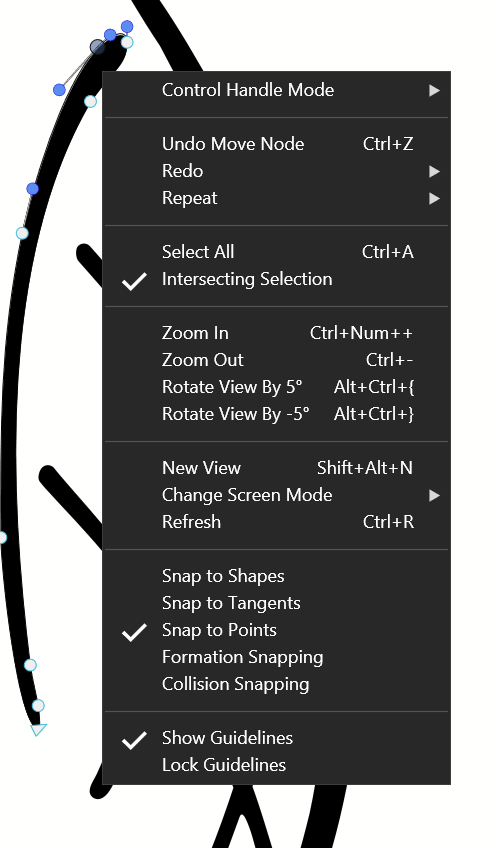
              0_1726374063899_4d517188-7d90-4f40-adb5-6bfaa858aad2-image.png

              When right-clicking after moving back to Node Tool from Anchor point, I can get this menu for the first try:
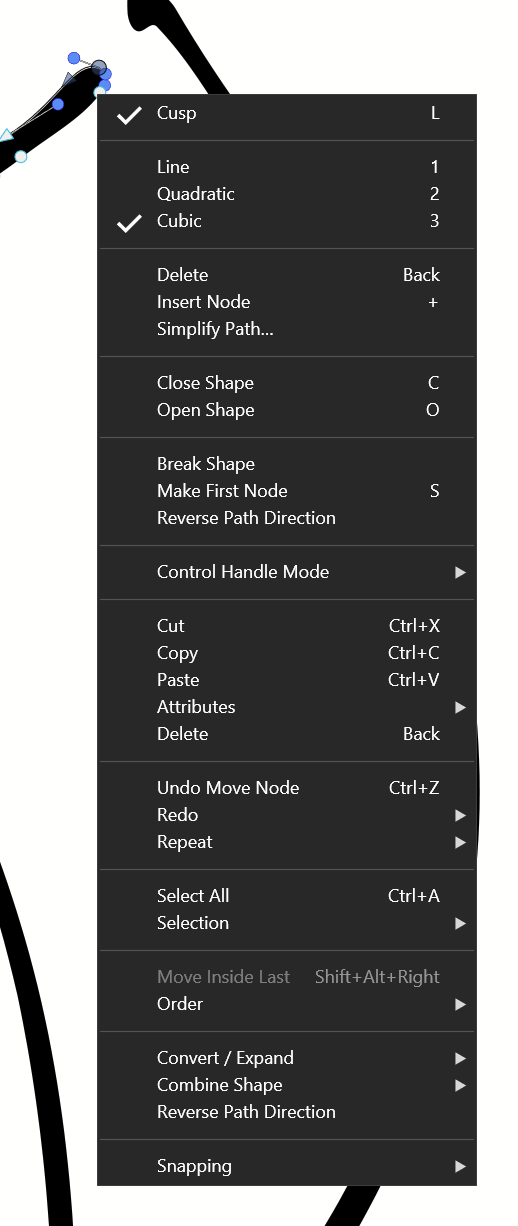
              0_1726374111400_1f1ccb92-7c81-4562-8b1d-ae214ef20f19-image.png

              Windows 11 Build 26200.7171 (25H2)
              AMD Ryzen 7 9700X with Gigabyte X870E Aorus Pro Ice
              32GB RAM @ 6000MHz
              PNY NVIDIA RTX 5070 Ti 16GB; Display 1: 4K @150%; Display 2: 4K @150%
              Wacom Intuos Pro L (2025); Wacom Intuos Pro M; Epson ET-8550; Siser Romeo

              VectorStylerV 1 Reply Last reply Reply Quote 1
              • VectorStylerV Offline
                VectorStyler @debraspicher
                last edited by

                @debraspicher Those options will show up only of you have some node, or a segment selected first. Just right clicking on the node will not select it.

                debraspicherD 1 Reply Last reply Reply Quote 1
                • debraspicherD Offline
                  debraspicher @VectorStyler
                  last edited by

                  @VectorStyler Ok, I see it now. It didn't seem to do this before, but it's possible I was only using the menu mostly after having trouble with nodes due to the poor scale. I had a lot of trouble with embedded control handles until you fixed scaling, so thank you for this. Now I mostly just rely on the keyboard shortcuts as I learn them.

                  Windows 11 Build 26200.7171 (25H2)
                  AMD Ryzen 7 9700X with Gigabyte X870E Aorus Pro Ice
                  32GB RAM @ 6000MHz
                  PNY NVIDIA RTX 5070 Ti 16GB; Display 1: 4K @150%; Display 2: 4K @150%
                  Wacom Intuos Pro L (2025); Wacom Intuos Pro M; Epson ET-8550; Siser Romeo

                  1 Reply Last reply Reply Quote 1
                  • First post
                    Last post