VectorStyler
    • Categories
    • Unread
    • Recent
    • Tags
    • Popular
    • Register
    • Login

    Cleaning up the look of the Dropdown option to choose the type of node

    Scheduled Pinned Locked Moved Features and Ideas
    3 Posts 2 Posters 3.5k Views 1 Watching
    Loading More Posts
    • Oldest to Newest
    • Newest to Oldest
    • Most Votes
    Reply
    • Reply as topic
    Log in to reply
    This topic has been deleted. Only users with topic management privileges can see it.
    • BoldlineB Offline
      Boldline
      last edited by

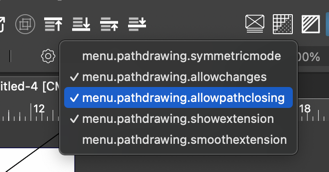
      I really like the dropdown option to choose the type of node you want to be using while drawing with the pen tool. it would probabaly look cleaner and be more legible to remove the "menu.pathdrawing." and just have it say "Symmetric Mode", "Allow Changes", "Allow Path Closing, etc. It also might look better to list them by kind - so maybe Symmetric and Smooth are listed at the top, since they would be edited more often than the show extension and smooth extension, and allow changes.
      0_1727964466469_803514b3-b6b8-4f1f-aa04-53966a04c1fc-CleanShot 2024-10-03 at 10.00.43.png

      🍎 macOS Tahoe 26.2, Mac mini (M1, 2020), Chip Apple M1, Memory 16 GB
      Cintiq 27QHD Display and LG Ultra HD Display

      BoldlineB 1 Reply Last reply Reply Quote 1
      • BoldlineB Offline
        Boldline @Boldline
        last edited by

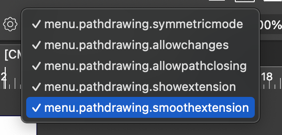
        @VectorStyler Additional question: Should the symmetric and the smooth options both be allowed to be checked at the same time? Wouldn't that be an either or scenario?
        0_1728024418235_881c86d6-0fb6-4174-8d92-4911269163fe-CleanShot 2024-10-04 at 02.46.45.png

        🍎 macOS Tahoe 26.2, Mac mini (M1, 2020), Chip Apple M1, Memory 16 GB
        Cintiq 27QHD Display and LG Ultra HD Display

        VectorStylerV 1 Reply Last reply Reply Quote 0
        • VectorStylerV Offline
          VectorStyler @Boldline
          last edited by

          @Boldline There seems to be an error here with the text resources.

          1 Reply Last reply Reply Quote 0
          • First post
            Last post
