VectorStyler
    • Categories
    • Unread
    • Recent
    • Tags
    • Popular
    • Register
    • Login

    Shapebuilder, Intertwine?

    Scheduled Pinned Locked Moved Questions and Support
    4 Posts 3 Posters 4.0k Views 3 Watching
    Loading More Posts
    • Oldest to Newest
    • Newest to Oldest
    • Most Votes
    Reply
    • Reply as topic
    Log in to reply
    This topic has been deleted. Only users with topic management privileges can see it.
    • J Offline
      jkwchui
      last edited by

      In continuing my migration from Illustrator, I find that the two things that I uses all the time but can't find out how to do in VectorStyler are:

      • *shapebuilder (shift-M) where you select multiple overlapping shapes, and combine them (destructively) by dragging across only the sections which you wish to unify.
      • intertwine where one object can simultaneously have one part above and another part underneath a second object.

      Are there VS features hidden somewhere, or does anyone have ergonomic workarounds?

      S VectorStylerV 2 Replies Last reply Reply Quote 1
      • S Offline
        Subpath @jkwchui
        last edited by

        @jkwchui said in Shapebuilder, Intertwine?:

        *shapebuilder (shift-M) where you select multiple ov

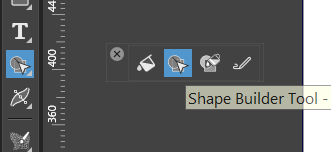
        Shapebuilder in VectorStyler is here
        0_1728190309888_Shapbuilder.png

        Win 11
        CPU: AMD Ryzen 5 9600X, 6-core.
        GPU: Nvidia Geforce RTX 5070.

        J 1 Reply Last reply Reply Quote 1
        • VectorStylerV Offline
          VectorStyler @jkwchui
          last edited by VectorStyler

          @jkwchui said in Shapebuilder, Intertwine?:

          intertwine where one object can simultaneously have one part above and another part underneath a second object.

          This is in the backlog for 1.3

          EDIT: intertwine can already be done, with references and clipping, but it is a bit more work.

          1 Reply Last reply Reply Quote 1
          • J Offline
            jkwchui @Subpath
            last edited by

            @Subpath Thank you!

            1 Reply Last reply Reply Quote 1
            • First post
              Last post
