VectorStyler
    • Categories
    • Unread
    • Recent
    • Tags
    • Popular
    • Register
    • Login

    Cannot get selection box rotation with corner rotate to operate together

    Scheduled Pinned Locked Moved Questions and Support
    6 Posts 2 Posters 5.1k Views 1 Watching
    Loading More Posts
    • Oldest to Newest
    • Newest to Oldest
    • Most Votes
    Reply
    • Reply as topic
    Log in to reply
    This topic has been deleted. Only users with topic management privileges can see it.
    • BoldlineB Offline
      Boldline
      last edited by

      I love the ability to rotate the angle of the selection box around an object and the many various functions in that dropdown.

      I was experimenting with it and at one point, I was able to freely move the selection box around the object and still be able to rotate the object itself by hovering by a corner and dragging it. After adjusting the settings in the dropdown and going back to how it was initially, I can't get the rotation from the corners to return while still leaving the option to rotate the selection box independently of that like I could before.
      Here is a too long video of me trying to get it back

      This was what I had selected initially and I was able to rotate the selection box with the handle at the bottom (not seen in this screenshot) and then still rotate the shape itself. how do I get back to that combination?
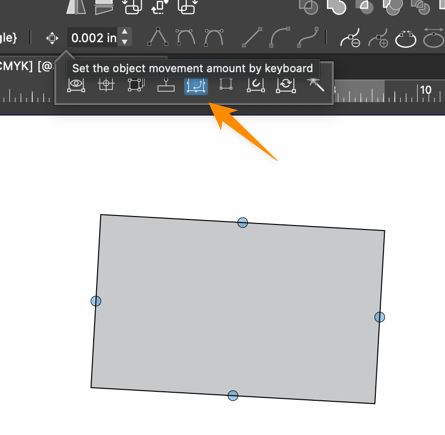
      0_1728990160920_80daaf6e-9fcc-4e10-b99c-232bf9a09eaa-CleanShot 2024-10-15 at 07.00.53.png

      🍎 macOS Tahoe 26.2, Mac mini (M1, 2020), Chip Apple M1, Memory 16 GB
      Cintiq 27QHD Display and LG Ultra HD Display

      BoldlineB 1 Reply Last reply Reply Quote 0
      • BoldlineB Offline
        Boldline @Boldline
        last edited by

        Update: I was eventually able to get the set up I wanted, but it took a lot of guesswork and finagling to get it to what I wanted. See the end of this new video

        There doesn't seem to be an easy straightforward way to get the corner angle rotate option to work alongside the selection box rotation handle.

        🍎 macOS Tahoe 26.2, Mac mini (M1, 2020), Chip Apple M1, Memory 16 GB
        Cintiq 27QHD Display and LG Ultra HD Display

        VectorStylerV 1 Reply Last reply Reply Quote 1
        • VectorStylerV Offline
          VectorStyler @Boldline
          last edited by

          @Boldline said in Cannot get selection box rotation with corner rotate to operate together:

          There doesn't seem to be an easy straightforward way to get the corner angle rotate option to work alongside the selection box rotation handle.

          I will try to improve this.

          BoldlineB 1 Reply Last reply Reply Quote 1
          • BoldlineB Offline
            Boldline @VectorStyler
            last edited by

            @VectorStyler thank you. I appreciate it

            🍎 macOS Tahoe 26.2, Mac mini (M1, 2020), Chip Apple M1, Memory 16 GB
            Cintiq 27QHD Display and LG Ultra HD Display

            VectorStylerV 1 Reply Last reply Reply Quote 0
            • VectorStylerV Offline
              VectorStyler @Boldline
              last edited by

              @Boldline Clicking an On/Off on the rotate knob option (4th icon) will reset the editor and then it should work.
              The fix will be in the next build.

              BoldlineB 1 Reply Last reply Reply Quote 1
              • BoldlineB Offline
                Boldline @VectorStyler
                last edited by

                @VectorStyler Thanks for looking into that and finding a solution for now and in the next build.

                🍎 macOS Tahoe 26.2, Mac mini (M1, 2020), Chip Apple M1, Memory 16 GB
                Cintiq 27QHD Display and LG Ultra HD Display

                1 Reply Last reply Reply Quote 0
                • First post
                  Last post
