VectorStyler
    • Categories
    • Unread
    • Recent
    • Tags
    • Popular
    • Register
    • Login

    Question about Repeat Last

    Scheduled Pinned Locked Moved Questions and Support
    3 Posts 2 Posters 4.8k Views
    Loading More Posts
    • Oldest to Newest
    • Newest to Oldest
    • Most Votes
    Reply
    • Reply as topic
    Log in to reply
    This topic has been deleted. Only users with topic management privileges can see it.
    • G Offline
      Gremriel
      last edited by

      Hi,

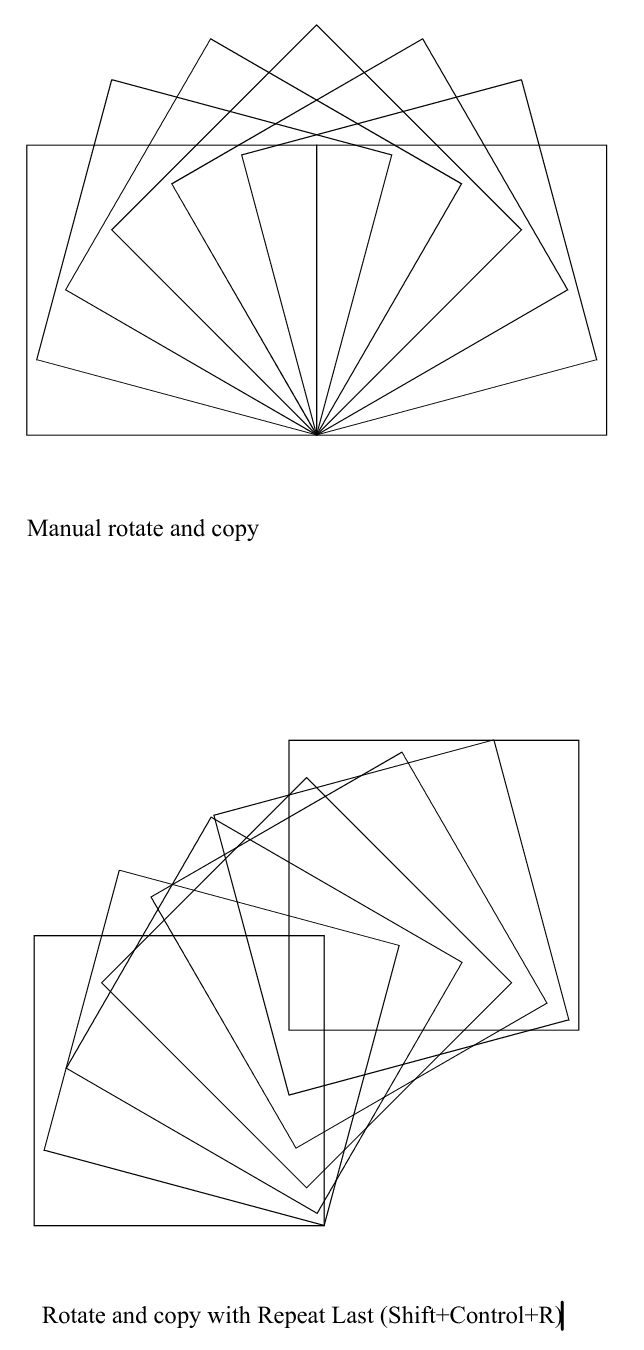
      When I draw an object, and move the rotation center (the orange dot) to the lower right corner, and then rotate and copy the object manually (with shift+alt), the copy rotates around the ornange dot.

      However, when I rotate and copy once, and then use the Repeat Last command, the copy rotates, but the resulting copy is offset.
      0_1620631053432_VectorStyler_mk4uIm2mFq.png

      I tried looking if there was an option somewhere that enables this offset, but the only one I found was the Duplicate Offset, which I have set to 0,0.

      Is this offset intended, and if so, can it be turned off?

      Thanks.

      WIndows 11

      VectorStylerV 1 Reply Last reply Reply Quote 0
      • VectorStylerV Offline
        VectorStyler @Gremriel
        last edited by

        @Gremriel I checked this and it looks like repeat last takes the rotation center from the new bounding box.
        An other way to do repeated rotation is to use Object -> Transform -> Rotate and set the Apply To to Copy, set the angle, number of repetitions, and rotation corner.

        1 Reply Last reply Reply Quote 0
        • G Offline
          Gremriel
          last edited by

          Hi,

          That works, thanks.

          WIndows 11

          1 Reply Last reply Reply Quote 0
          • First post
            Last post
