VectorStyler
    • Categories
    • Unread
    • Recent
    • Tags
    • Popular
    • Register
    • Login

    Reorganising objects aligned along a stroke?

    Scheduled Pinned Locked Moved Questions and Support
    7 Posts 2 Posters 5.9k Views 2 Watching
    Loading More Posts
    • Oldest to Newest
    • Newest to Oldest
    • Most Votes
    Reply
    • Reply as topic
    Log in to reply
    This topic has been deleted. Only users with topic management privileges can see it.
    • B Offline
      B-Vs-V
      last edited by B-Vs-V

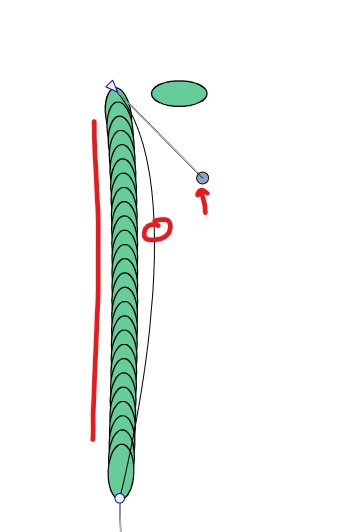
      I must have forgotten something important to activate ☺ : I thought that aligning objects along a stroke allowed me to reorganise the whole by modifying the stroke nodes
      0_1729757241840_v1.jpg

      W11 Pro 25H2 - 12th Gen Intel(R) i7-12700K 3.61 GHz - RAM 64 Go - NVIDIA GF GTX 4070 Ti - Intuos - Dell UP3216Q / Eizo ColorEdge
      W11 Pro 25H2 - 12th Gen Intel(R) i7-12700KF 3.60 GHz -RAM 64 Go - NVIDIA GF GTX 3080 - IntuosPro- ProArt PA329C

      B VectorStylerV 2 Replies Last reply Reply Quote 1
      • B Offline
        B-Vs-V
        last edited by

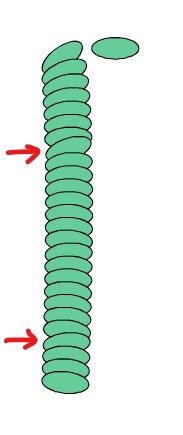
        The alignment does not seem to follow the stroke perfectly:
        0_1729757761407_v1.jpg

        W11 Pro 25H2 - 12th Gen Intel(R) i7-12700K 3.61 GHz - RAM 64 Go - NVIDIA GF GTX 4070 Ti - Intuos - Dell UP3216Q / Eizo ColorEdge
        W11 Pro 25H2 - 12th Gen Intel(R) i7-12700KF 3.60 GHz -RAM 64 Go - NVIDIA GF GTX 3080 - IntuosPro- ProArt PA329C

        1 Reply Last reply Reply Quote 0
        • B Offline
          B-Vs-V
          last edited by B-Vs-V

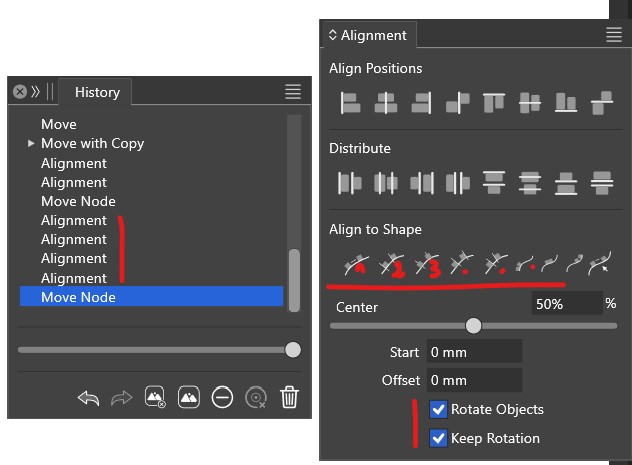
          if possible, could the History panel specify the type of alignment used (if they are numbered, for example), and what this two option means (keep rotation)?
          0_1729757939643_v1.jpg

          W11 Pro 25H2 - 12th Gen Intel(R) i7-12700K 3.61 GHz - RAM 64 Go - NVIDIA GF GTX 4070 Ti - Intuos - Dell UP3216Q / Eizo ColorEdge
          W11 Pro 25H2 - 12th Gen Intel(R) i7-12700KF 3.60 GHz -RAM 64 Go - NVIDIA GF GTX 3080 - IntuosPro- ProArt PA329C

          1 Reply Last reply Reply Quote 0
          • B Offline
            B-Vs-V @B-Vs-V
            last edited by

            @Pat said in Reorganising objects aligned along a stroke?:

            I must have forgotten something important to activate ☺ : I thought that aligning objects along a stroke allowed me to reorganise the whole by modifying the stroke nodes

            0_1729757241840_v1.jpg

            @VectorStyler I can't get that working. Perhaps I need to use the blending feature for this? 🤔

            W11 Pro 25H2 - 12th Gen Intel(R) i7-12700K 3.61 GHz - RAM 64 Go - NVIDIA GF GTX 4070 Ti - Intuos - Dell UP3216Q / Eizo ColorEdge
            W11 Pro 25H2 - 12th Gen Intel(R) i7-12700KF 3.60 GHz -RAM 64 Go - NVIDIA GF GTX 3080 - IntuosPro- ProArt PA329C

            B 1 Reply Last reply Reply Quote 0
            • B Offline
              B-Vs-V @B-Vs-V
              last edited by

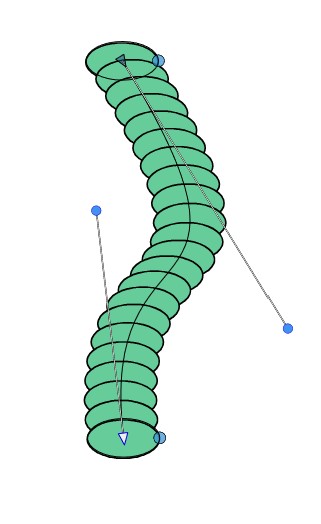
              Well, I get something with blended objects but I would like the (long) axis of the ellipses follow the stroke shape. Possible ?
              0_1729762684560_v1.jpg

              W11 Pro 25H2 - 12th Gen Intel(R) i7-12700K 3.61 GHz - RAM 64 Go - NVIDIA GF GTX 4070 Ti - Intuos - Dell UP3216Q / Eizo ColorEdge
              W11 Pro 25H2 - 12th Gen Intel(R) i7-12700KF 3.60 GHz -RAM 64 Go - NVIDIA GF GTX 3080 - IntuosPro- ProArt PA329C

              1 Reply Last reply Reply Quote 0
              • B Offline
                B-Vs-V
                last edited by

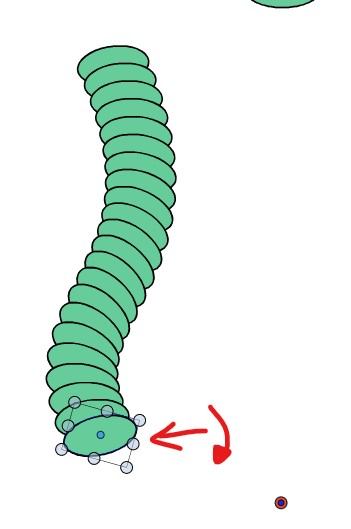
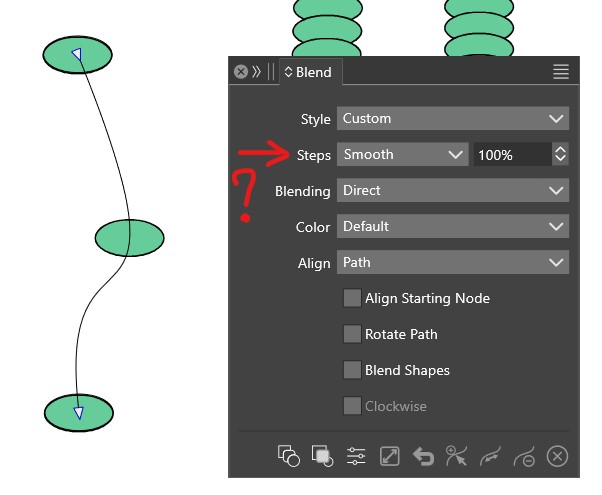
                @VectorStyler ok, I found a way to do it by rotating the original objects but it seems to me that there is a bug with the ‘Smooth’ option:
                0_1729763672033_v2.jpg

                0_1729763681544_v1.jpg

                W11 Pro 25H2 - 12th Gen Intel(R) i7-12700K 3.61 GHz - RAM 64 Go - NVIDIA GF GTX 4070 Ti - Intuos - Dell UP3216Q / Eizo ColorEdge
                W11 Pro 25H2 - 12th Gen Intel(R) i7-12700KF 3.60 GHz -RAM 64 Go - NVIDIA GF GTX 3080 - IntuosPro- ProArt PA329C

                1 Reply Last reply Reply Quote 0
                • VectorStylerV Offline
                  VectorStyler @B-Vs-V
                  last edited by

                  @Pat said in Reorganising objects aligned along a stroke?:

                  I thought that aligning objects along a stroke allowed me to reorganise the whole by modifying the stroke nodes

                  No the objects are not linked to the stroke, if the shape is changed, you must align again.

                  could the History panel specify the type of alignment used

                  I added this to the features backlog (will be done, but later).

                  I would like the (long) axis of the ellipses follow the stroke shape. Possible ?

                  If the "Rotate Path" checkbox is selected in the Blend panel (or panel menu), the ellipse will be rotated according to the direction of the path.

                  1 Reply Last reply Reply Quote 1
                  • First post
                    Last post