VectorStyler
    • Categories
    • Unread
    • Recent
    • Tags
    • Popular
    • Register
    • Login

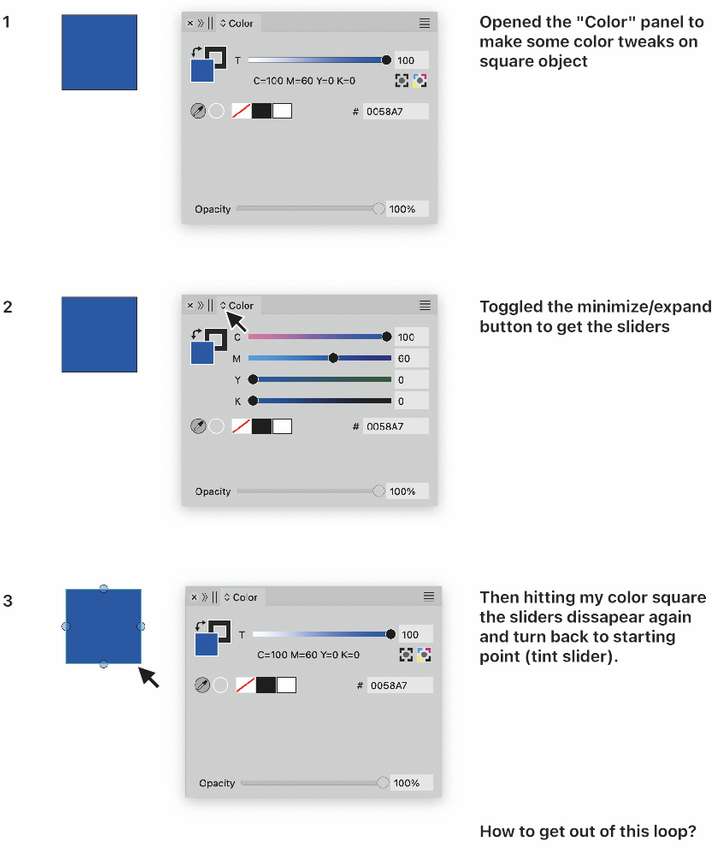
    How to get out of this loop?
    Scheduled Pinned Locked Moved Questions and Support
    4 Posts 2 Posters 3.5k Views 2 Watching
    Loading More Posts
    • Oldest to Newest
    • Newest to Oldest
    • Most Votes
    Reply
    • Reply as topic
    Log in to reply
    This topic has been deleted. Only users with topic management privileges can see it.
    • AyoA Offline
      Ayo
      last edited by

      0_1730384391996_cd0abbd1-dac8-442a-93ea-4578d71fd007-image.png

      VectorStylerV 1 Reply Last reply Reply Quote 1
      • VectorStylerV Offline
        VectorStyler @Ayo
        last edited by

        @Ayo Is that rectangle filled with a spot color? If it is than the color panel will update to that.

        AyoA 1 Reply Last reply Reply Quote 0
        • AyoA Offline
          Ayo @VectorStyler
          last edited by

          @VectorStyler said in How to get out of this loop?:

          Is that rectangle filled with a spot color?

          Yes Indeed. Is this kind of editing not allowed at spotcolors?

          VectorStylerV 1 Reply Last reply Reply Quote 0
          • VectorStylerV Offline
            VectorStyler @Ayo
            last edited by

            @Ayo said in How to get out of this loop?:

            Is this kind of editing not allowed at spotcolors?

            Not directly from the color panel, unless expanded into CMYK first (that color icon under the tint number field).

            To edit the spot color without expanding, double click on it in the color palette.

            1 Reply Last reply Reply Quote 1
            • First post
              Last post