VectorStyler
    • Categories
    • Unread
    • Recent
    • Tags
    • Popular
    • Register
    • Login

    Color panel discrepancies - which to believe?

    Scheduled Pinned Locked Moved Questions and Support
    9 Posts 2 Posters 6.2k Views 2 Watching
    Loading More Posts
    • Oldest to Newest
    • Newest to Oldest
    • Most Votes
    Reply
    • Reply as topic
    Log in to reply
    This topic has been deleted. Only users with topic management privileges can see it.
    • RaaskotR Offline
      Raaskot
      last edited by

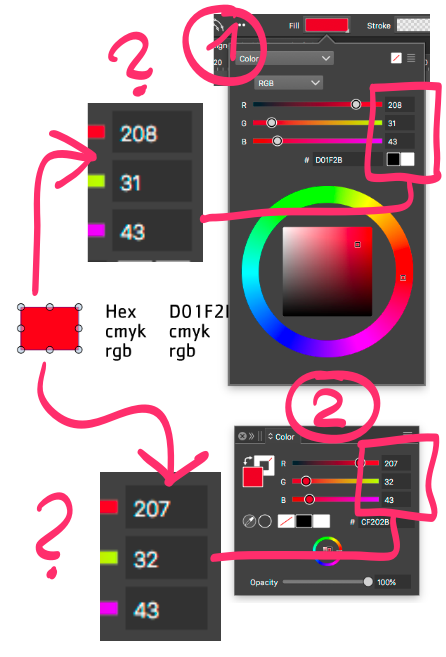
      Color panel 1 and panel 2 displays conflicting number fill values on the same shape/object.

      Which one is correct and why are they different?
      0_1732091769428_70119876-8ec1-4c43-b56e-71a797644e8d-billede.png

      VectorStylerV 2 Replies Last reply Reply Quote 1
      • VectorStylerV Offline
        VectorStyler @Raaskot
        last edited by

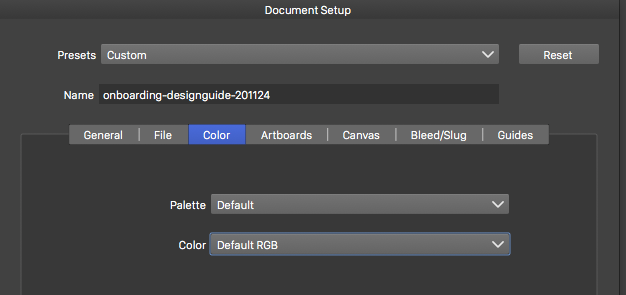
        @Raaskot What is the document color mode?

        RaaskotR 1 Reply Last reply Reply Quote 0
        • RaaskotR Offline
          Raaskot @VectorStyler
          last edited by

          @VectorStyler
          0_1732094222381_f9230fdb-ea26-452d-b539-90d90457d6ab-billede.png

          1 Reply Last reply Reply Quote 0
          • VectorStylerV Offline
            VectorStyler @Raaskot
            last edited by

            @Raaskot Send me a vstyler file where this color discrepancy occurs. It looks like the original color of the rectangle was not set in RGB mode.

            RaaskotR 2 Replies Last reply Reply Quote 0
            • RaaskotR Offline
              Raaskot @VectorStyler
              last edited by

              @VectorStyler

              0_1732096460139_onboarding-designguide-201124.pdf

              1 Reply Last reply Reply Quote 1
              • RaaskotR Offline
                Raaskot @VectorStyler
                last edited by

                @VectorStyler
                The problem was as you suggest.

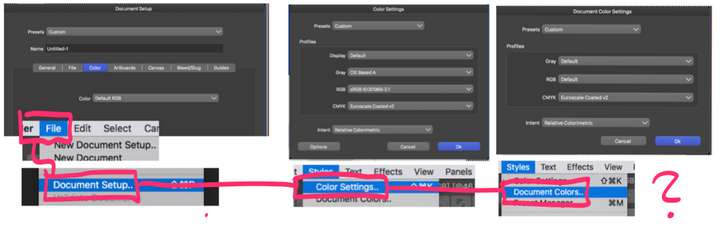
                Setting same profile all over made the numbers consistent also when opening file in Illustrator. Color profile handling has all time (not only in VS) been confusing. Can you tell which panels is crucial and which I just can leave (like "Default")? And what is Global RGB vs. just RGB?
                0_1732184076375_a6d8c330-60b3-4b4e-8897-56a8d5c2c6f6-billede.png

                VectorStylerV 1 Reply Last reply Reply Quote 1
                • VectorStylerV Offline
                  VectorStyler @Raaskot
                  last edited by

                  @Raaskot said in Color panel discrepancies - which to believe?:

                  And what is Global RGB vs. just RGB?

                  Using Global RGB (or Global CMYK) will show the document with the common color profile set in Color Settings, and will not have a document specific color profile.

                  If color management is not needed, it is preferred to use these Global modes.

                  RaaskotR 1 Reply Last reply Reply Quote 1
                  • RaaskotR Offline
                    Raaskot @VectorStyler
                    last edited by

                    @VectorStyler
                    Thanks.

                    What does "Default" then?

                    VectorStylerV 1 Reply Last reply Reply Quote 0
                    • VectorStylerV Offline
                      VectorStyler @Raaskot
                      last edited by

                      @Raaskot said in Color panel discrepancies - which to believe?:

                      What does "Default" then?

                      "Global RGB" means "Default RGB"

                      1 Reply Last reply Reply Quote 1
                      • First post
                        Last post