VectorStyler
    • Categories
    • Unread
    • Recent
    • Tags
    • Popular
    • Register
    • Login

    update 1.2.055

    Scheduled Pinned Locked Moved Release notes of past builds
    20 Posts 7 Posters 11.9k Views 5 Watching
    Loading More Posts
    • Oldest to Newest
    • Newest to Oldest
    • Most Votes
    Reply
    • Reply as topic
    Log in to reply
    This topic has been deleted. Only users with topic management privileges can see it.
    • B Offline
      B-Vs-V @VectorStyler
      last edited by

      @VectorStyler first time I've encountered this issue: first VS doesn't seem to launch and it takes several minutes to open (not tested). Should I uninstall VS first?

      W11 Pro 25H2 - 12th Gen Intel(R) i7-12700K 3.61 GHz - RAM 64 Go - NVIDIA GF GTX 4070 Ti - Intuos - Dell UP3216Q / Eizo ColorEdge
      W11 Pro 25H2 - 12th Gen Intel(R) i7-12700KF 3.60 GHz -RAM 64 Go - NVIDIA GF GTX 3080 - IntuosPro- ProArt PA329C

      VectorStylerV 2 Replies Last reply Reply Quote 1
      • B Offline
        B-Vs-V @VectorStyler
        last edited by

        @VectorStyler uninstalling and reinstalling doesn't help. I'm going back to the previous version.

        W11 Pro 25H2 - 12th Gen Intel(R) i7-12700K 3.61 GHz - RAM 64 Go - NVIDIA GF GTX 4070 Ti - Intuos - Dell UP3216Q / Eizo ColorEdge
        W11 Pro 25H2 - 12th Gen Intel(R) i7-12700KF 3.60 GHz -RAM 64 Go - NVIDIA GF GTX 3080 - IntuosPro- ProArt PA329C

        1 Reply Last reply Reply Quote 0
        • VectorStylerV Offline
          VectorStyler @B-Vs-V
          last edited by

          @B-Vs-V I will try to find out what causes this.

          1 Reply Last reply Reply Quote 0
          • VectorStylerV Offline
            VectorStyler @B-Vs-V
            last edited by

            @B-Vs-V Test are running here on Windows 11 and 10.
            I tried again the install on a Windows 11 machine and it seems to be working.

            One thing: uninstall, but also remove the user files from c:\Users<user name>\AppData\Roaming\NumericPath\VectorStyler1.2\vector\data\resources\ and then install

            B 2 Replies Last reply Reply Quote 0
            • B Offline
              B-Vs-V @VectorStyler
              last edited by

              @VectorStyler no user files there (e.g., no NP folder) after uninstalling.

              W11 Pro 25H2 - 12th Gen Intel(R) i7-12700K 3.61 GHz - RAM 64 Go - NVIDIA GF GTX 4070 Ti - Intuos - Dell UP3216Q / Eizo ColorEdge
              W11 Pro 25H2 - 12th Gen Intel(R) i7-12700KF 3.60 GHz -RAM 64 Go - NVIDIA GF GTX 3080 - IntuosPro- ProArt PA329C

              VectorStylerV 1 Reply Last reply Reply Quote 1
              • BoldlineB Offline
                Boldline
                last edited by

                FYI - The new build update installed just fine on the M1 Mac here. So the issue @B-Vs-V is having seems to be windows related

                🍎 macOS Tahoe 26.2, Mac mini (M1, 2020), Chip Apple M1, Memory 16 GB
                Cintiq 27QHD Display and LG Ultra HD Display

                1 Reply Last reply Reply Quote 0
                • VectorStylerV Offline
                  VectorStyler @B-Vs-V
                  last edited by

                  @B-Vs-V

                  first VS doesn't seem to launch and it takes several minutes to open

                  Another thing: does it launch at all, and what about the second attempt (the code signing certificate is changed, but it is from the same provider).

                  B 1 Reply Last reply Reply Quote 0
                  • B Offline
                    B-Vs-V @VectorStyler
                    last edited by

                    @VectorStyler VS finally launches, but it takes some four minutes, and every time.

                    W11 Pro 25H2 - 12th Gen Intel(R) i7-12700K 3.61 GHz - RAM 64 Go - NVIDIA GF GTX 4070 Ti - Intuos - Dell UP3216Q / Eizo ColorEdge
                    W11 Pro 25H2 - 12th Gen Intel(R) i7-12700KF 3.60 GHz -RAM 64 Go - NVIDIA GF GTX 3080 - IntuosPro- ProArt PA329C

                    VectorStylerV 1 Reply Last reply Reply Quote 1
                    • VectorStylerV Offline
                      VectorStyler @B-Vs-V
                      last edited by

                      @B-Vs-V

                      VS finally launches, but it takes some four minutes, and every time.

                      Don't know what can cause this. I will try to get feedback from other Windows based users.

                      B 1 Reply Last reply Reply Quote 0
                      • B Offline
                        B-Vs-V @VectorStyler
                        last edited by

                        @VectorStyler Well, normal behaviour now but I had to make the NP file in C:\Users...\AppData\Local... inaccessible. I lost all my presets but I propose to reintegrate file by file from the old directory.

                        W11 Pro 25H2 - 12th Gen Intel(R) i7-12700K 3.61 GHz - RAM 64 Go - NVIDIA GF GTX 4070 Ti - Intuos - Dell UP3216Q / Eizo ColorEdge
                        W11 Pro 25H2 - 12th Gen Intel(R) i7-12700KF 3.60 GHz -RAM 64 Go - NVIDIA GF GTX 3080 - IntuosPro- ProArt PA329C

                        VectorStylerV 1 Reply Last reply Reply Quote 1
                        • VectorStylerV Offline
                          VectorStyler @B-Vs-V
                          last edited by

                          @B-Vs-V said in update 1.2.055:

                          I lost all my presets but I propose to reintegrate file by file from the old directory.

                          The presets can be copied manually.

                          1 Reply Last reply Reply Quote 0
                          • debraspicherD Offline
                            debraspicher
                            last edited by

                            Nice, thank you for this!

                            Windows 11 Build 26200.7171 (25H2)
                            AMD Ryzen 7 9700X with Gigabyte X870E Aorus Pro Ice
                            32GB RAM @ 6000MHz
                            PNY NVIDIA RTX 5070 Ti 16GB; Display 1: 4K @150%; Display 2: 4K @150%
                            Wacom Intuos Pro L (2025); Wacom Intuos Pro M; Epson ET-8550; Siser Romeo

                            1 Reply Last reply Reply Quote 0
                            • debraspicherD Offline
                              debraspicher
                              last edited by debraspicher

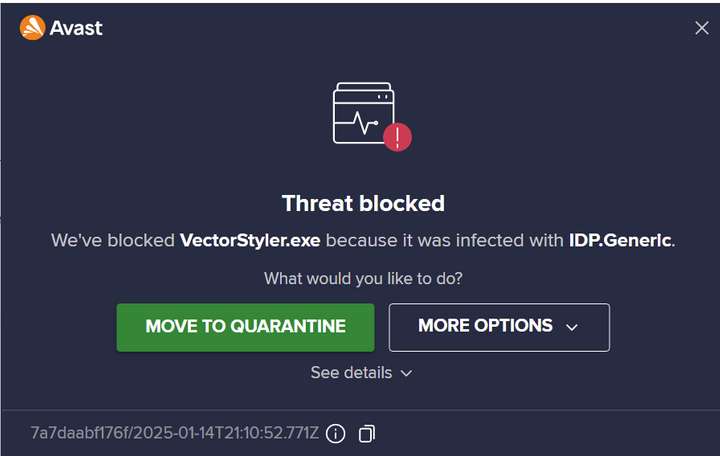
                              My VS opens, but it also triggered my virus scanner (Avast) to run a check on it. What's odd is the program was open in the background while it was running its scan. Then it closed it and reopened it after it was finished (it passed).

                              On close, this popped up though:
                              0_1736889101148_d132ce57-930f-4e24-9853-093e5bdcea56-image.png

                              I had to add it as an exception.

                              Windows 11 Build 26200.7171 (25H2)
                              AMD Ryzen 7 9700X with Gigabyte X870E Aorus Pro Ice
                              32GB RAM @ 6000MHz
                              PNY NVIDIA RTX 5070 Ti 16GB; Display 1: 4K @150%; Display 2: 4K @150%
                              Wacom Intuos Pro L (2025); Wacom Intuos Pro M; Epson ET-8550; Siser Romeo

                              VectorStylerV 1 Reply Last reply Reply Quote 0
                              • VectorStylerV Offline
                                VectorStyler @debraspicher
                                last edited by

                                @debraspicher I will contact Avast about this. This happened once in the past when I changed the code signing certificate.

                                1 Reply Last reply Reply Quote 1
                                • B Offline
                                  B-Vs-V @VectorStyler
                                  last edited by

                                  @VectorStyler said in update 1.2.055:

                                  @B-Vs-V Test are running here on Windows 11 and 10.
                                  I tried again the install on a Windows 11 machine and it seems to be working.

                                  One thing: uninstall, but also remove the user files from c:\Users<user name>\AppData\Roaming\NumericPath\VectorStyler1.2\vector\data\resources\ and then install

                                  @VectorStyler No folder there (Roaming) after having installed VS .055 but NP is located there C:...\AppData\Local

                                  W11 Pro 25H2 - 12th Gen Intel(R) i7-12700K 3.61 GHz - RAM 64 Go - NVIDIA GF GTX 4070 Ti - Intuos - Dell UP3216Q / Eizo ColorEdge
                                  W11 Pro 25H2 - 12th Gen Intel(R) i7-12700KF 3.60 GHz -RAM 64 Go - NVIDIA GF GTX 3080 - IntuosPro- ProArt PA329C

                                  VectorStylerV 1 Reply Last reply Reply Quote 1
                                  • VectorStylerV Offline
                                    VectorStyler @B-Vs-V
                                    last edited by

                                    @B-Vs-V said in update 1.2.055:

                                    C:...\AppData\Local

                                    Yes, this is different per Windows.

                                    1 Reply Last reply Reply Quote 0
                                    • F Offline
                                      FastVector
                                      last edited by

                                      The update on windows 10 is just working fine for me.

                                      Windows 10 | 1920x1080 | 125%

                                      1 Reply Last reply Reply Quote 1
                                      • S Offline
                                        Subpath
                                        last edited by

                                        No problem here either (win 10), Vectorstyler started and ran
                                        as usual

                                        Win 11
                                        CPU: AMD Ryzen 5 9600X, 6-core.
                                        GPU: Nvidia Geforce RTX 5070.

                                        1 Reply Last reply Reply Quote 1
                                        • syllieS Offline
                                          syllie
                                          last edited by

                                          Thanks for the update! I too am on Win 10 and the update installed and ran without issues.

                                          Windows 10 Pro | 22H2

                                          1 Reply Last reply Reply Quote 1
                                          • First post
                                            Last post