VectorStyler
    • Categories
    • Unread
    • Recent
    • Tags
    • Popular
    • Register
    • Login

    Edit Shape Effect is shown on Objects without any Shape effect

    Scheduled Pinned Locked Moved Questions and Support
    4 Posts 2 Posters 2.9k Views 2 Watching
    Loading More Posts
    • Oldest to Newest
    • Newest to Oldest
    • Most Votes
    Reply
    • Reply as topic
    Log in to reply
    This topic has been deleted. Only users with topic management privileges can see it.
    • S Offline
      Subpath
      last edited by Subpath

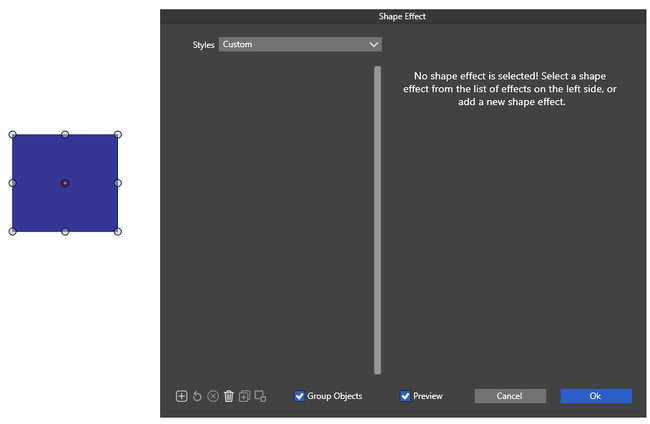
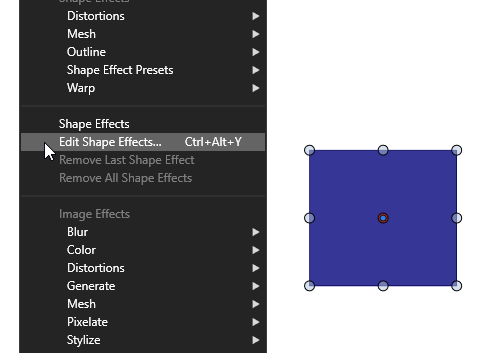
      Is there a reason why "Edit Shape Effect" is shown and can be
      selected even if a object does not have any shape effect?
      .
      .
      0_1738662005026_Edit-Shape-Effect-2.png

      0_1738662015232_Edit-Shape-Effect-1.png

      Win 11
      CPU: AMD Ryzen 5 9600X, 6-core.
      GPU: Nvidia Geforce RTX 5070.

      VectorStylerV 1 Reply Last reply Reply Quote 1
      • VectorStylerV Offline
        VectorStyler @Subpath
        last edited by

        @Subpath Yes, you can start adding shape effects in the view, starting with an empty shape effect list.

        S 1 Reply Last reply Reply Quote 1
        • S Offline
          Subpath @VectorStyler
          last edited by Subpath

          @VectorStyler

          Thanks,
          I think my question came up because for some reason
          "Edit Image Effect" couldn't be selected.
          But now both are showing.

          I was looking for a way to determine whether an
          object has no shape/image effect. The menu item
          "Remove all shape effects" looks like one option,
          because it only appears when an effect has been applied.
          Or is there another option?

          Win 11
          CPU: AMD Ryzen 5 9600X, 6-core.
          GPU: Nvidia Geforce RTX 5070.

          VectorStylerV 1 Reply Last reply Reply Quote 1
          • VectorStylerV Offline
            VectorStyler @Subpath
            last edited by

            @Subpath said in Edit Shape Effect is shown on Objects without any Shape effect:

            Or is there another option?

            In the Layers panel there will be a shape effect editing icon shown in the object row.

            1 Reply Last reply Reply Quote 1
            • First post
              Last post