VectorStyler
    • Categories
    • Unread
    • Recent
    • Tags
    • Popular
    • Register
    • Login

    A kind of "for each" for Shape Effects

    Scheduled Pinned Locked Moved Features and Ideas
    10 Posts 3 Posters 7.4k Views 3 Watching
    Loading More Posts
    • Oldest to Newest
    • Newest to Oldest
    • Most Votes
    Reply
    • Reply as topic
    Log in to reply
    This topic has been deleted. Only users with topic management privileges can see it.
    • S Offline
      Subpath
      last edited by Subpath

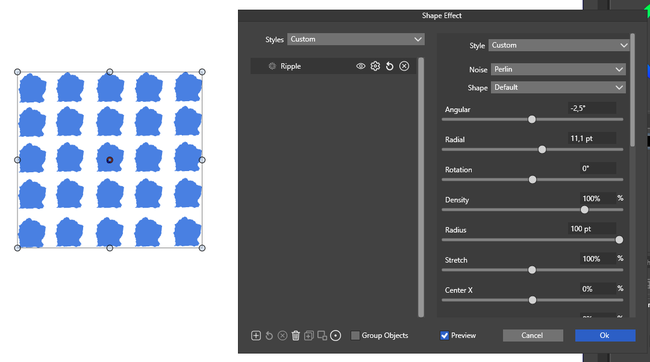
      If you apply a shape effect to a series of objects, all objects will
      get the same shape effect. See image.

      It would be nice if the shape effect had an option that worked like
      "for each" when transforming. So that each object gets the shape effect,
      but each one slightly differently. If that's possible.
      .
      .
      0_1740130299897_Shape Effect.png

      Win 11
      CPU: AMD Ryzen 5 9600X, 6-core.
      GPU: Nvidia Geforce RTX 5070.

      VectorStylerV 1 Reply Last reply Reply Quote 2
      • VectorStylerV Offline
        VectorStyler @Subpath
        last edited by

        @Subpath The only way to do this now is with the repeater, number variables and randomizing the variables with the repeater.

        S 1 Reply Last reply Reply Quote 1
        • S Offline
          Subpath @VectorStyler
          last edited by Subpath

          @VectorStyler

          I thought this kind of "for each" option for shape effects
          would be a nice and useful addition in the future.

          Would it be possible for you to describe the steps required to
          use that repeater option? That would be very helpful as I have
          not used the number variables in the repeater yet and I don't
          know how that would affect a shape effect.

          Win 11
          CPU: AMD Ryzen 5 9600X, 6-core.
          GPU: Nvidia Geforce RTX 5070.

          VectorStylerV 1 Reply Last reply Reply Quote 0
          • VectorStylerV Offline
            VectorStyler @Subpath
            last edited by

            @Subpath said in A kind of "for each" for Shape Effects:

            Would it be possible for you to describe the steps required to use that repeater option?

            • create a number variable (panels->styles->values), select the editing type based on the parameter to be randomized.
            • create single object from that grid.
            • add the shape effect to this object.
            • edit the shape effect and ctrl click on the field to be randomized,
            • select the variable name from the list, confirm.
            • create a repeater from the object.
            • in the Repeater panel menu, select Adjust Number Values
            • in the opened Adjust Numbers view, select the variable to be adjusted.
            • check Adjusted Number and set the adjustment mode (Randomized) and min/max values.
            • confirm and now every repeated instance should have a random override for this number variable.
            S L 2 Replies Last reply Reply Quote 2
            • S Offline
              Subpath @VectorStyler
              last edited by

              @VectorStyler

              thank you, very appreciated
              I'll take a look at it

              Win 11
              CPU: AMD Ryzen 5 9600X, 6-core.
              GPU: Nvidia Geforce RTX 5070.

              1 Reply Last reply Reply Quote 0
              • L Offline
                Li Xiao @VectorStyler
                last edited by

                @VectorStyler I would prefer if shape effects supported tiling and allowed for synchronized adjustments of the same parameters across grouped shape effects.
                This way, I wouldn't have to modify the same parameters for dozens of shape effects multiple times.
                https://youtu.be/DRhA_DunDIc

                VectorStylerV 1 Reply Last reply Reply Quote 1
                • VectorStylerV Offline
                  VectorStyler @Li Xiao
                  last edited by

                  @Li-Xiao You can do this with number variables. Define a number variable for that parameter (in the Values panel) and then use that in all these shape effects.

                  L 1 Reply Last reply Reply Quote 1
                  • L Offline
                    Li Xiao @VectorStyler
                    last edited by

                    @VectorStyler said in A kind of "for each" for Shape Effects:

                    number variables

                    Thank you! The same parameters can be handled using number variables. Is there a method for tiling?

                    VectorStylerV 1 Reply Last reply Reply Quote 1
                    • VectorStylerV Offline
                      VectorStyler @Li Xiao
                      last edited by

                      @Li-Xiao said in A kind of "for each" for Shape Effects:

                      Is there a method for tiling?

                      For tiling shape effects? No such method yet.
                      But this gives an interesting idea of a shape effect that tiles other shape effects. Would that kind of feature solve this?

                      Send me that example file from the video, I would like to experiment a bit.

                      L 1 Reply Last reply Reply Quote 1
                      • L Offline
                        Li Xiao @VectorStyler
                        last edited by

                        @VectorStyler

                        a shape effect that tiles other shape effects.

                        That might be feasible.

                        0_1740240086701_Circular Bump.vstyler

                        1 Reply Last reply Reply Quote 0
                        • First post
                          Last post