VectorStyler
    • Categories
    • Unread
    • Recent
    • Tags
    • Popular
    • Register
    • Login

    Distinguish keyboards

    Scheduled Pinned Locked Moved Questions and Support
    13 Posts 2 Posters 9.8k Views 2 Watching
    Loading More Posts
    • Oldest to Newest
    • Newest to Oldest
    • Most Votes
    Reply
    • Reply as topic
    Log in to reply
    This topic has been deleted. Only users with topic management privileges can see it.
    • VectorStylerV Offline
      VectorStyler @monsterfox
      last edited by

      @monsterfox This should already work.

      M 1 Reply Last reply Reply Quote 0
      • M Offline
        monsterfox @VectorStyler
        last edited by

        @VectorStyler I have tested it. The numeric keypad cannot be set up with shortcut keys.

        VectorStylerV 1 Reply Last reply Reply Quote 0
        • VectorStylerV Offline
          VectorStyler @monsterfox
          last edited by

          @monsterfox Could be a keyboard type / language issue, I will test this.

          Are you using Windows 10 or 11?

          Also: what is shown in the shortcut key editor when you press a key combination containing a numeric keypad key?

          M 2 Replies Last reply Reply Quote 0
          • M Offline
            monsterfox @VectorStyler
            last edited by

            @VectorStyler Mine is Windows 11, and the keys are not responding at all.

            1 Reply Last reply Reply Quote 1
            • M Offline
              monsterfox @VectorStyler
              last edited by

              @VectorStyler Discovering that transparency is a system-default shortcut with no configurable source, could it be added?

              VectorStylerV 1 Reply Last reply Reply Quote 0
              • VectorStylerV Offline
                VectorStyler @monsterfox
                last edited by

                @monsterfox said in Distinguish keyboards:

                @VectorStyler Discovering that transparency is a system-default shortcut with no configurable source, could it be added?

                No clear what is needed here. Should the transparency key presses (number keys) be customizable?

                It can be turned off with the Settings -> Changing -> Opacity Editing Keys checkbox.

                M 1 Reply Last reply Reply Quote 0
                • M Offline
                  monsterfox @VectorStyler
                  last edited by

                  @VectorStyler What I mean is that the default shortcut keys for setting transparency in the software are the number keys on the main keyboard. I want to set these shortcut keys to the number keys on the numeric keypad.

                  VectorStylerV 1 Reply Last reply Reply Quote 1
                  • VectorStylerV Offline
                    VectorStyler @monsterfox
                    last edited by

                    @monsterfox said in Distinguish keyboards:

                    I want to set these shortcut keys to the number keys on the numeric keypad.

                    At least here, this seems to be working with the numeric keys also.

                    M 2 Replies Last reply Reply Quote 0
                    • M Offline
                      monsterfox @VectorStyler
                      last edited by

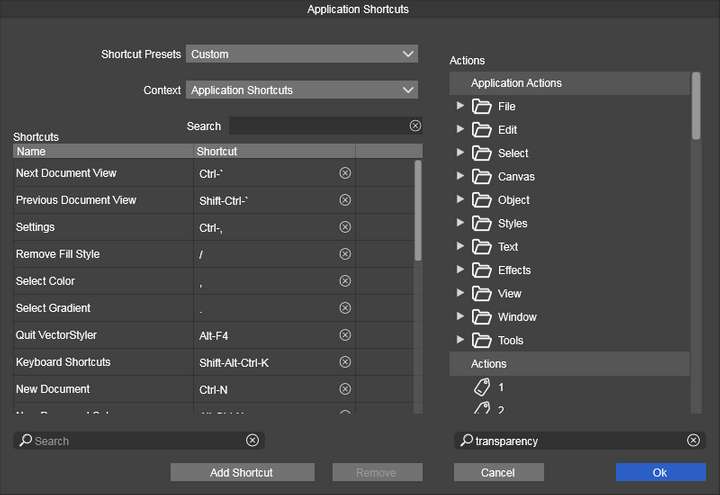
                      @VectorStyler 0_1742649320008_a7997a75-ff0c-4ebf-b605-47283e2f2cce-1742649227795.jpg
                      If I need to add a shortcut for opacity, where should I look in the menu? Perhaps I haven't found it yet.

                      VectorStylerV 1 Reply Last reply Reply Quote 0
                      • M Offline
                        monsterfox @VectorStyler
                        last edited by

                        @VectorStyler I think I know where the issue lies. The shortcuts on the main keyboard and the numeric keypad are synchronized. By default, both can be set to adjust opacity. Now that I've set the number 6 on the main keyboard to the pen tool, the 6 on the numeric keypad has also changed to the pen tool. The shortcuts for the main and numeric keypads are not separated.

                        VectorStylerV 1 Reply Last reply Reply Quote 1
                        • VectorStylerV Offline
                          VectorStyler @monsterfox
                          last edited by

                          @monsterfox said in Distinguish keyboards:

                          If I need to add a shortcut for opacity, where should I look in the menu?

                          For opacity, the shortcuts are not customizable in this way. It is either disabled or enabled.

                          1 Reply Last reply Reply Quote 0
                          • VectorStylerV Offline
                            VectorStyler @monsterfox
                            last edited by

                            @monsterfox said in Distinguish keyboards:

                            The shortcuts for the main and numeric keypads are not separated.

                            I will try to find a solution for this.

                            1 Reply Last reply Reply Quote 0
                            • First post
                              Last post