VectorStyler
    • Categories
    • Unread
    • Recent
    • Tags
    • Popular
    • Register
    • Login

    Slightly snapping of Sliders on Zero / Neutral Position

    Scheduled Pinned Locked Moved Features and Ideas
    6 Posts 3 Posters 4.7k Views 3 Watching
    Loading More Posts
    • Oldest to Newest
    • Newest to Oldest
    • Most Votes
    Reply
    • Reply as topic
    Log in to reply
    This topic has been deleted. Only users with topic management privileges can see it.
    • S Offline
      Subpath
      last edited by Subpath

      One thing I often wish for when working with VS sliders
      is a somewhat defined zero/neutral position. This means
      that the slider would slightly snaps to the zero / neutral position.

      This isn't a problem with sliders that start at zero, but I miss it
      and find it difficult with sliders where the zero/neutral position (0 or 100%)
      is in the middle.

      It would be nice and helpful if this were possible.

      Win 11
      CPU: AMD Ryzen 5 9600X, 6-core.
      GPU: Nvidia Geforce RTX 5070.

      VectorStylerV 1 Reply Last reply Reply Quote 1
      • VectorStylerV Offline
        VectorStyler @Subpath
        last edited by

        @Subpath I added this to the backlog. One challenge is to define the neutral position for all those fields.

        B S 2 Replies Last reply Reply Quote 2
        • B Offline
          B-Vs-V @VectorStyler
          last edited by

          @VectorStyler ... and double-clicking the cursor returns it to zero ☺ would be very nice.

          W11 Pro 25H2 - 12th Gen Intel(R) i7-12700K 3.61 GHz - RAM 64 Go - NVIDIA GF GTX 4070 Ti - Intuos - Dell UP3216Q / Eizo ColorEdge
          W11 Pro 25H2 - 12th Gen Intel(R) i7-12700KF 3.60 GHz -RAM 64 Go - NVIDIA GF GTX 3080 - IntuosPro- ProArt PA329C

          1 Reply Last reply Reply Quote 2
          • S Offline
            Subpath @VectorStyler
            last edited by Subpath

            @VectorStyler, thank you

            Could you tell me what would be easier for you?

            As @B-Vs-V mentioned a double click, I could also
            live with such a solution.

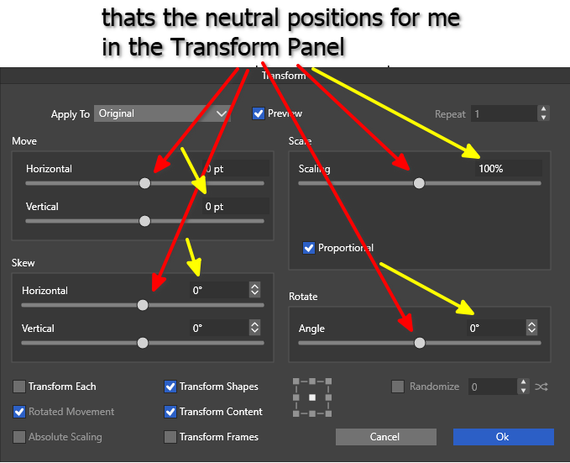
            By neutral position I mean the standard setting. For
            percentages, for example, this is usually 100%; for
            other values, it's usually zero.

            Win 11
            CPU: AMD Ryzen 5 9600X, 6-core.
            GPU: Nvidia Geforce RTX 5070.

            1 Reply Last reply Reply Quote 0
            • S Offline
              Subpath
              last edited by

              @VectorStyler

              i also wrote Neutral because i did know a better Term
              will post a picture

              Win 11
              CPU: AMD Ryzen 5 9600X, 6-core.
              GPU: Nvidia Geforce RTX 5070.

              1 Reply Last reply Reply Quote 0
              • S Offline
                Subpath
                last edited by

                @VectorStyler

                Here is a picture of what I meant

                0_1742544279063_neutral position.png

                Win 11
                CPU: AMD Ryzen 5 9600X, 6-core.
                GPU: Nvidia Geforce RTX 5070.

                1 Reply Last reply Reply Quote 2
                • First post
                  Last post