VectorStyler
    • Categories
    • Unread
    • Recent
    • Tags
    • Popular
    • Register
    • Login

    update 1.2.066

    Scheduled Pinned Locked Moved Release notes of past builds
    13 Posts 5 Posters 7.5k Views 4 Watching
    Loading More Posts
    • Oldest to Newest
    • Newest to Oldest
    • Most Votes
    Reply
    • Reply as topic
    Log in to reply
    This topic has been deleted. Only users with topic management privileges can see it.
    • S Offline
      Subpath
      last edited by

      @VectorStyler

      Thanks that the Shape Panel keep Side changes of the Polygon tool now

      Win 11
      CPU: AMD Ryzen 5 9600X, 6-core.
      GPU: Nvidia Geforce RTX 5070.

      1 Reply Last reply Reply Quote 1
      • debraspicherD Offline
        debraspicher @VectorStyler
        last edited by

        @VectorStyler

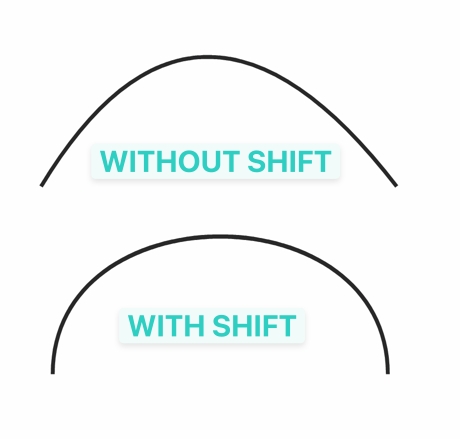
        Added a Shift+ modifier for moving on segment path locations.

        Which one does this one refer to? It sounds lovely.

        Windows 11 Build 26200.7171 (25H2)
        AMD Ryzen 7 9700X with Gigabyte X870E Aorus Pro Ice
        32GB RAM @ 6000MHz
        PNY NVIDIA RTX 5070 Ti 16GB; Display 1: 4K @150%; Display 2: 4K @150%
        Wacom Intuos Pro L (2025); Wacom Intuos Pro M; Epson ET-8550; Siser Romeo

        VectorStylerV BoldlineB 2 Replies Last reply Reply Quote 1
        • VectorStylerV Offline
          VectorStyler @debraspicher
          last edited by

          @debraspicher said in update 1.2.066:

          Which one does this one refer to?

          https://www.vectorstyler.com/forum/topic/5049/shift-modifier-to-keep-end-nodes-stationary

          debraspicherD 1 Reply Last reply Reply Quote 2
          • BoldlineB Offline
            Boldline @debraspicher
            last edited by

            @debraspicher said in update 1.2.066:

            @VectorStyler

            Added a Shift+ modifier for moving on segment path locations.

            Which one does this one refer to? It sounds lovely.

            I'm glad you asked this because I hadn't caught it right away due to the wording and I was the one who requested it! haha.
            It's always fun to see an idea for a feature online and then request it and its added so quickly to VS. This is one I will make good use of often in my work
            0_1743427253806_3daf5237-8e40-41ef-b2ef-8d0265cfdad7-CleanShot 2025-03-31 at 09.16.34.png

            🍎 macOS Tahoe 26.2, Mac mini (M1, 2020), Chip Apple M1, Memory 16 GB
            Cintiq 27QHD Display and LG Ultra HD Display

            S 1 Reply Last reply Reply Quote 4
            • S Offline
              Subpath @Boldline
              last edited by Subpath

              @Boldline

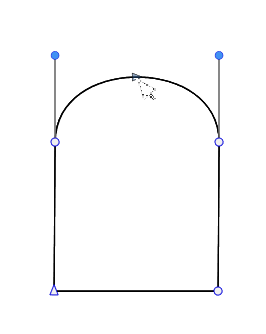
              this one is indeed pretty helpful
              cant count how many times i did something
              similar in CorelDraw with aligning the handles
              0_1743435483647_with Shift.png

              Win 11
              CPU: AMD Ryzen 5 9600X, 6-core.
              GPU: Nvidia Geforce RTX 5070.

              DanielD 1 Reply Last reply Reply Quote 3
              • DanielD Offline
                Daniel @Subpath
                last edited by

                @Subpath, @VectorStyler: Please, please: When you implement Bezigon, remember to implement Tangential Node. Someone else raised this too, and it may get lost in the crowd of conversations we're having. Tangential Node is an important missing concept in Gravit's implementation of Bezigon. Reminder to not miss it. Will add as a comment to the XLS.

                Work: Windows 11 | Intel i9 14900HS (24 Cores/32 Threads) | GeForce RTX 4070 | 64 GB RAM
                Personal: Windows 11 | Amd Ryzen 9 7950X (16 Core, 32 Threads) | GeForce RTX 3060 | 32 GB RAM

                S 1 Reply Last reply Reply Quote 2
                • S Offline
                  Subpath @Daniel
                  last edited by

                  @Daniel
                  just to make this clear, i am just a normal user like you 🙂

                  Win 11
                  CPU: AMD Ryzen 5 9600X, 6-core.
                  GPU: Nvidia Geforce RTX 5070.

                  DanielD 1 Reply Last reply Reply Quote 1
                  • DanielD Offline
                    Daniel @Subpath
                    last edited by

                    @Subpath: yeah. I hit reply to your comment, so it added you. Sorry!

                    Work: Windows 11 | Intel i9 14900HS (24 Cores/32 Threads) | GeForce RTX 4070 | 64 GB RAM
                    Personal: Windows 11 | Amd Ryzen 9 7950X (16 Core, 32 Threads) | GeForce RTX 3060 | 32 GB RAM

                    BoldlineB 1 Reply Last reply Reply Quote 1
                    • BoldlineB Offline
                      Boldline @Daniel
                      last edited by

                      @Daniel haha @Subpath is but a mere mortal like the rest of us 🙂

                      🍎 macOS Tahoe 26.2, Mac mini (M1, 2020), Chip Apple M1, Memory 16 GB
                      Cintiq 27QHD Display and LG Ultra HD Display

                      1 Reply Last reply Reply Quote 1
                      • S Offline
                        Subpath
                        last edited by

                        @Daniel , no problem

                        @Boldline, of course
                        and i am fine with that 🙂

                        Win 11
                        CPU: AMD Ryzen 5 9600X, 6-core.
                        GPU: Nvidia Geforce RTX 5070.

                        1 Reply Last reply Reply Quote 1
                        • debraspicherD Offline
                          debraspicher @VectorStyler
                          last edited by

                          @VectorStyler Thanks! That's so helpful!

                          @Boldline said in update 1.2.066:

                          @debraspicher said in update 1.2.066:

                          @VectorStyler

                          Added a Shift+ modifier for moving on segment path locations.

                          Which one does this one refer to? It sounds lovely.

                          I'm glad you asked this because I hadn't caught it right away due to the wording and I was the one who requested it! haha.
                          It's always fun to see an idea for a feature online and then request it and its added so quickly to VS. This is one I will make good use of often in my work

                          0_1743427253806_3daf5237-8e40-41ef-b2ef-8d0265cfdad7-CleanShot 2025-03-31 at 09.16.34.png

                          I figured it wasn't this, but there was another function we were talking about recently, but it involves snapping:

                          https://www.vectorstyler.com/forum/topic/5000/how-to-snap-handle-to-the-tangent-line/5

                          Yours is one I normally do manually (illustrations) so this is very appreciated to keep curves pristine.


                          Windows 11 Build 26200.7171 (25H2)
                          AMD Ryzen 7 9700X with Gigabyte X870E Aorus Pro Ice
                          32GB RAM @ 6000MHz
                          PNY NVIDIA RTX 5070 Ti 16GB; Display 1: 4K @150%; Display 2: 4K @150%
                          Wacom Intuos Pro L (2025); Wacom Intuos Pro M; Epson ET-8550; Siser Romeo

                          1 Reply Last reply Reply Quote 2
                          • First post
                            Last post