Feedback for Image FX in VS (Plus we need a feedback thread)
-
I have feedback for image FX in VS. There are so many great options, and I like the choice. I also like that they're non-destructive.
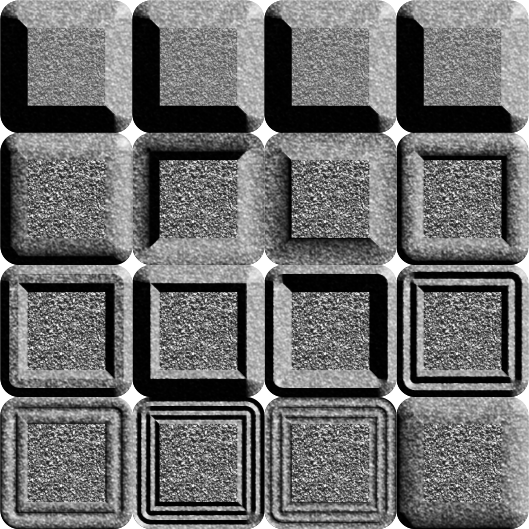
The limitation comes when it comes to actually customizing the FX. Here's a specific example of this limitation. This is an experiment for old church illustration that has stone walls. To create the complex carving, what I often do is to first do a light study. I bevel and extrude simple shapes and take note of how light reflects off the surfaces. Here, I've taken a square, clipped stone texture into it, and applied a range of bevels.
Feedback for FX themselves:
Peforming the same in VS is at the moment not satisfactory. The bevel FX is a bit bloodless. By which I mean, it is not strong enough. Manipulating light direction, contrast, elevation does not produce the desired result. This, I reckon, can be addressed easily via the algorithm.But customization on FX is where I'd be pleased to see some improvement. In Affinity and PL, this is is possible through curve profiles for FX. If this is already possible in VS, I can't seem to have found it. Please point out. Thank you.
Then, I also need to be able to change the blend modes and colours of the lights and shadows themselves. Again, please indulge me if I've missed this and point out.
Feedback for performance:
Next, I noticed significant lag when I pile effects on each other. I understand that FX make heavy use of CPU and GPU, but as you can see from my signature, I have hefty machines. It should suffice. Yet, I get severe throttle.Then, selecting multiple objects with FX also seriously throttled my CPU.
Finally, I don't think this thread belongs in the general discussion section or in bugs. I think we need a feedback thread that just talks about program and feature performance.
-
In Affinity and PL, this is is possible through curve profiles for FX
Any pointers for this might help.
Next, I noticed significant lag when I pile effects on each other
Yes, this happens with complex effects. As a workaround there is an "image render" option for layers or objects with heavy effects (in Object Options), that will temporarily cache these effects.
I think these kinds of posts can go to the feature request folder.
-
@VectorStyler I will build out an FX panel with all the relevant options this weekend and post into XLS thread. Please could you move this thread to that category too? I don't want this to get lost.

