VectorStyler
    • Categories
    • Unread
    • Recent
    • Tags
    • Popular
    • Register
    • Login

    Change the shape of the eraser tool

    Scheduled Pinned Locked Moved Questions and Support
    10 Posts 4 Posters 6.5k Views 3 Watching
    Loading More Posts
    • Oldest to Newest
    • Newest to Oldest
    • Most Votes
    Reply
    • Reply as topic
    Log in to reply
    This topic has been deleted. Only users with topic management privileges can see it.
    • BoldlineB Online
      Boldline
      last edited by

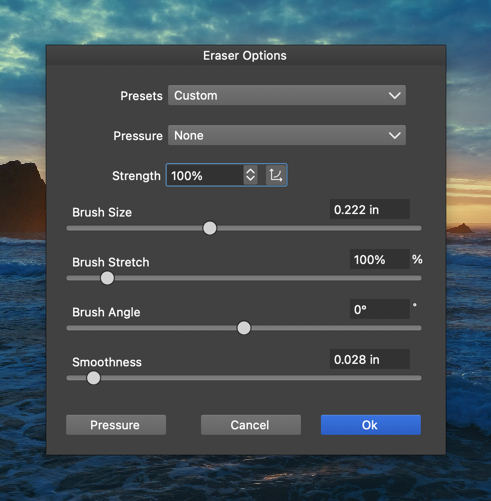
      If I want to change the shape of the eraser to a circle or square, how do I do that? Should that option be available in the eraser panel?
      0_1746274571486_858fbc4d-d702-46a2-8618-dd9f91449f7a-CleanShot 2025-05-03 at 08.15.45.png

      🍎 macOS Sequoia 15.3, Mac mini (M1, 2020), Chip Apple M1, Memory 16 GB
      Cintiq 27QHD Display and LG Ultra HD Display

      VectorStylerV 1 Reply Last reply Reply Quote 0
      • J Offline
        Jono
        last edited by

        Apologies for interjecting, but where are the eraser options located?

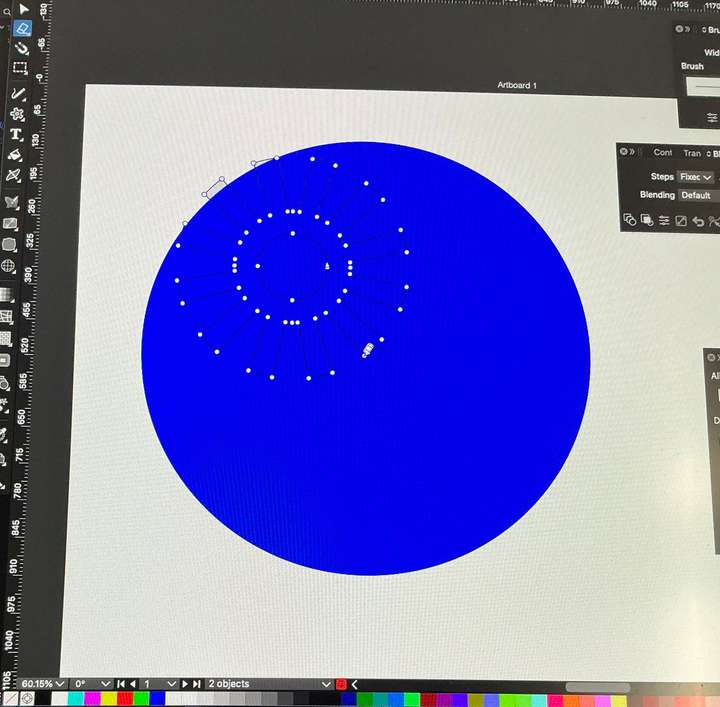
        Also, when I use the eraser tool I get a large blue shape appear on the screen. The eraser works ok when I move it along a path and doesn't erase everything under the blue. I had to take a photo of screen as blue shape only appears when the eraser is active, ie when pen is pushing down.
        0_1746279792297_screen-photo.jpg

        Mac mini (M1, 2020) | Tahoe 26.1 | Wacom Cintiq 16 (1920 x 1080 px)

        S 1 Reply Last reply Reply Quote 0
        • S Offline
          Subpath @Jono
          last edited by Subpath

          @Jono

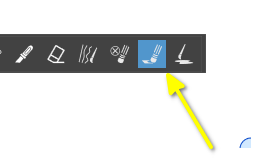
          What i spotted from your Image, you dont have Eraser Tool selected.
          This is the "Path Eraser Tool"

          Here a Picture
          0_1746293133622_Eraser Tool.png

          Thats the "Eraser Tool".
          Just double click this Tool icon to get the Eraser Options

          Win 11
          CPU: AMD Ryzen 5 9600X, 6-core.
          GPU: Nvidia Geforce RTX 5070.

          1 Reply Last reply Reply Quote 0
          • S Offline
            Subpath
            last edited by

            @VectorStyler

            It seems a bit strange to me that the Brush Size
            of the "Path Eraser Tool" could only be changed by
            double Click on the "Eraser Tool"

            If i double click on the "Path Eraser Tool" the
            Path Panel appears. Also there is no Brush size
            Preview, only the "Eraser Tool" and the "Node Remover Tool"
            shows a Brush Size Preview.

            Win 11
            CPU: AMD Ryzen 5 9600X, 6-core.
            GPU: Nvidia Geforce RTX 5070.

            VectorStylerV 1 Reply Last reply Reply Quote 0
            • J Offline
              Jono
              last edited by

              Thanks for the explanation. Until now I had not previously used the eraser tool (or the path eraser tool). I think I was foxed by the missing double click option for the path eraser tool, even though it wasn't actually the tool I wanted to use!

              I agree it seems inconsistent only having access to change the path eraser's brush size from the eraser tool options.

              Maybe just me, but I think the icon for the path eraser is more what I would think of as an 'eraser'.

              It seems the initial default brush size was set to 800px, hence the large blue preview.

              Mac mini (M1, 2020) | Tahoe 26.1 | Wacom Cintiq 16 (1920 x 1080 px)

              S 1 Reply Last reply Reply Quote 0
              • S Offline
                Subpath @Jono
                last edited by Subpath

                @Jono

                ... Maybe just me, but I think the icon for the path eraser is more what I would think of as an 'eraser'. ...

                I agree with you; the "Path Eraser Tool" looks a bit misleading. I
                would have guessed it was actually the Eraser Tool.

                The difference only becomes apparent when you read the
                tooltip, which is also not a good sign.

                Win 11
                CPU: AMD Ryzen 5 9600X, 6-core.
                GPU: Nvidia Geforce RTX 5070.

                1 Reply Last reply Reply Quote 0
                • VectorStylerV Offline
                  VectorStyler @Boldline
                  last edited by

                  @Boldline said in Change the shape of the eraser tool:

                  If I want to change the shape of the eraser to a circle or square, how do I do that?

                  When the Eraser tool is active, the context panel contains this option.

                  1 Reply Last reply Reply Quote 0
                  • VectorStylerV Offline
                    VectorStyler @Subpath
                    last edited by

                    @Subpath said in Change the shape of the eraser tool:

                    It seems a bit strange to me that the Brush Size
                    of the "Path Eraser Tool" could only be changed by
                    double Click on the "Eraser Tool"

                    This option should also be in the context panel.

                    S 1 Reply Last reply Reply Quote 0
                    • S Offline
                      Subpath @VectorStyler
                      last edited by

                      @VectorStyler

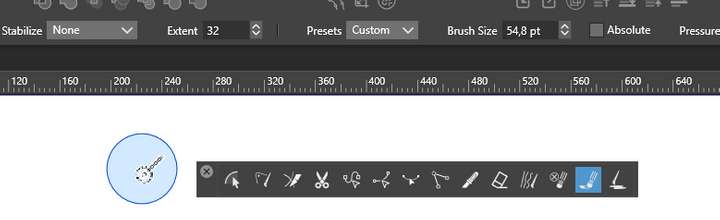
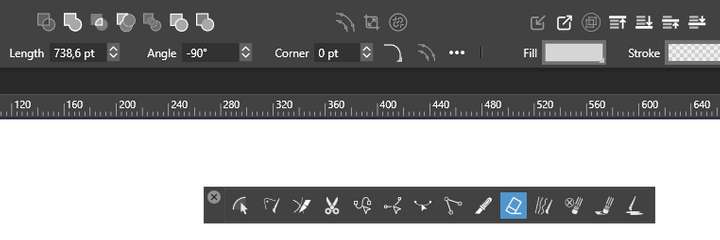
                      Brush Size for the "Path Eraser Tool" is not shown
                      in the Context Panel when the Path Eraser Tool is selected.

                      The Brush Size for the Eraser Tools will only shown
                      when the " Eraser Tool " is selected. Which seems
                      a bit confusing.

                      See Pictures

                      0_1746427457668_Eraser Tool.png
                      .
                      .
                      0_1746427469863_Path Eraser Tool.png

                      Win 11
                      CPU: AMD Ryzen 5 9600X, 6-core.
                      GPU: Nvidia Geforce RTX 5070.

                      VectorStylerV 1 Reply Last reply Reply Quote 1
                      • VectorStylerV Offline
                        VectorStyler @Subpath
                        last edited by

                        @Subpath said in Change the shape of the eraser tool:

                        Brush Size for the "Path Eraser Tool" is not shown

                        Yes, I was thinking of a different tool. I will add this.

                        1 Reply Last reply Reply Quote 1
                        • First post
                          Last post