VectorStyler
    • Categories
    • Unread
    • Recent
    • Tags
    • Popular
    • Register
    • Login

    An Idea for improving menu navigation

    Scheduled Pinned Locked Moved Features and Ideas
    5 Posts 3 Posters 3.1k Views 3 Watching
    Loading More Posts
    • Oldest to Newest
    • Newest to Oldest
    • Most Votes
    Reply
    • Reply as topic
    Log in to reply
    This topic has been deleted. Only users with topic management privileges can see it.
    • encartE Offline
      encart
      last edited by

      Is it possible to add a delay ( e.g. 0.5s) before the menu level closes? Currently, to get to an item from the next menu level you have to follow the menu items precisely ( red arrows). If the menu didn't react so instantly , it would be possible to do it faster and wouldn't require such precision.
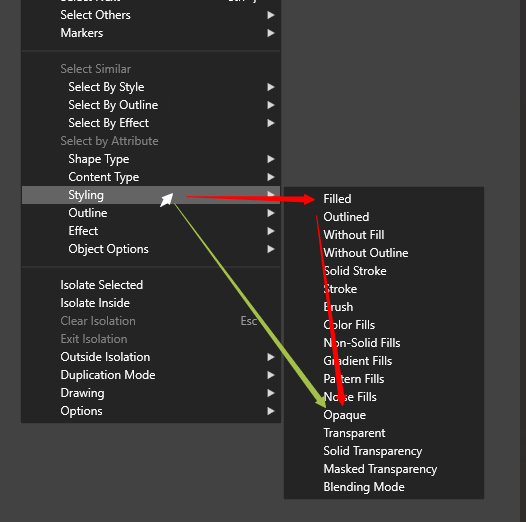
      0_1749562571857_Menu delay.png

      Windows 11 Home 10.0.22621

      VectorStylerV S 2 Replies Last reply Reply Quote 7
      • VectorStylerV Offline
        VectorStyler @encart
        last edited by

        @encart I will try to add this

        1 Reply Last reply Reply Quote 1
        • S Offline
          Subpath @encart
          last edited by Subpath

          @encart

          1+ from me for that
          have the same problem here
          you need be careful precisely horizontal
          I often slipped a little and the menu is gone

          Win 11
          CPU: AMD Ryzen 5 9600X, 6-core.
          GPU: Nvidia Geforce RTX 5070.

          1 Reply Last reply Reply Quote 1
          • encartE Offline
            encart
            last edited by encart

            Thank you for the changes you have made. I am invariably amazed at the speed with which you make them.
            I only have one comment. I would add some small delay (100ms?) before the menu is displayed. Now, when I move the cursor over the menu, the next level is displayed, but it is not always the one I want and I have to wait 0.5s before it disappears.
            https://go.screenpal.com/watch/cT1DoNnXUr2

            Edit: Just discovered a bug.
            Any item clicked with mouse displays second copy of menu.
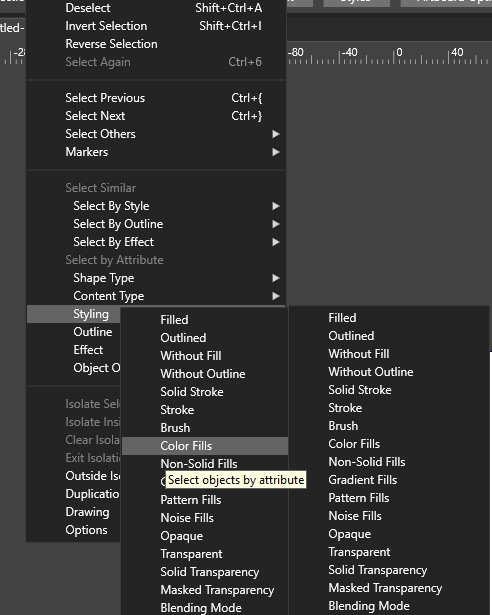
            0_1750091869010_Screenshot 2025-06-16 181530.png
            Clicking on menu items should bypass the delay I mentioned above and display the menu immediately?

            Windows 11 Home 10.0.22621

            VectorStylerV 1 Reply Last reply Reply Quote 1
            • VectorStylerV Offline
              VectorStyler @encart
              last edited by

              @encart I will try to fix this ASAP.

              1 Reply Last reply Reply Quote 0
              • First post
                Last post
