VectorStyler
    • Categories
    • Unread
    • Recent
    • Tags
    • Popular
    • Register
    • Login

    Where to disable the Selection Frame which follows the Shape form ?

    Scheduled Pinned Locked Moved Questions and Support
    5 Posts 2 Posters 2.5k Views 2 Watching
    Loading More Posts
    • Oldest to Newest
    • Newest to Oldest
    • Most Votes
    Reply
    • Reply as topic
    Log in to reply
    This topic has been deleted. Only users with topic management privileges can see it.
    • S Offline
      Subpath
      last edited by Subpath

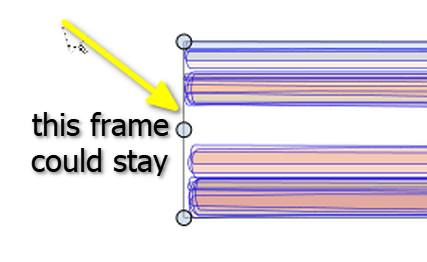
      Would like to disable the Selection Frame which follows the Shape form.
      Because it make its hard to see the colors when colorize.

      Need a tip where could do that. My guess is Settings > Indicator Styles
      but i dont know exactly which one.
      .
      .
      Here's an image: The selection frame the arrow points to can stay.
      But the others should be deactivated.
      0_1753194843583_Selection frame.png

      Win 11
      CPU: AMD Ryzen 5 9600X, 6-core.
      GPU: Nvidia Geforce RTX 5070.

      VectorStylerV 1 Reply Last reply Reply Quote 0
      • VectorStylerV Offline
        VectorStyler @Subpath
        last edited by

        @Subpath Not possible to disable if the object is selected (can be hidden when moving, but it will show when in modal views)
        But you can select the object and switch to some other tool (maybe a style picker), and then the selection frame is not shown

        S 1 Reply Last reply Reply Quote 1
        • S Offline
          Subpath @VectorStyler
          last edited by Subpath

          @VectorStyler

          As an alternative to disable it.
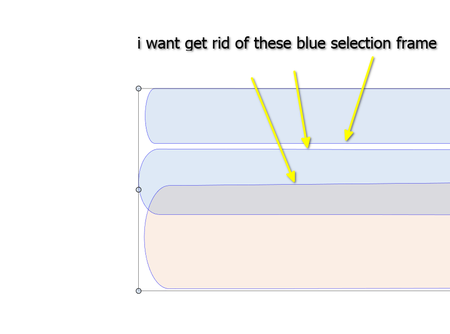
          Is it possible to change the color of these blue selection frames, for example to white?

          I took another picture just to make sure what I mean
          0_1753203616508_selection frame 2.png

          Win 11
          CPU: AMD Ryzen 5 9600X, 6-core.
          GPU: Nvidia Geforce RTX 5070.

          VectorStylerV 1 Reply Last reply Reply Quote 1
          • VectorStylerV Offline
            VectorStyler @Subpath
            last edited by

            @Subpath in Settings -> Indicator Styles -> Selection Outline (the Selection Indicators group)

            S 1 Reply Last reply Reply Quote 1
            • S Offline
              Subpath @VectorStyler
              last edited by

              @VectorStyler

              Thank you

              Win 11
              CPU: AMD Ryzen 5 9600X, 6-core.
              GPU: Nvidia Geforce RTX 5070.

              1 Reply Last reply Reply Quote 0
              • First post
                Last post
