VectorStyler
    • Categories
    • Unread
    • Recent
    • Tags
    • Popular
    • Register
    • Login

    Can't save

    Scheduled Pinned Locked Moved Questions and Support
    5 Posts 2 Posters 2.4k Views 2 Watching
    Loading More Posts
    • Oldest to Newest
    • Newest to Oldest
    • Most Votes
    Reply
    • Reply as topic
    Log in to reply
    This topic has been deleted. Only users with topic management privileges can see it.
    • 861475_VctSt8 Offline
      861475_VctSt
      last edited by

      After updating to 1.2.076, I can no longer save files.
      The following alert appears. (License 0)
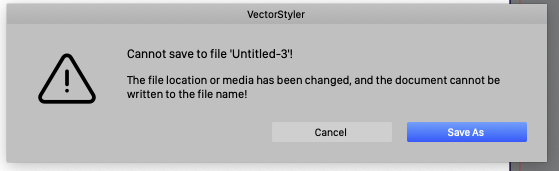
      0_1753321537672_01.jpg
      The document content is simple, such as a single rectangle.
      I can save files without any problems with 1.2.034 on the same machine.

      I have performed maintenance on my Mac using TechTools, etc.

      LIc. 0 OS10.15.7
      MacBook Air (13-inch, Mid 2012) / Intel Core i5, 8GB / Intel HD Graphics 4000
      LIc. 1 OS13.6.7
      MacBook Pro (14-inch, 2023) / Apple M2 Pro, 16GB / Apple GPU

      VectorStylerV 1 Reply Last reply Reply Quote 0
      • VectorStylerV Offline
        VectorStyler @861475_VctSt
        last edited by

        @861475_VctSt Most likely something broke with the update.
        Remove VectorStyler completely also the settings folder (Help -> Reveal Workspace)
        Download and install again.

        What happens immediately after selecting the Save command for a new file? Did it show the Save panel?
        And what folder was selected?

        861475_VctSt8 1 Reply Last reply Reply Quote 0
        • 861475_VctSt8 Offline
          861475_VctSt @VectorStyler
          last edited by

          @VectorStyler

          Thanks.

          As you pointed out, there seemed to be a problem during the update. I deleted all VS-related data, did a clean install, and the problem was solved.

          I don't do this as often these days, but I still find it a bit of a hassle to restore the environment after a clean install of VS.

          I make irregular backups of the following.
          🙏 Could you suggest any more effective backups?

          xxx.settings
          xxx.vstool
          xxx.vswork
          /Users/hara/Library/Application Support/NumericPath/VectorStyler1.2/vector/data/presets

          LIc. 0 OS10.15.7
          MacBook Air (13-inch, Mid 2012) / Intel Core i5, 8GB / Intel HD Graphics 4000
          LIc. 1 OS13.6.7
          MacBook Pro (14-inch, 2023) / Apple M2 Pro, 16GB / Apple GPU

          VectorStylerV 1 Reply Last reply Reply Quote 0
          • VectorStylerV Offline
            VectorStyler @861475_VctSt
            last edited by

            @861475_VctSt said in Can't save:
            It should be enough to backup and restore the /Users/hara/Library/Application Support/NumericPath/VectorStyler1.2/vector/data/resources folder (important: "resources", not "presets").

            The problem is that if there was any settings / workspace option causing this issue, then it might persist.
            Next time if this issue occurs, please send me the content of the "resources" folder

            861475_VctSt8 1 Reply Last reply Reply Quote 0
            • 861475_VctSt8 Offline
              861475_VctSt @VectorStyler
              last edited by

              @VectorStyler

              Understood. I will back up that folder regularly.

              The following data

              xxx.settings
              xxx.vstool
              xxx.vswork
              may be modified by updates, so even if you back it up, there is no guarantee that it will be 100% inherited.


              LIc. 0 OS10.15.7
              MacBook Air (13-inch, Mid 2012) / Intel Core i5, 8GB / Intel HD Graphics 4000
              LIc. 1 OS13.6.7
              MacBook Pro (14-inch, 2023) / Apple M2 Pro, 16GB / Apple GPU

              1 Reply Last reply Reply Quote 1
              • First post
                Last post