VectorStyler
    • Categories
    • Unread
    • Recent
    • Tags
    • Popular
    • Register
    • Login

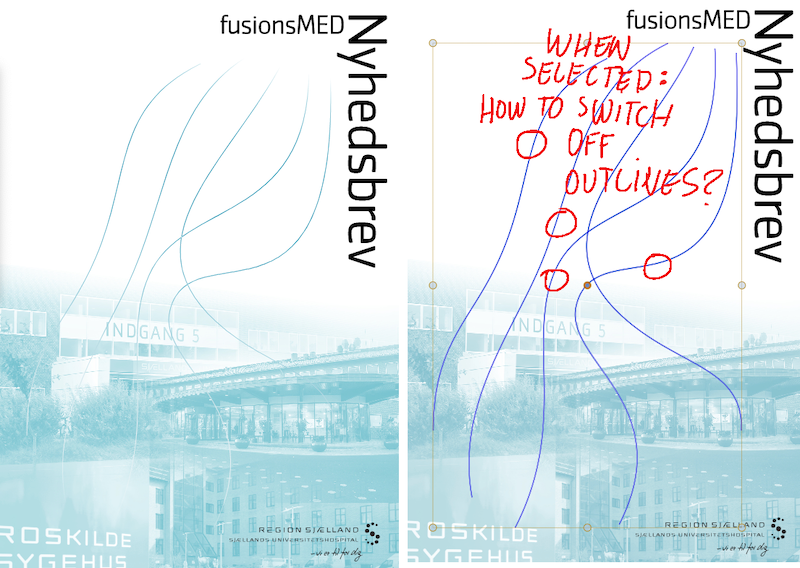
    Shapes. Switching off display of outline when selected
    Scheduled Pinned Locked Moved Questions and Support
    11 Posts 4 Posters 4.4k Views 4 Watching
    Loading More Posts
    • Oldest to Newest
    • Newest to Oldest
    • Most Votes
    Reply
    • Reply as topic
    Log in to reply
    This topic has been deleted. Only users with topic management privileges can see it.
    • S Offline
      Subpath @Raaskot
      last edited by Subpath

      @Raaskot

      i know there are some settings, which i dont
      know by now

      apart from that was one idea i had to create a clone
      see video

      Win 11
      CPU: AMD Ryzen 5 9600X, 6-core.
      GPU: Nvidia Geforce RTX 5070.

      1 Reply Last reply Reply Quote 1
      • E Offline
        EricP
        last edited by

        I'd like to know this as well.
        I find selected path highlighting useful in some scenario but detrimental in other use cases, like coloring. I'd love a way to switch this off momentarily or permanently through preferences

        1 Reply Last reply Reply Quote 0
        • VectorStylerV Offline
          VectorStyler @Raaskot
          last edited by

          @Raaskot said in Shapes. Switching off display of outline when selected:

          How do I switch off display of outline when selected, but still maintaining the editing mode?

          What is the active tool, when you don't want to see the outlines?

          RaaskotR E 2 Replies Last reply Reply Quote 1
          • RaaskotR Offline
            Raaskot @VectorStyler
            last edited by

            @VectorStyler
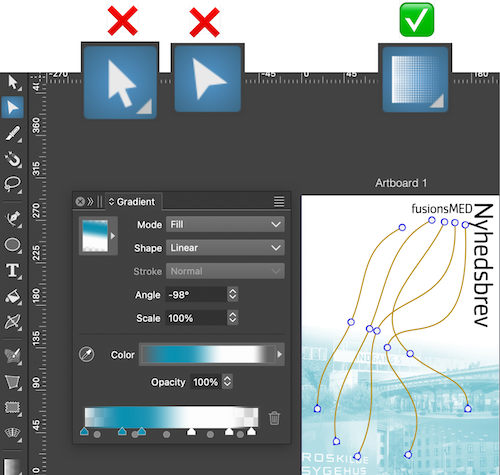
            Aha ... I'm using the gradient panel independently from tool

            But I understand: You must choose gradient tool to preview. I suggest switching highlight to off temporarely when user adjusts gradient steps.
            0_1758182231162_8ad4ff79-2d87-4c3e-856a-a1e3ecfa93e2-image.png

            1 Reply Last reply Reply Quote 1
            • E Offline
              EricP @VectorStyler
              last edited by

              @VectorStyler mostly when I'm coloring shapes using color filters such as colorize or hue adjustments.

              Outline highlighting in blue affects color perception when adjusting fills and makes us "blind" when adjusting strokes.
              I believe shapes need to be selected first before applying effects, so the active tool would be Transform tool in that case

              VectorStylerV 1 Reply Last reply Reply Quote 1
              • VectorStylerV Offline
                VectorStyler @EricP
                last edited by

                @EricP I will try to improve this

                RaaskotR 2 Replies Last reply Reply Quote 1
                • RaaskotR Offline
                  Raaskot @VectorStyler
                  last edited by

                  This post is deleted!
                  1 Reply Last reply Reply Quote 0
                  • RaaskotR Offline
                    Raaskot @VectorStyler
                    last edited by

                    @VectorStyler

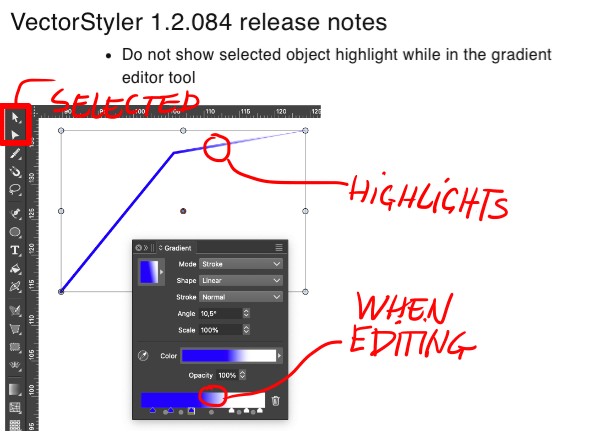
                    Hm, my initial thought was that it was fixed, but highlight when editing in panel with other tools selected appears just as before. Intended?
                    0_1758803649866_5654a367-81f6-43fd-9a6d-c127223d2337-image.png

                    VectorStylerV 1 Reply Last reply Reply Quote 1
                    • VectorStylerV Offline
                      VectorStyler @Raaskot
                      last edited by

                      @Raaskot It is off only when the gradient tool (from the toolbox) is active
                      The other outlines can be customized in the Settings -> Indicator Styles and set to None

                      RaaskotR 1 Reply Last reply Reply Quote 1
                      • RaaskotR Offline
                        Raaskot @VectorStyler
                        last edited by Raaskot

                        @VectorStyler
                        Got it. Cool.

                        0_1758885335080_3db78acf-3c5d-4b54-b868-fe427716217d-image.png

                        1 Reply Last reply Reply Quote 1
                        • First post
                          Last post

