VectorStyler
    • Categories
    • Unread
    • Recent
    • Tags
    • Popular
    • Register
    • Login

    How does Path Eraser Tool work?

    Scheduled Pinned Locked Moved Questions and Support
    6 Posts 2 Posters 2.5k Views 2 Watching
    Loading More Posts
    • Oldest to Newest
    • Newest to Oldest
    • Most Votes
    Reply
    • Reply as topic
    Log in to reply
    This topic has been deleted. Only users with topic management privileges can see it.
    • RaaskotR Offline
      Raaskot
      last edited by Raaskot

      Often I miss examples in the online guide to understand what specific tools actually does:

      0_1760534458915_415e60ab-4ed0-4673-9fe6-9d6089caaec0-image.png

      Tried to test but yielding no idea. What is the purpose?

      VectorStylerV 1 Reply Last reply Reply Quote 1
      • VectorStylerV Offline
        VectorStyler @Raaskot
        last edited by

        @Raaskot It should erase a section of a path (I will fix that typo):
        https://share.cleanshot.com/lXPmMc7w

        It is different from the regular eraser tool: it does not "exclude" the paint area from the closed shape, but cuts the path and creates an open path.

        1 Reply Last reply Reply Quote 1
        • RaaskotR Offline
          Raaskot
          last edited by

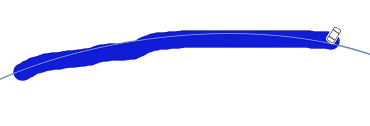
          Cool, understand now, but how do you get that thick marker line? Mine is very thin. Tried to adjust in setting but no cigar. Any suggestions?
          0_1760537144227_a6253986-3607-477f-9462-2b73913bca8e-image.png

          Settings:
          0_1760536934890_20c713d2-5396-46b1-9d78-c3d4036c01a9-image.png

          VectorStylerV 1 Reply Last reply Reply Quote 2
          • VectorStylerV Offline
            VectorStyler @Raaskot
            last edited by

            @Raaskot It should be this line in the default settings.

            It might be affected by the other eraser tool brush size. Try to change that.

            1 Reply Last reply Reply Quote 0
            • RaaskotR Offline
              Raaskot
              last edited by

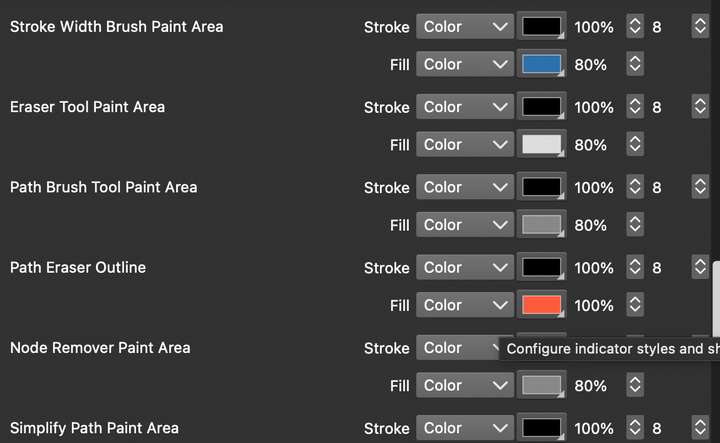
              I've tried to change all settings to full ("8"), but nothings seems to happen. Am I applying correctly?
              0_1760579858318_02ab42bb-d705-44ea-aa85-15483dfc27ec-image.png

              VectorStylerV 1 Reply Last reply Reply Quote 1
              • VectorStylerV Offline
                VectorStyler @Raaskot
                last edited by

                @Raaskot said in How does Path Eraser Tool work?:

                I've tried to change all settings to full ("8"), but nothings seems to happen.

                It is not in the settings. Activate the eraser tool (not the path eraser, but the other one), and set the brush size in the context panel.


                1 Reply Last reply Reply Quote 1
                • First post
                  Last post
